EasyManua.ls Logo

Technics SU-Z55 EK - Disassembly Instructions; Removing Cabinet and Front Panel; Removing Switch PC Boards

Technics SU-Z55 EK
23 pages
Print Icon
To Next Page IconTo Next Page
To Previous Page IconTo Previous Page
Loading...
li
DISASSEMBLY
INSTRUCTIONS
©
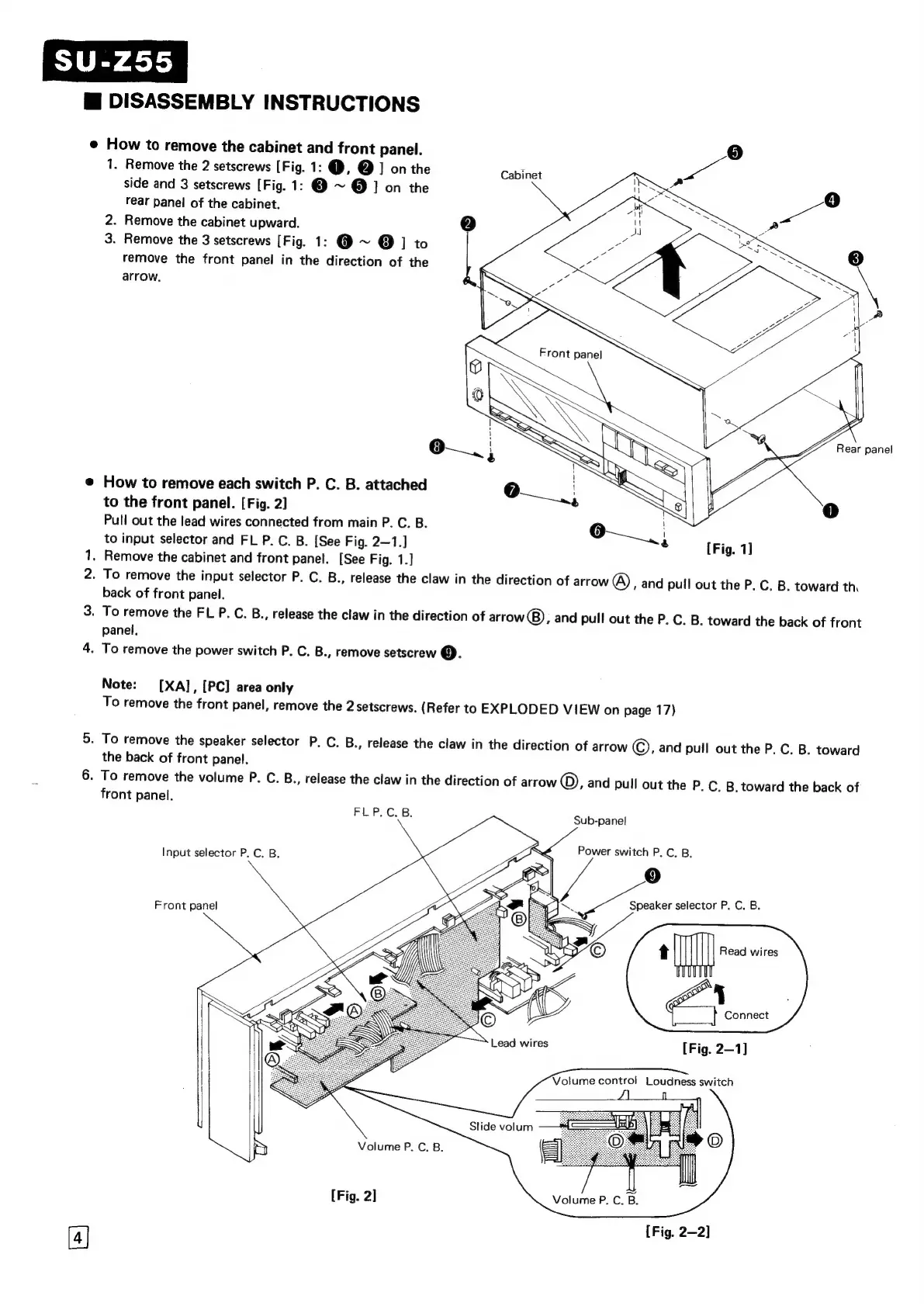
How
to
remove
the
cabinet
and
front
panel.
1.
Remove
the
2
setscrews
[Fig.
1:
@,
@
]
on
the
Patines
wa
side
and
3
setscrews
[Fig.
1:
@
~
@
1]
on
the
rear
panel
of
the
cabinet.
2.
Remove
the
cabinet
upward.
2]
3.
Remove
the
3
setscrews
[Fig.
1:
@
~
@
]
to
remove
the
front
panel
in
the
direction
of
the
arrow.
e@
How
to
remove
each
switch
P.
C.
B.
attached
to
the
front
panel.
[Fig.
2]
Pull
out
the
lead
wires
connected
from
main
P.
C.
B.
to
input
selector
and
FL
P.
C.
B.
[See
Fig.
2—1.]
1,
Remove
the
cabinet
and
front
panel.
[See
Fig.
1.]
.
To
remove
the
input
selector
P.
C.
B.,
release
the
claw
in
the
direction
of
arrow
@),
and
pull
out
the
P.
C.
B.
toward
th.
back
of
front
panel.
3.
To
remove
the
FL
P.
C.
B.,
release
the
claw
in
the
direction
of
arrow),
and
pull
out
the
P.
C.
B.
toward
the
back
of
front
panel.
4.
To
remove
the
power
switch
P.
C.
B.,
remove
setscrew
©.
[Fig.
1]
No
Note:
[XA],
[PC]
area
only
To
remove
the
front
panel,
remove
the
2
setscrews.
(Refer
to
EXPLODED
VIEW
on
page
17)
5.
To
remove
the
speaker
selector
P.
C.
B.,
release
the
claw
in
the
direction
of
arrow
©,
and
pull
out
the
P.
C.
B.
toward
the
back
of
front
panel.
6.
To
remove
the
volume
P.
C.
B.,
release
the
claw
in
the
direction
of
arrow
©,
and
pull
out
the
P.
C,
B,
toward
the
back
of
front
panel.
FLP.C.B.
Sub-panel
Power
switch
P.
C,
B,
Speaker
selector
P.
C. B.
t
Mt
Read
wires
ae
Connect
[Fig.
2—1]
Input
selector
P.
C.
B.
Front
panel
Lead
wires
Volume
control
Loudness
switch
Slide
volum
Volume
P.
C.
B.
[Fig.
2]
Volume
P.
C.
B.
[Fig.
2—2]

Related product manuals