EasyManua.ls Logo

Technics SX-G5 - Page 16

Technics SX-G5
44 pages
Print Icon
To Next Page IconTo Next Page
To Previous Page IconTo Previous Page
Loading...
Multi-tremoto
Speed
Adjustment
The
Technics
organ
allows
the
speed
to
be
adjusted
in
the
®
The
vibrato
and
slow
multi-tremolo
speeds
remain
fast
multi-tremolo
position.
The
fast
multi-tremolo
creates
an
unchanged
during
this
adjustment.
effect
like
two
speakers
rotating
at
different
speeds.
The
fast
e
Adjustment
Range
and
slow
speeds
are
both
adjustabie.
Fast
speed:
8.4
Hz
to
30.5
Hz
.
Press
the
record
button.
Slow
speed:
4.9
Hz
to
8.1
Hz
.
Fast
speed
adjustment:
¢
if
you
wish
to
return
the
speed
to
the
factory
preset
state
Press
the
upper
tab
volces
button
of
the
multi-tremolo.
(20.3
Hz
and
6.4
Hz),
press
the
initial
key
in
step
3
or
5
(The
LED
on
the
button
will
slowly
flash.)
above.
.
Tap
the
lower
part
of
the
siow/fast
button
to
increase
the
4
staaledVenlov—
frequency.
Tap
the
upper
part
to
decrease
it.
[
#Musical=Display=
®
The
frequency
is
indicated
on
the
musical
display.
The
Multi-tremolo
speed
is
displayed.
During
speed
adjustment,
the
multi-tremolo
is
auto-
(G7-F3)
matically
turned
on
for
both
the
upper
and
lower
keyboards.
This
allows
you
to
carefully
check
how
the
tremolo
effect
is
applied.
.
Slow
speed
adjustment:
Press
the
lower
tab
volces
button
of
the
multi-tremolo.
.
Adjust
the
frequency
using
the
slow/fast
button.
.
When
the
adjustment
is
completed,
press
the
record
button
to
turn
it
off.
This
bar
represents
a
decimal
point.
(18)
Effect
Conductor
(G7-F3)
@
For
celeste
effect
on
the
SX-GS5,
refer
to
the
separate
operating
instructions.
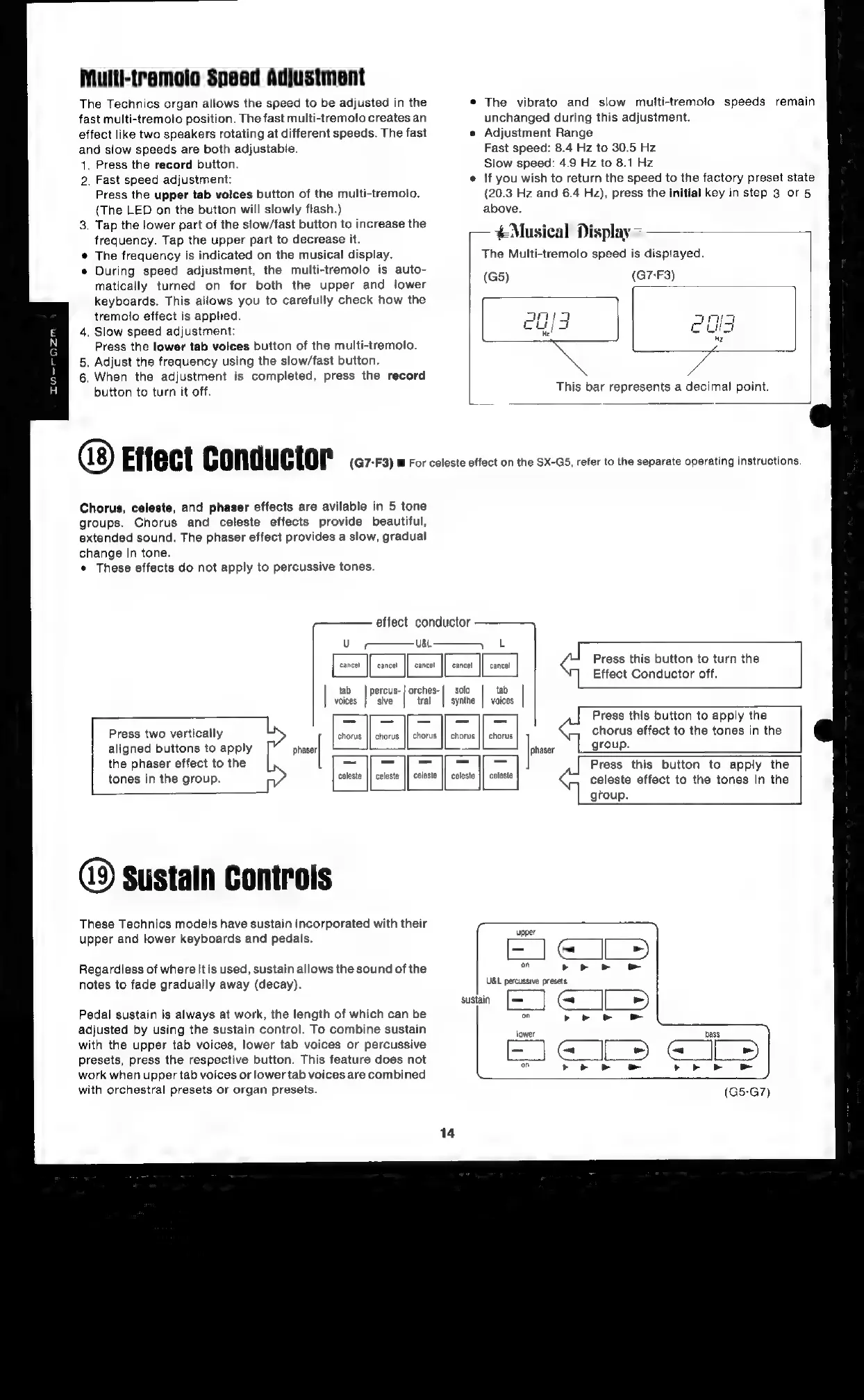
Chorus,
celeste,
and
phaser
effects
are
avilable
in
5
tone
groups.
Chorus
and
celeste
effects
provide
beautiful,
extended
sound.
The
phaser
effect
provides
a
slow,
gradual
change
in
tone.
¢
These
effects
do
not
apply
to
percussive
tones.
effect
conductor
Uo
ait
Fi
aata
[oe
cnc
|
Press
this
button
to
turn
the
Effect
Conductor
off.
cancel
|]
cancel
tab
|
percus-
|
orches-|
solo
tab
voices
}
sive
tral
|
synthe
|
voices
= =
|
Press
this
button
to
apply
the
dl
is
Press
two
vertically
fenonig:
||
-ehorus
chorus
effect
to
the
tones
in
the
aligned
buttons
to
apply
js
group.
the
phaser
effect
to
the
~
=
—s
_
_-
Press
this
button
to
apply
the
tones
in
the
group.
celeste
||
celeste
|]
celeste
||
celeste
celesle
celeste
effect
to
the
tones
in
the
group.
horu:
chorus
||
chorus
49
sustain
Controls
These
Technics
models
have
sustain
incorporated
with
their
upper
and
lower
keyboards
and
pedals.
C
~<
Regardless
of
where
it
is
used,
sustain
allows
the
sound
of
the
>.>
notes
to
fade
gradually
away
(decay).
UBL
percussive
presets
sustain
Pedal
sustain
is
always
at
work,
the
length
of
which
can
be
adjusted
by
using
the
sustain
control.
To
combine
sustain
with
the
upper
tab
voices,
lower
tab
voices
or
percussive
presets,
press
the
respective
button.
This
feature
does
not
work
when
upper
tab
voices
or
lower
tab
voices
are
combined
with
orchestral
presets
or
organ
presets.

Related product manuals