EasyManua.ls Logo

Technics SX-G5 - Page 19

Technics SX-G5
44 pages
Print Icon
To Next Page IconTo Next Page
To Previous Page IconTo Previous Page
Loading...
How
to
Use
the
Factory-Preset
USC
In
addition,
the
factory-preset
20
voices
combinations
allows
you
to
choose
your
favorites
for
storage
in
|
through
VII
buttons.
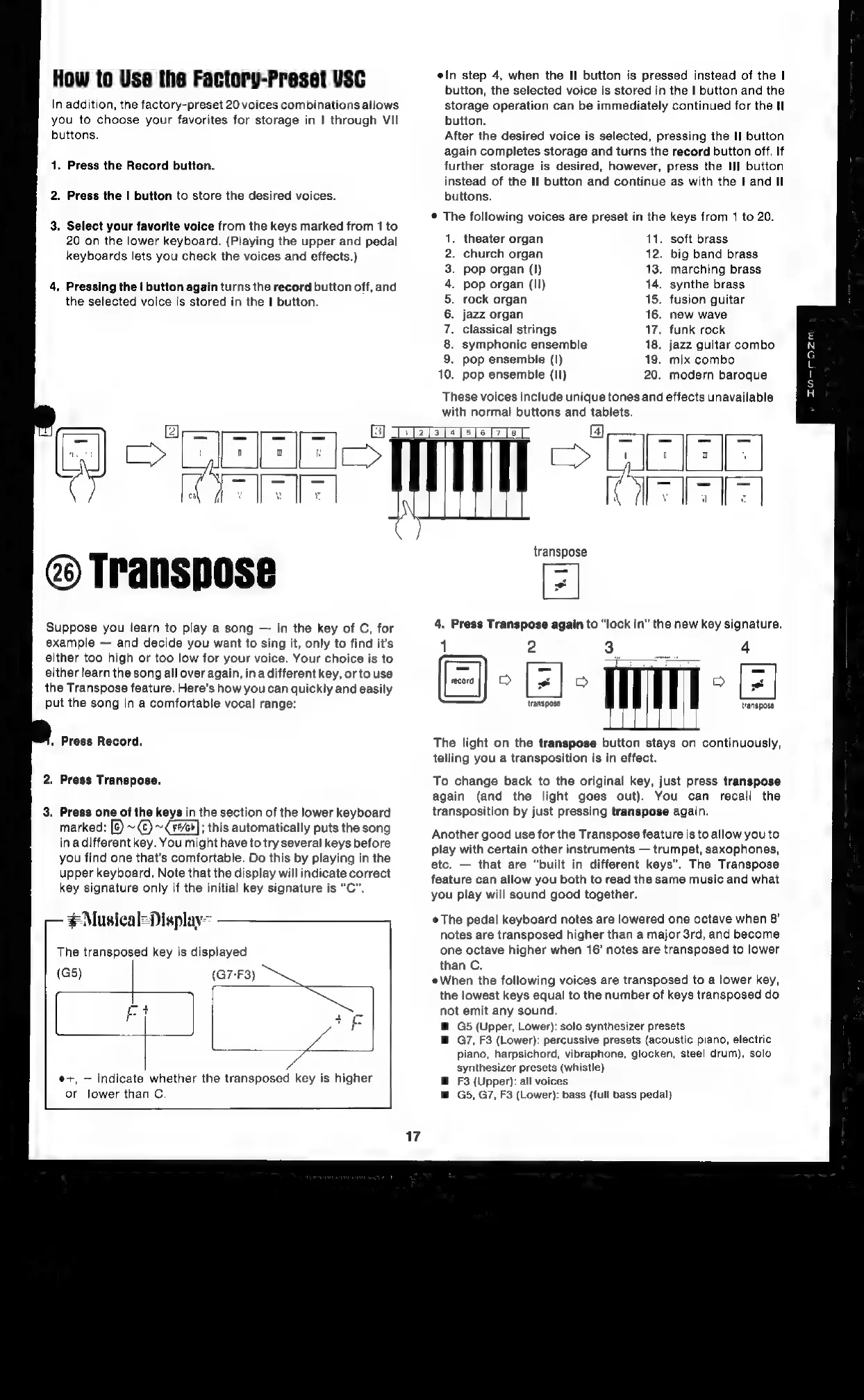
1.
Press
the
Record
button.
2.
Press
the
|
button
to
store
the
desired
voices.
3.
Select
your
favorite
voice
from
the
keys
marked
from
1
to
20
on
the
lower
keyboard.
(Playing
the
upper
and
pedal
keyboards
lets
you
check
the
voices
and
effects.)
.
Pressing
the
|
button
again
turns
the
record
button
off,
and
the
selected
voice
is
stored
in
the
|
button.
ein
step
4,
when
the
II
button
is
pressed
instead
of
the
|
button,
the
selected
voice
is
stored
in
the
|
button
and
the
storage
operation
can
be
immediately
continued
for
the
Hl
button.
After
the
desired
voice
is
selected,
pressing
the
II
button
again
completes
storage
and
turns
the
record
button
off.
If
further
storage
is
desired,
however,
press
the
III
button
instead
of
the
II
button
and
continue
as
with
the
I
and
Il
buttons.
The
following
voices
are
preset
in
the
keys
from
1
to
20.
theater
organ
11.
soft
brass
church
organ
12.
big
band
brass
pop
organ
(I)
13.
marching
brass
pop
organ
(Il)
14.
synthe
brass
rock
organ
15.
fusion
guitar
jazz
organ
16.
new
wave
classical
strings
17.
funk
rock
symphonic
ensemble
18.
jazz
guitar
combo
pop
ensemble
(1)
19.
mix
combo
pop
ensemble
(Il)
20.
modern
baroque
1.
2.
3.
4.
5.
6.
Ts
8.
9.
0.
These
voices
include
unique
tones
and
effects
unavailable
with
normal
buttons
and
tabiets.
1
@)
Transpose
Suppose
you
learn
to
play
a
song
in
the
key
of
C,
for
example
and
decide
you
want
to
sing
it,
only
to find
it’s
either
too
high
or
too
low
for
your
voice.
Your
choice
is
to
either
learn
the
song
all
over
again,
ina
different
key,
orto
use
the
Transpose
feature.
Here’s
how
you
can
quickly
and
easily
put
the
song
in
a
comfortable
vocal
range:
«
Press
Record.
2.
Press
Transpose.
3.
Press
one
of
the
keys
in
the
section
of
the
lower
keyboard
marked:
[&)
~¢)
~
#6];
this
automatically
puts
the
song
in
adifferent
key.
You
might
have
to
try
several
keys
before
you
find
one
that’s
comfortable.
Do
this
by
playing
in
the
upper
keyboard.
Note
that
the
display
will
indicate
correct
key
signature
only
if
the
initial
key
signature
is
“C”.
#Musical=Display=
The
transposed
key
is
displayed
e+,
indicate
whether
the
transposed
key
is
higher
or
lower
than
C.
FEEIO
iN
o
GEE
Tee
|
la
ITS
Te
|
transpose
[=
4.
Press
Transpose
again
to
“lock
in”
the
new
key
signature.
1
2
a)
transpose
transpose
The
light
on
the
transpose
button
stays
on
continuously,
telling
you
a
transposition
is
in
effect.
To
change
back
to
the
original
key,
just
press
transpose
again
(and
the
light
goes
out).
You
can
recall
the
transposition
by
just
pressing
transpose
again.
Another
good
use
for
the
Transpose
feature
is
to
allow
you
to
play
with
certain
other
instruments
trumpet,
saxophones,
etc.
that
are
“built
in
different
keys”.
The
Transpose
feature
can
allow
you
both
to
read
the
same
music
and
what
you
play
will
sound
good
together.
The
pedal
keyboard
notes
are
lowered
one
octave
when
8’
notes
are
transposed
higher
than
a
major
3rd,
and
become
one
octave
higher
when
16’
notes
are
transposed
to
lower
than
C.
When
the
following
voices
are
transposed
to
a
lower
key,
the
lowest
keys
equal
to
the
number
of
keys
transposed
do
not
emit
any
sound.
G5
(Upper,
Lower):
solo
synthesizer
presets
G7,
F3
(Lower):
percussive
presets
(acoustic
piano,
electric
piano,
harpsichord,
vibraphone,
glocken,
steel
drum),
solo
synthesizer
presets
(whistle)
F3
(Upper):
all
voices
G5,
G7,
F3
(Lower):
bass
(full
bass
pedal)

Related product manuals