EasyManua.ls Logo

Technics SX-G5 - Page 20

Technics SX-G5
44 pages
Print Icon
To Next Page IconTo Next Page
To Previous Page IconTo Previous Page
Loading...
@
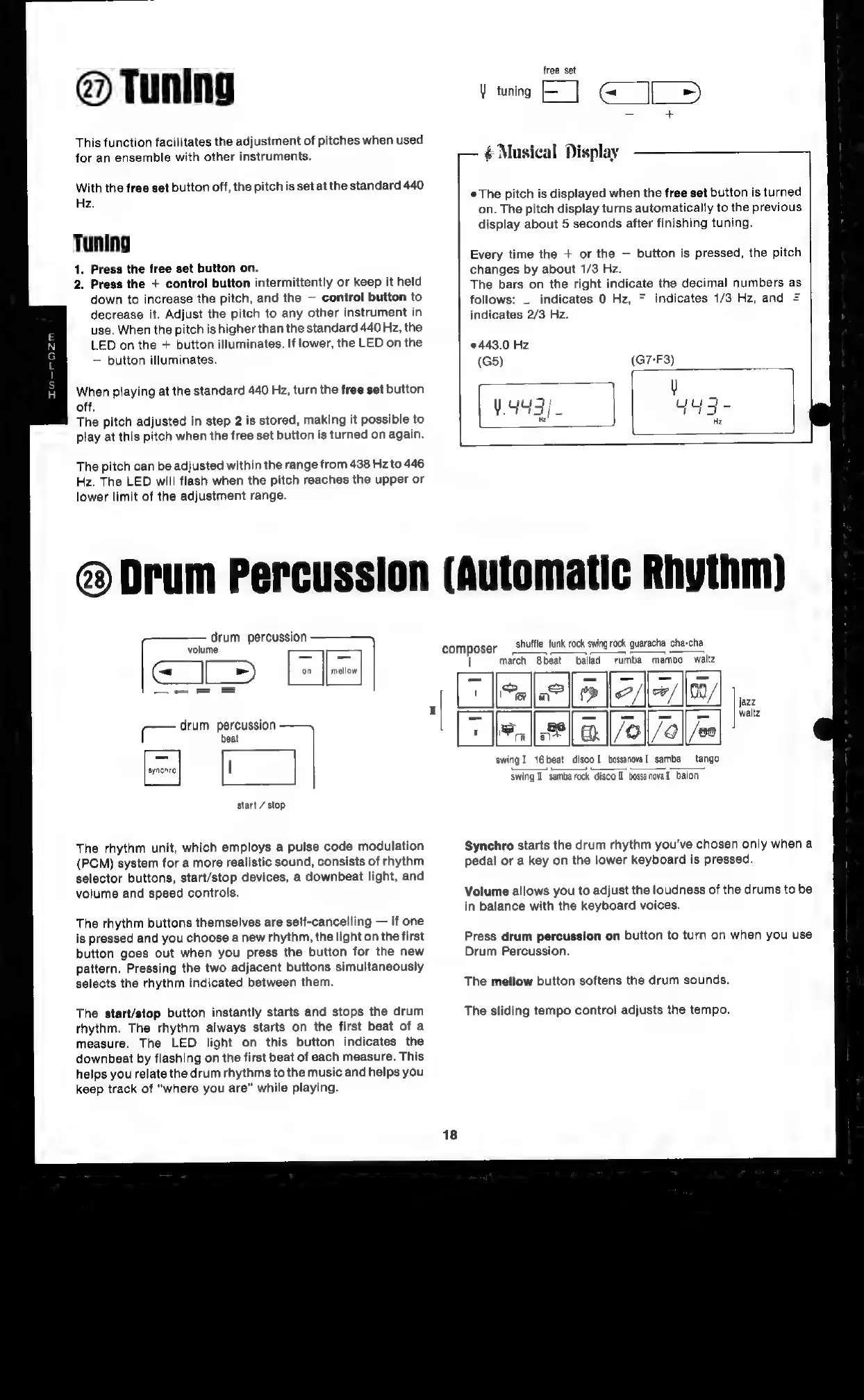
Tuning
This
function
facilitates
the
adjustment
of
pitches
when
used
for
an
ensemble
with
other
instruments.
With
the
free
set
button
off,
the
pitch
is
set
at
the
standard
440
Hz.
Tuning
1.
Press
the
free
set
button
on.
2.
Press
the
+
control
button
intermittently
or
keep
it
held
down
to
increase
the
pitch,
and
the
control
button
to
decrease
it.
Adjust
the
pitch
to
any
other
instrument
in
use.
When
the
pitch
is
higher
than
the
standard
440
Hz,
the
LED
on
the
+
button
illuminates.
If
lower,
the
LED
on
the
button
illuminates.
When
playing
at
the
standard
440
Hz,
turn
the
free
set
button
off.
The
pitch
adjusted
in
step
2
is
stored,
making
it
possible
to
play
at
this
pitch
when
the
free
set
button
is
turned
on
again.
The
pitch
can
be
adjusted
within
the
range
from
438
Hz
to
446
Hz.
The
LED
will
flash
when
the
pitch
reaches
the
upper
or
lower
limit
of
the
adjustment
range.
free
set
Y
tuning
ai
al»)
Ir
Musical
Display—
The
pitch
is
displayed
when
the
free
set
button
is
turned
on.
The
pitch
display
turns
automatically
to
the
previous
display
about
5
seconds
after
finishing
tuning.
Every
time
the
+
or
the
button
is
pressed,
the
pitch
changes
by
about
1/3
Hz.
The
bars
on
the
right
indicate
the
decimal
numbers
as
follows:
_
indicates
0
Hz,
=
indicates
1/3
Hz,
and
=
indicates
2/3
Hz.
443.0
Hz
(G5)
Drum
Percussion
(Automatic
Rhythm)
drum
percussion
ars.
(lel|
argent
drum
percussion
beat
=
start
/
stop
The
rhythm
unit,
which
employs
a
pulse
code
modulation
(PCM)
system
for
a
more
realistic
sound,
consists
of
rhythm
selector
buttons,
start/stop
devices,
a
downbeat
light,
and
volume
and
speed
controls.
The
rhythm
buttons
themselves
are
self-cancelling
if
one
is
pressed
and
you
choose
a
new
rhythm,
the
light
on
the
first
button
goes
out
when
you
press
the
button
for
the
new
pattern.
Pressing
the
two
adjacent
buttons
simultaneously
selects
the
rhythm
indicated
between
them.
The
start/stop
button
instantly
starts
and
stops
the
drum
rhythm.
The
rhythm
always
starts
on
the
first
beat
of
a
measure.
The
LED
light
on
this
button
indicates
the
downbeat
by
flashing
on
the
first
beat
of
each
measure.
This
helps
you
relate
the
drum
rhythms
to
the
music
and
helps
you
keep
track
of
“where
you
are”
while
playing.
com
ie
shuffle
funk
rock
swing
rock
guaracha
cha-cha
march
8beat
ballad
rumba
mambo
waltz
,
Cele
eT
|
EE
fsa
eee]
a]
swing!
16beat
disco!
bossanoval
samba
tango
swing
I
samba
rock
disco
I
bossanoval
baion
Synchro
starts
the
drum
rhythm
you've
chosen
only
when
a
pedal
or
a
key
on
the
lower
keyboard
is
pressed.
Volume
allows
you
to
adjust
the
loudness
of
the
drums
to
be
in
balance
with
the
keyboard
voices.
Press
drum
percussion
on
button
to
turn
on
when
you
use
Drum
Percussion.
The
mellow
button
softens
the
drum
sounds.
The
sliding
tempo
control
adjusts
the
tempo.

Related product manuals