EasyManua.ls Logo

Technics SX-G5 - Page 33

Technics SX-G5
44 pages
Print Icon
To Next Page IconTo Next Page
To Previous Page IconTo Previous Page
Loading...
@
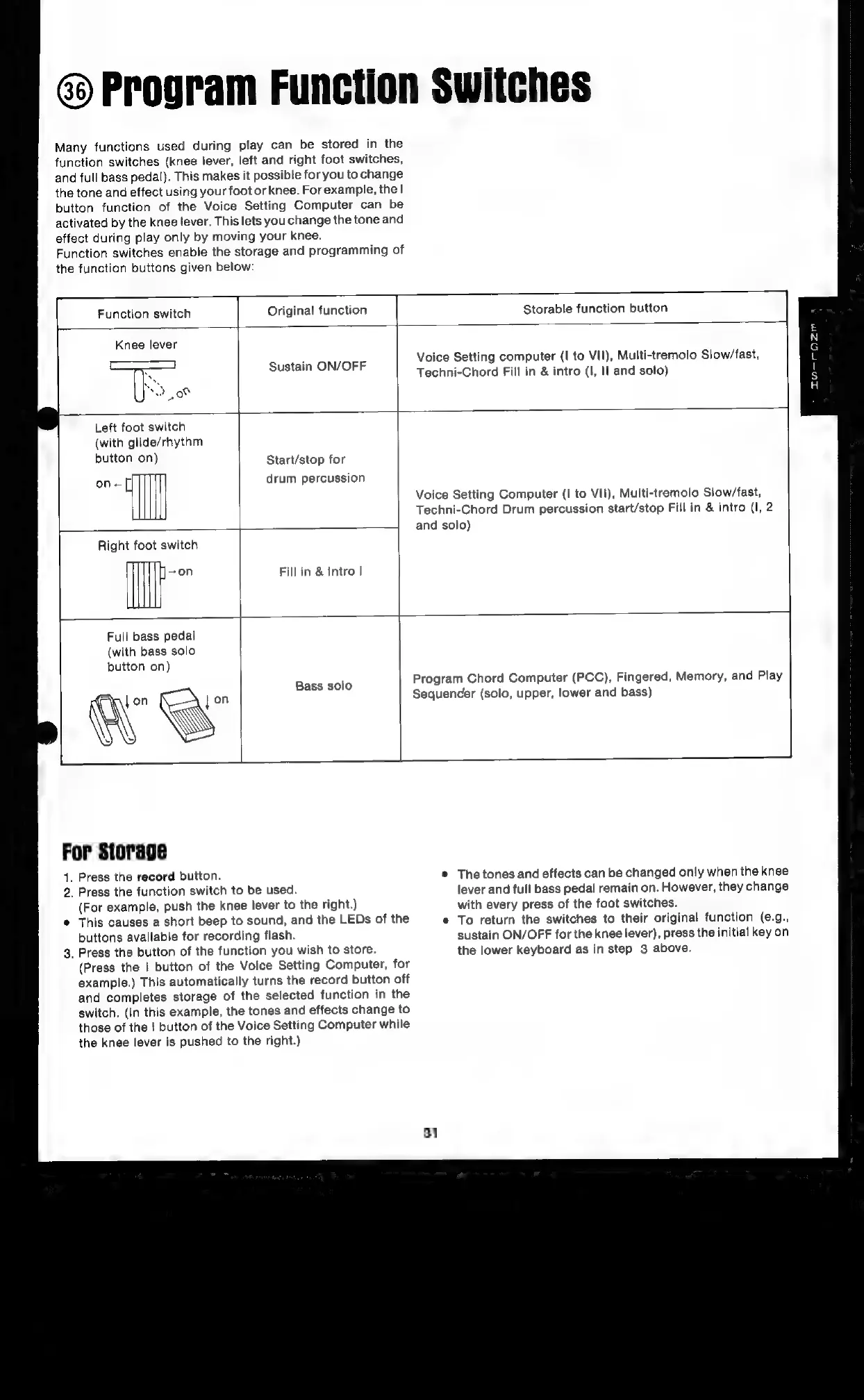
Program
Function
Switches
Many
functions
used
during
play
can
be
stored
in
the
function
switches
(knee
lever,
left
and
right
foot
switches,
and
full
bass
pedal).
This
makes
it
possible
for you
to
change
the
tone
and
effect
using
your
foot
or
knee.
For
example,
the!
button
function
of
the
Voice
Setting
Computer
can
be
activated
by
the
knee
lever.
This
lets
you
change
the
tone
and
effect
during
play
only
by
moving
your
knee.
Function
switches
enable
the
storage
and
programming
of
the
function
buttons
given
below:
—T
Function
switch
Original
function
Storable
function
button
=
Knee
lever
Voice
Setting
computer
(I
to
VII),
Multi-tremolo
Slow/fast,
Sustain
ON/OFF
Techni-Chord
Fill
in
&
intro
(|,
Il
and
solo)
Left
foot
switch
(with
glide/rhythm
button
on)
Start/stop
for
on-[]
drum
percussion
Voice
Setting
Computer
(I
to
VII),
Multi-tremolo
Slow/fast,
Techni-Chord
Drum
percussion
start/stop
Fill
in
&
intro
(I,
2
and
solo)
Right
foot
switch
on
Fill
in
&
Intro
|
Full
bass
pedal
(with
bass
solo
button
on)
Bass
solo
Program
Chord
Computer
(PCC),
Fingered,
Memory,
and
Play
on
Sequencer
(solo,
upper,
lower
and
bass)
iY
For
Storage
1.
Press
the
record
button.
©
The
tones
and
effects
can
be
changed
only
when
the
knee
2.
Press
the
function
switch
to
be
used.
lever
and
full
bass
pedal
remain
on.
However,
they
change
(For
example,
push
the
knee
lever
to
the
right.)
with
every
press
of
the
foot
switches.
*
This
causes
a
short
beep
to
sound,
and
the
LEDs
of
the
¢
To
return
the
switches
to
their
original
function
(¢.g.,
buttons
available
for
recording
flash.
sustain
ON/OFF
for
the
knee
lever),
press
the
initial
key
on
3.
Press
the
button
of
the
function
you
wish
to
store.
the
lower
keyboard
as
in
step
3
above.
(Press
the
|
button
of
the
Voice
Setting
Computer,
for
example.)
This
automatically
turns
the
record
button
off
and
completes
storage
of
the
selected
function
in
the
switch.
(In
this
example,
the
tones
and
effects
change
to
those
of
the
|
button
of
the
Voice
Setting
Computer
while
the
knee
lever
is
pushed
to
the
right.)
31

Related product manuals