EasyManua.ls Logo

Technics SX-G5 - Page 4

Technics SX-G5
44 pages
Print Icon
To Next Page IconTo Next Page
To Previous Page IconTo Previous Page
Loading...
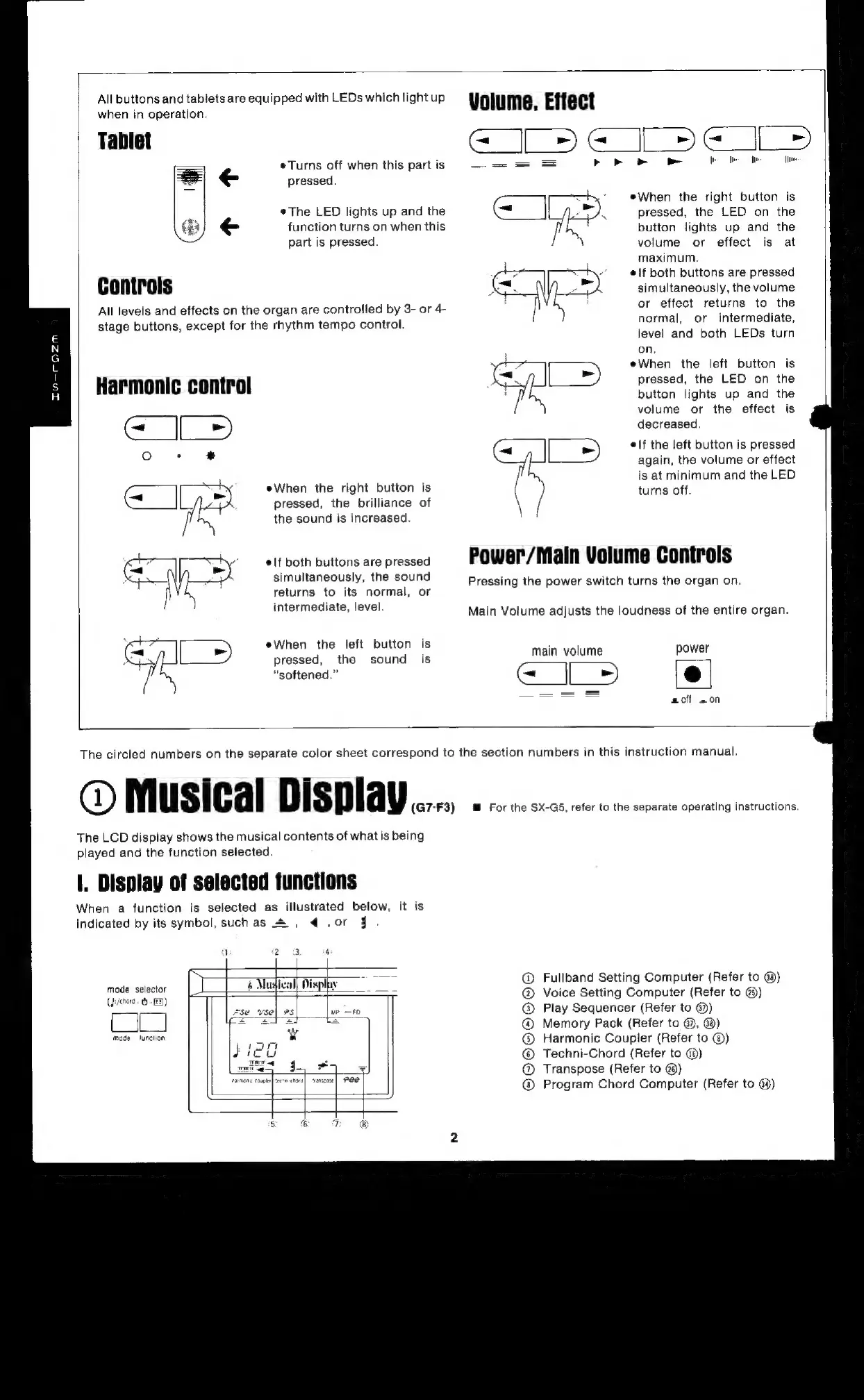
All
buttons
and
tablets
are
equipped
with
LEDs
which
light
up
when
in
operation.
Tablet
eTurns
off
when
this
part
is
=
pressed.
The
LED
lights
up
and
the
function
turns
on
when
this
part
is
pressed.
Controls
stage
buttons,
except
for
the
rhythm
tempo
control.
Harmonic
control
a
eWhen
the
right
button
is
pressed,
the
brilliance
of
the
sound
is
increased.
elf
both
buttons
are
pressed
simultaneously,
the
sound
returns
to
its
normal,
or
intermediate,
level.
eWhen
the
left
button
is
pressed,
the
sound
is
“softened.”
All
levels
and
effects
on
the
organ
are
controlled
by
3-
or
4-
Volume,
Effect
GI
12S
1
oy
|
a
a
a
eWhen
the
right
button
is
pressed,
the
LED
on
the
button
lights
up
and
the
volume
or
effect
is
at
maximum.
elf
both
buttons
are
pressed
simultaneously,
the
volume
or
effect
returns
to
the
normal,
or
intermediate,
level
and
both
LEDs
turn
on.
eWhen
the
left
button
is
pressed,
the
LED
on
the
button
lights
up
and
the
volume
or
the
effect
is
decreased.
elf
the
left
button
is
pressed
again,
the
volume
or
effect
is
at
minimum
and
the
LED
turns
off.
Power/Main
Volume
Controls
Pressing
the
power
switch
turns
the
organ
on.
Main
Volume
adjusts
the
loudness
of
the
entire
organ.
main
volume
power
[>
[el
aoff
.on
The
circled
numbers
on
the
separate
color
sheet
correspond
to
the
section
numbers
in
this
instruction
manual.
M
i
|
Di
[
@)
usica
isp
av
(G7-F3)
For
the
SX-GS,
refer
to
the
separate
operating
instructions.
The
LCD
display
shows
the
musical
contents
of
whatis
being
played
and
the
function
selected.
When
a
function
is
selected
as
illustrated
below,
it
is
indicated
by
its
symbol,
suchas
=
,
4@
,or
j
a
Display
mode
selector
(J:/ehord..
5
-])
mode
function
Fullband
Setting
Computer
(Refer
to
@)
Voice
Setting
Computer
(Refer
to
@)
Play
Sequencer
(Refer
to
@)
Memory
Pack
(Refer
to
@),
@)
Harmonic
Coupler
(Refer
to
@)
Techni-Chord
(Refer
to
@)
@
Transpose
(Refer
to
@)
@
Program
Chord
Computer
(Refer
to
@)
©OO000

Related product manuals