EasyManua.ls Logo

Technics SX-G5 - Page 6

Technics SX-G5
44 pages
Print Icon
To Next Page IconTo Next Page
To Previous Page IconTo Previous Page
Loading...
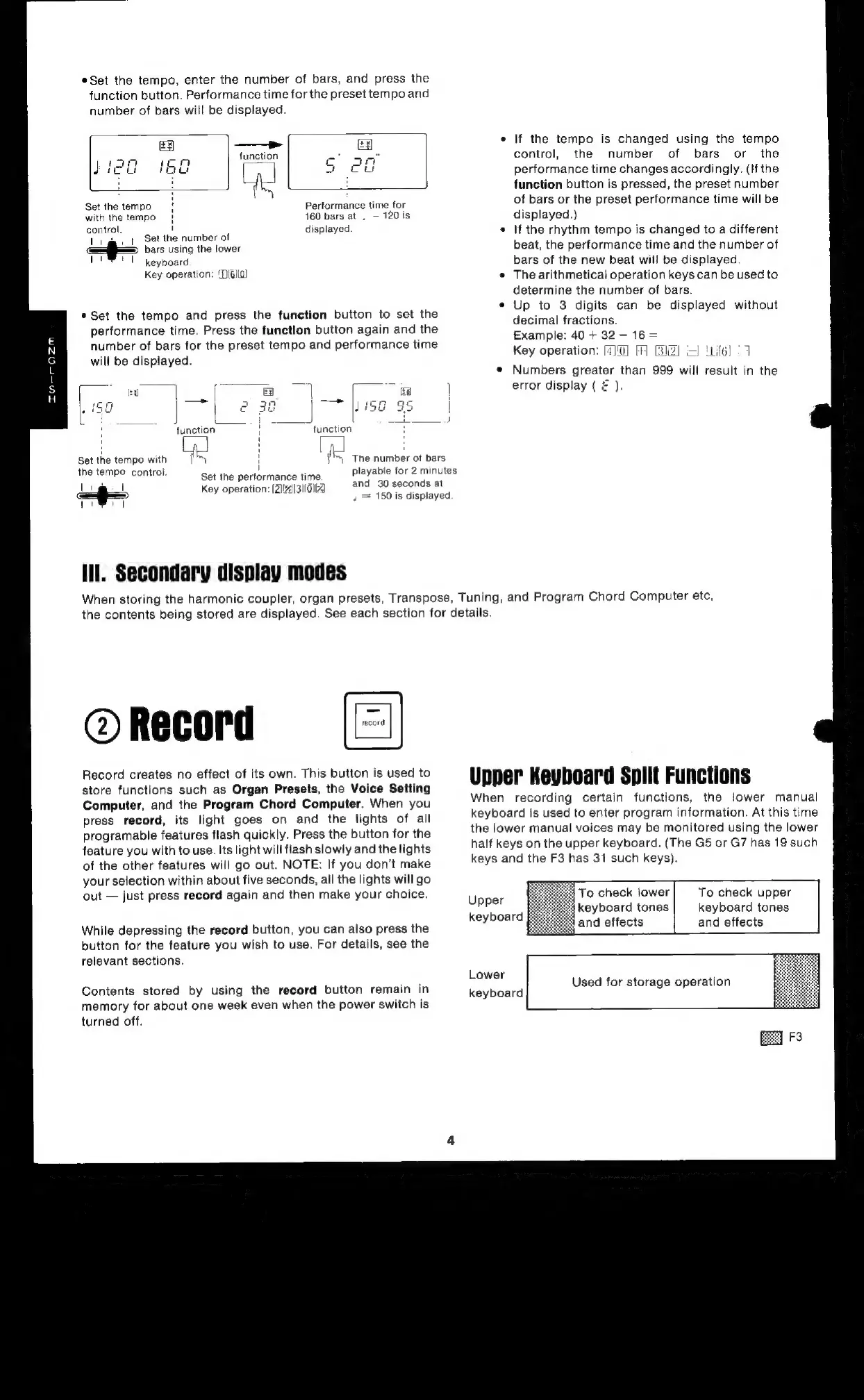
*Set
the
tempo,
enter
the
number
of
bars,
and
press
the
function
button.
Performance
time
for
the
preset
tempo
and
number
of
bars
will
be
displayed.
—P
function
Performance
time
for
460
bars
at
,
120
is
displayed.
Set
the
tempo
with
the
tempo
control.
|
Set
the
number
of
i
a
bars
using
the
lower
VP
keyboard
Key
operation:
‘D(6Il0)
*Set
the
tempo
and
press
the
function
button
to
set
the
performance
time.
Press
the
funetlon
button
again
and
the
number
of
bars
for
the
preset
tempo
and
performance
time
will
be
displayed.
|
“function
ve
function
Set
the
tempo
with
The
number
ot
bars
If
the
tempo
is
changed
using
the
tempo
control,
the
number
of
bars
or
the
performance
time
changes
accordingly.
(If
the
function
button
is
pressed,
the
preset
number
of
bars
or
the
preset
performance
time
will
be
displayed.)
If
the
rhythm
tempo
is
changed
to
a
different
beat,
the
performance
time
and
the
number
of
bars
of
the
new
beat
will
be
displayed.
The
arithmetical
operation
keys
can
be
used
to
determine
the
number
of
bars.
Up
to
3
digits
can
be
displayed
without
decimal
fractions.
Example:
40
+
32
-
16
=
Key
operation:
[4){0]
FF]
BIZ)
I
'if6)
27
Numbers
greater
than
999
will
result
in
the
error
display
(
=
).
the
tempo
control.
Set
the
performance
time.
Key
operation:
[2]
|31|014
playable
for
2
minutes
and
30
seconds
at
»
=
150
is
displayed
Ill.
Secondary
display
modes
When
storing
the
harmonic
coupler,
organ
presets,
Transpose,
Tuning,
and
Program
Chord
Computer
etc,
the
contents
being
stored
are
displayed.
See
each
section
for
details.
@
Record
Record
creates
no
effect
of
its
own.
This
button
is
used
to
store
functions
such
as
Organ
Presets,
the
Voice
Setting
Computer,
and
the
Program
Chord
Computer.
When
you
press
record,
its
light
goes
on
and
the
fights
of
all
programable
features
flash
quickly.
Press
the
button
for
the
feature
you
with
to
use.
Its
light
will
flash
slowly
and
the
lights
of
the
other
features
will
go
out.
NOTE:
If
you
don’t
make
your
selection
within
about
five
seconds,
all
the
lights
will
go
out
just
press
record
again
and
then
make
your
choice.
While
depressing
the
record
button,
you
can
also
press
the
button
for
the
feature
you
wish
to
use.
For
details,
see
the
relevant
sections.
Contents
stored
by
using
the
record
button
remain
in
memory
for
about
one
week
even
when
the
power
switch
is
turned
off.
Upper
Keyboard
Split
Functions
When
recording
certain
functions,
the
lower
manual
keyboard
is
used
to
enter
program
information.
At
this
time
the
lower
manual
voices
may
be
monitored
using
the
lower
half
keys
on
the
upper
keyboard.
(The
G5
or
G7
has
19
such
keys
and
the
F3
has
31
such
keys).
To
check
lower
keyboard
tones
and
effects
To
check
upper
keyboard
tones
and
effects
Upper
keyboard
Lower
Used
for
storage
operation
keyboard

Related product manuals