EasyManua.ls Logo

Technics SX-G5 - Page 7

Technics SX-G5
44 pages
Print Icon
To Next Page IconTo Next Page
To Previous Page IconTo Previous Page
Loading...
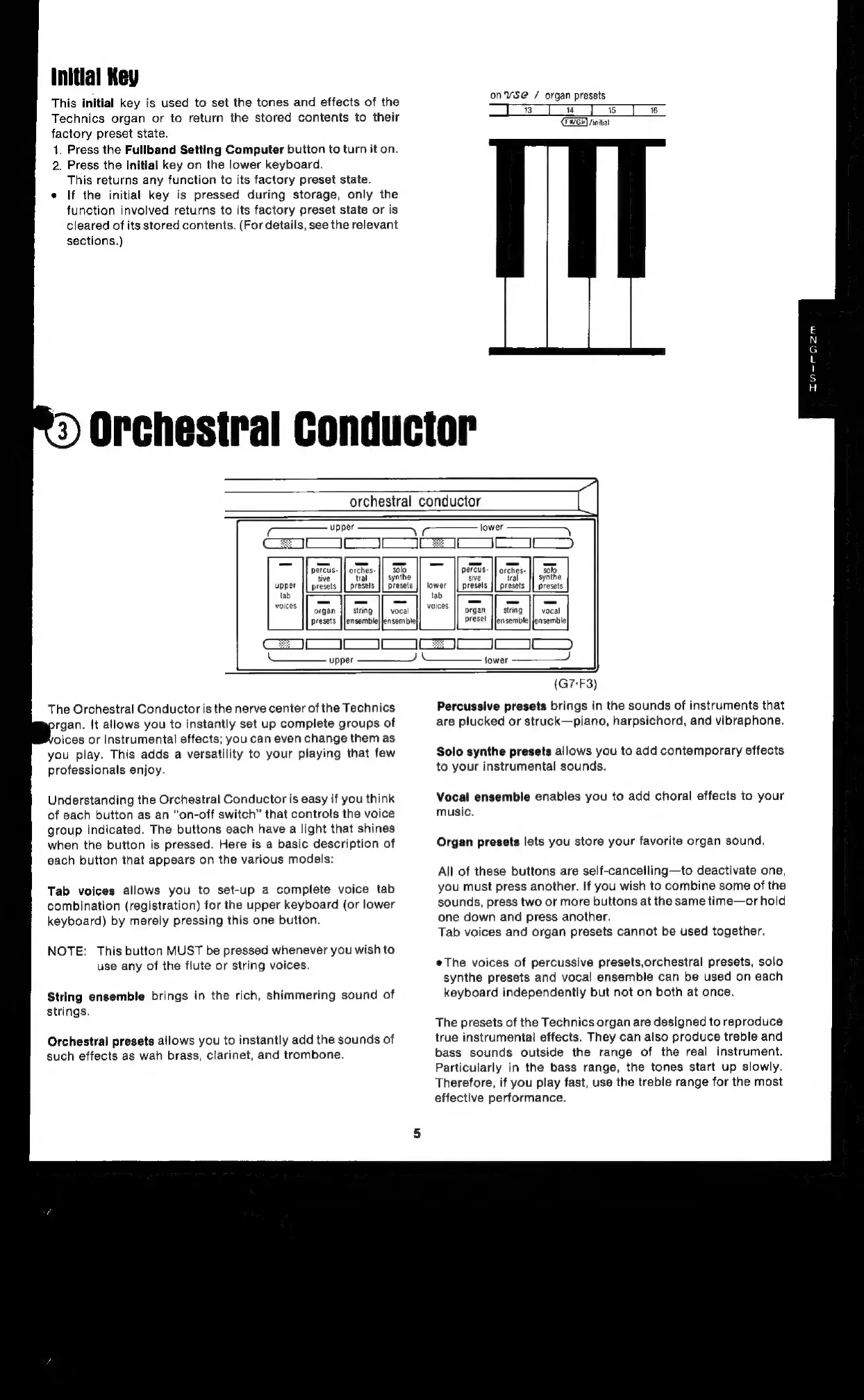
This
initial
key
is
used
to
set
the
tones
and
effects
of
the
Technics
organ
or
to
return
the
stored
contents
to
their
factory
preset
state.
1.
Press
the
Fullband
Setting
Computer
button
to
turn
it
on.
2.
Press
the
initial
key
on
the
lower
keyboard.
This
returns
any
function
to
its
factory
preset
state.
e
If
the
initial
key
is
pressed
during
storage,
only
the
function
involved
returns
to
its
factory
preset
state
or
is
cleared
of
its
stored
contents.
(For
details,
see
the
relevant
sections.)
on¥vsSe@
/
organ
presets
mn
a]
6
E2765)
finitiat
L
6
Orchestral
Conductor
orchestral
conductor
lower
~
[
jE
jE)
orches
solo
tral
presels
synthe
||
percts.
sive
lower
||
presets
s
solo
synthe
presets
preset
string
|]
vocal
lensemble|
nsemble|
vocal
ensemble}
tab
voices
||
organ
presel
lensemble|
It
J
|
w)
The
Orchestral
Conductor
is
the
nerve
center
of
the
Technics
rgan.
It
allows
you
to
instantly
set
up
complete
groups
of
oices
or
instrumental
effects;
you
can
even
change
them
as
you
play.
This
adds
a
versatility
to
your
playing
that
few
professionals
enjoy.
Understanding
the
Orchestral
Conductor
is
easy
if
you
think
of
each
button
as
an
“on-off
switch”
that
controls
the
voice
group
indicated.
The
buttons
each
have
a
light
that
shines
when
the
button
is
pressed.
Here
is
a
basic
description
of
each
button
that
appears
on
the
various
models:
Tab
voices
allows
you
to
set-up
a
complete
voice
tab
combination
(registration)
for
the
upper
keyboard
(or
lower
keyboard)
by
merely
pressing
this
one
button.
NOTE:
This
button
MUST
be
pressed
whenever
you
wish
to
use
any
of
the
flute
or
string
voices.
String
ensemble
brings
in
the
rich,
shimmering
sound
of
strings.
Orchestral
presets
allows
you
to
instantly
add
the
sounds
of
such
effects
as
wah
brass,
clarinet,
and
trombone.
(G7-F3)
Percussive
presets
brings
in
the
sounds
of
instruments
that
are
plucked
or
struck—piano,
harpsichord,
and
vibraphone.
Solo
synthe
presets
allows
you
to
add
contemporary
effects
to
your
instrumental
sounds.
Vocal
ensemble
enables
you
to
add
choral
effects
to
your
music.
Organ
presets
lets
you
store
your
favorite
organ
sound.
All
of
these
buttons
are
self-cancelling—to
deactivate
one,
you
must
press
another.
If
you
wish
to
combine
some
of
the
sounds,
press
two
or
more
buttons
at
the
same
time—or
hold
one
down
and
press
another.
Tab
voices
and
organ
presets
cannot
be
used
together.
The
voices
of
percussive
presets,orchestral
presets,
solo
synthe
presets
and
vocal
ensemble
can
be
used
on
each
keyboard
independently
but
not
on
both
at
once.
The
presets
of
the
Technics
organ
are
designed
to
reproduce
true
instrumental
effects.
They
can
also
produce
treble
and
bass
sounds
outside
the
range
of
the
real
instrument.
Particularly
in
the
bass
range,
the
tones
start
up
slowly.
Therefore,
if
you
play
fast,
use
the
treble
range
for
the
most
effective
performance.

Related product manuals