Part
V
The
following
kinds
of
data
can
be
transmitted/received
• Keyboard
key
note (keyboard on/off) data
• Keyboard velocity data (KN200: receive only)
• Pitch bend data (KN400)
•
Control change data
• modulation
• balance
• main volume
• sustain
• rhythm variation
• fill
in,
intro & ending
• digital celeste
• Program change data (sound for each part, and
DRUMS instrument)
• Clock signal
• Start/stop data
Note: Data cannot
be
transmitted/received when
the DEMO
)l button
is
on.
MIDI
Part
V
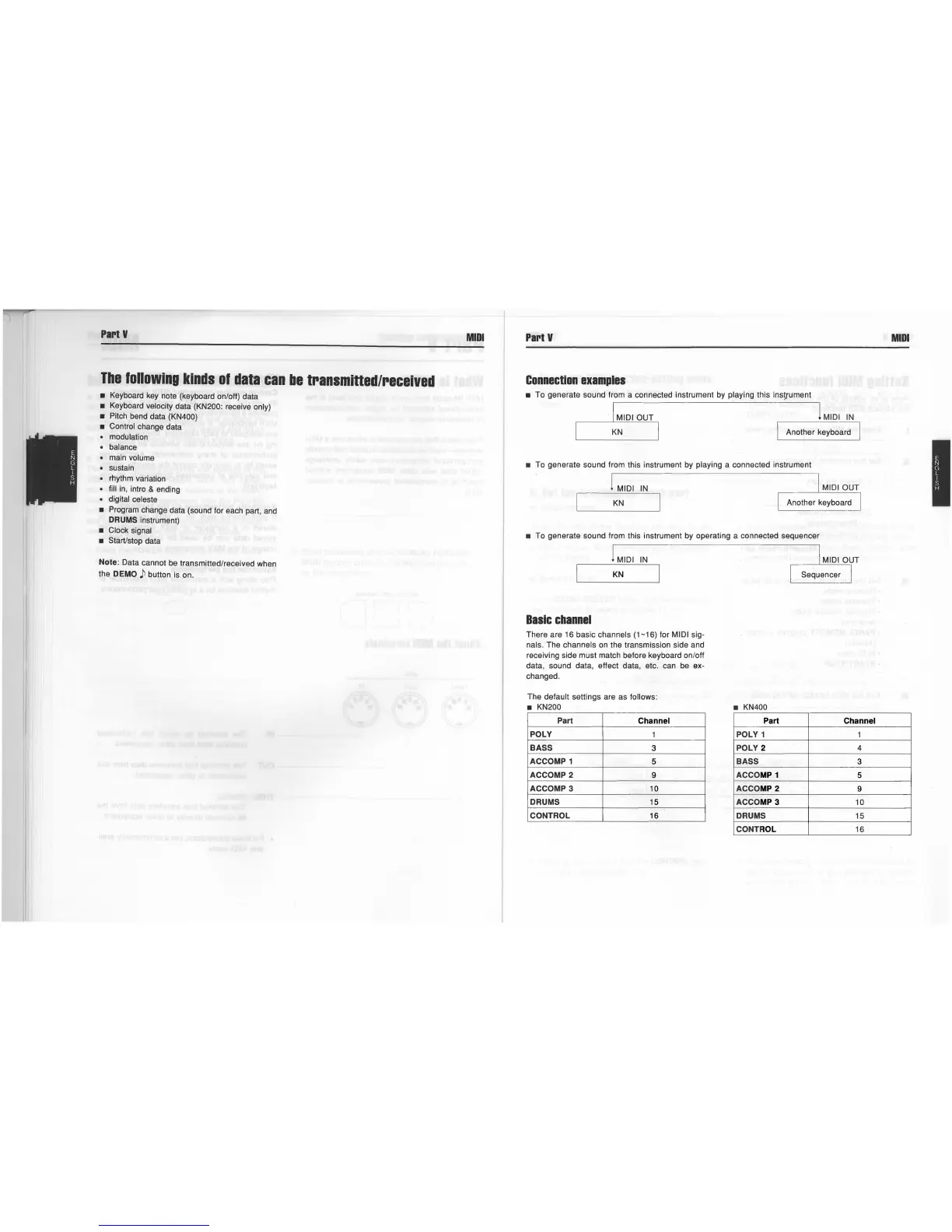
Connection
examples
• To generate sound from a connected instrument
by
playing this instrument
· 1 MIDI OUT 1 MIDI
IN
KN
I Another keyboard
• To generate sound from this instrument
by
playing a connected instrument
1 MIDI
IN
MIDI OUT
KN
• To generate sound from this instrument
by
operating a connected sequencer
1 MIDI
IN
I MIDI OUT
KN
Sequencer I
Basic
channel
There are 16 basic channels (1-16) for MIDI sig-
nals. The channels
on
the transmission side and
receiving side must match before keyboard on/off
data, sound data, effect data, etc. can
be
ex
-
changed.
The default settings are as
follows:
• KN200
Part
Channel
POLY
1
BASS
3
ACCOMP 1
5
ACCOMP 2
9
ACCOMP 3 10
DRUMS
15
CONTROL 16
• KN400
Part
Channel
POLY 1 1
POLY 2 4
BASS
3
ACCO
MP
1
5
ACCO
MP
2
9
ACCO
MP
3
10
DRUMS
15
CONTROL 16
MIDI



 To Next Page
 Loading...