⇒ While pressing the MODE SET button, press
the keyboard key that corresponds to the
desired TOUCH SENSITIVITY (LIGHT/ NOR-
MAL/HEAVY).
• When a keyboard key is pressed, the MODE SET indicator
flashes.
• In the initialized state, the setting is NORMAL.
⇒ While pressing the MODE SET button, press
the keyboard key that corresponds to REVERB
OFF or ON.
• When the MODE SET button is pressed, its indicator
flashes.
• In the initialized state, the setting is ON, and reverb is
added to the sound.
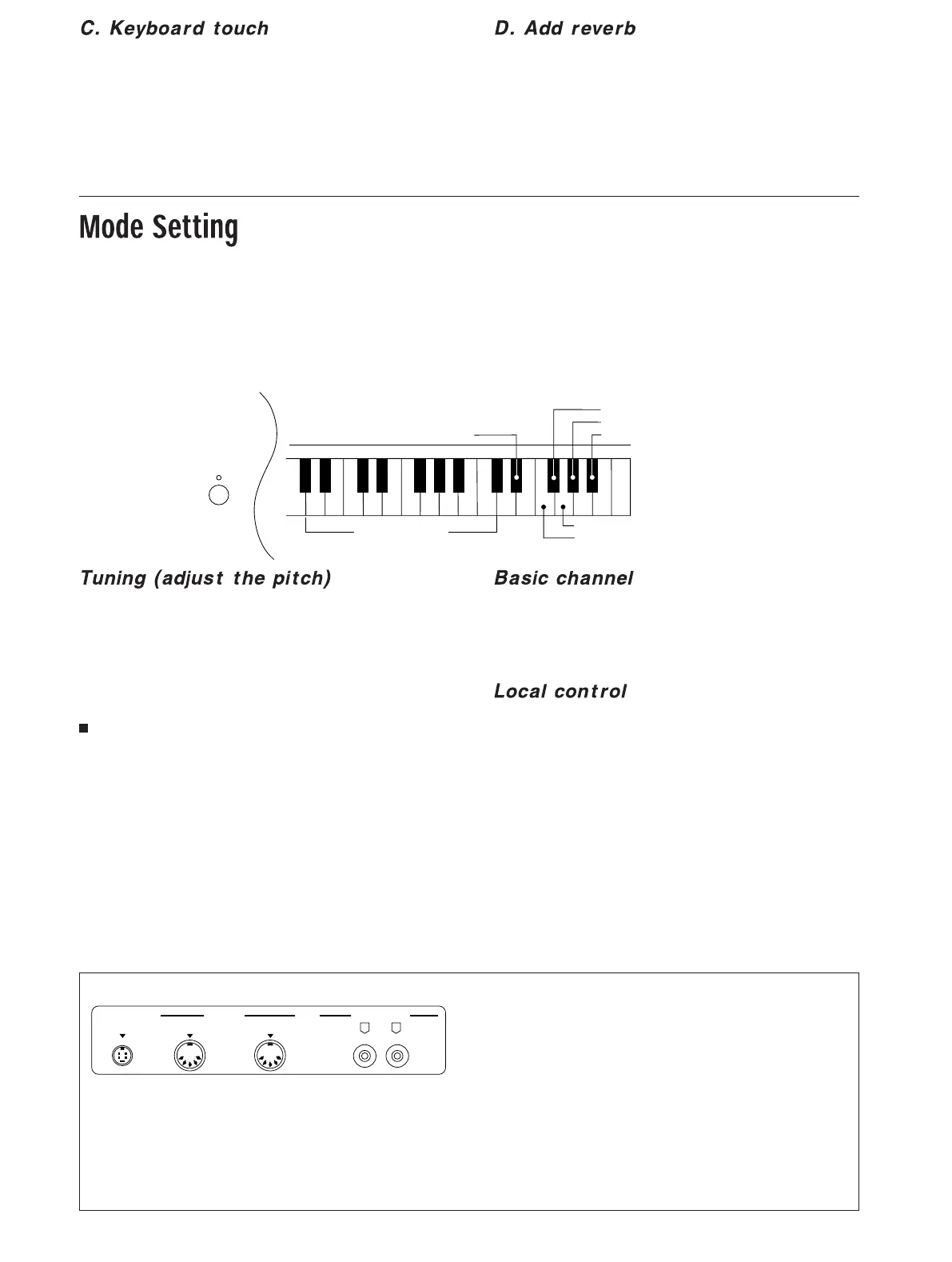
While the MODE SET button is depressed, the keys indicated
in the illustration below are used for setting the functions.
⇒ Keep the MODE SET button depressed while
following the procedures below.
• When the MODE SET button is released, the function-set-
ting mode is canceled, and the keys return to the perform-
ance mode.
• If the left pedal is depressed during function-setting, even
if you release the MODE SET button, the function-setting
mode remains active.
• During function-setting, the indicator for the MODE SET
button is lit. When you press a key to select a setting, the
indicator flashes and a confirming beep is heard.
• All settings revert to their factory-preset settings when the
power is turned off.
You can adjust the pitch of this instrument when you are
playing together with other instruments.
⇒ Press F#6 to set the pitch to 440 Hz (initial
setting).
⇒ Press G#6 to set the pitch to 442 Hz.
⇒ Press A#6 to set the pitch to 443 Hz.
Fine tuning
⇒ Each time G6 is pressed, the pitch is raised by
0.8 cent.
⇒ Each time F6 is pressed, the pitch is lowered
by 0.8 cent.
• If you attempt to raise the pitch above 453 Hz or lower it
below 427.3 Hz, the confirming beep does not sound even
when the key is pressed.
• You can hold the G6 or F6 key down to change the pitch
quickly. In this case, the MODE SET indicator changes
from flashing to lit when the highest or lowest pitch is
reached.
Assign the MIDI basic channel.
⇒ Press the key corresponding to the basic chan-
nel number. (Refer to the illustration above.)
• The default setting is channel 1.
This setting is for when this instrument is used as the master
keyboard.
⇒ The local control is switched between on
(default) and off each time the D#6 key is
pressed.
• When the local control is set to off, the signals generated
by the keys and pedals of this instrument are not sent to
its sound generator, but are handled only as MIDI output
(this instrument generates no sound).
BASIC CHANNEL
C5
1
257
10 12 14
3 4 6 8 9 11131516
D#6: LOCAL CONTROL
ON/OFF
F#6:
G#6:
A#6:
440 Hz
442 Hz
443 Hz
G6:
F6:
+0.8 cent
–0.8 cent
C6 C7
MODE SET
MIDI
PEDAL IN
OUT
IN
AUX IN
RL
MIDI
IN
MIDI data from another instrument is received
through this terminal.
OUT
MIDI data from this instrument is transmitted to
another instrument through this terminal.
• For these connections, use a commercially available
MIDI cable.
PEDAL IN
Connect the pedal cord from the included stand to this
terminal.
Rear panel terminals
AUX IN
Other instrument's Line Out can be connected to this
terminal.


 To Previous Page
 Loading...