Supplement Airplane Maintenance Manual
Cessna 172 with TAE 125-02-99 / -114
AMM-20-02
Rev. No:
Rev. Date:
Chapter:
Issue:
Issue Date:
Page:
Content:
20-AMM-31-02
3
06.11.2013
5
8
1
25.08.2014
MAINTENANCE PRACTICES
1. General
This maintenance practice provides instructions to check
the “WATER LEVEL“ signal.
2. Checking the “WATER LEVEL“ signal
A. Drain the Coolant from the Expansion Tank
(1) Remove the cap of the expansion tank.
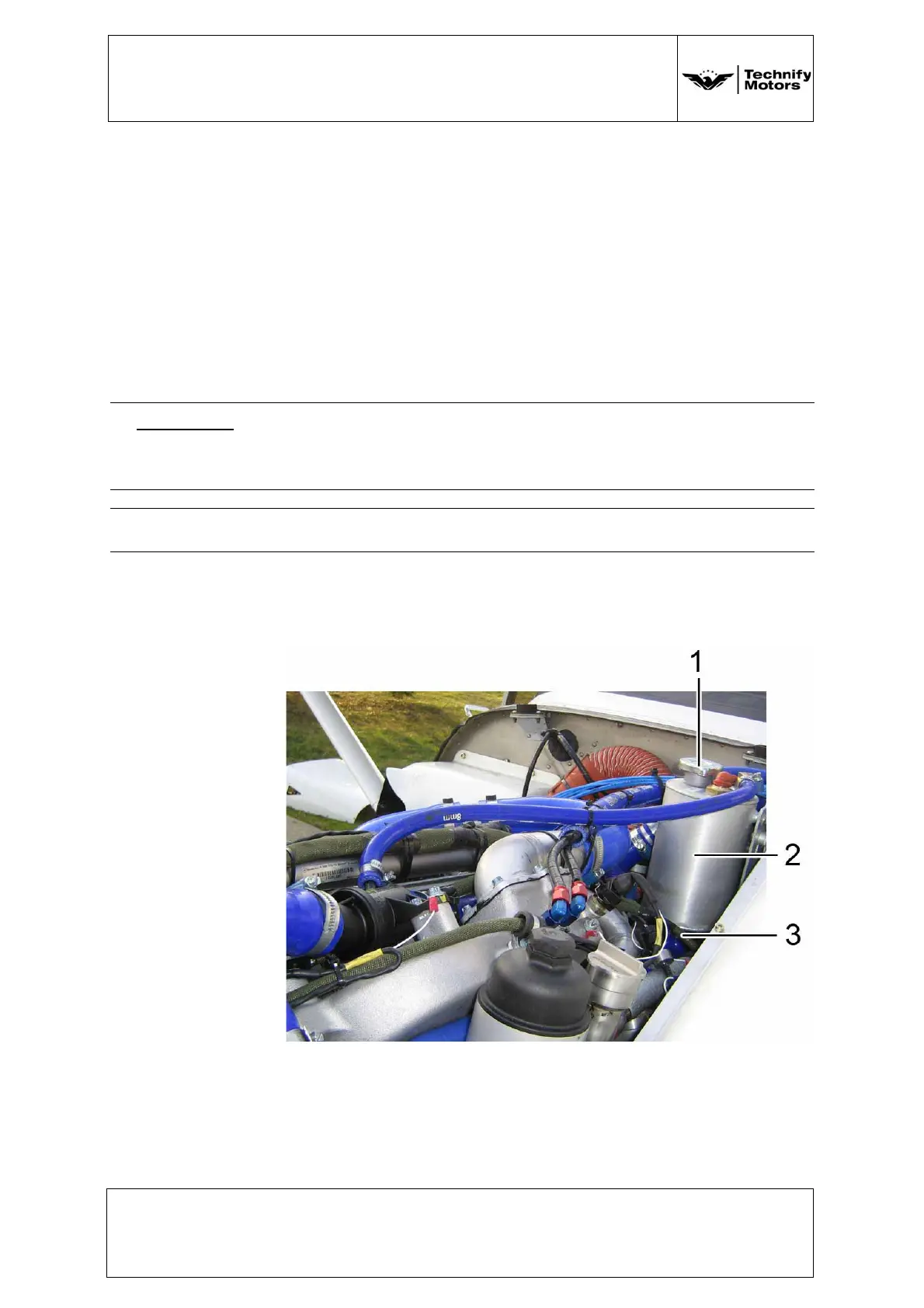
(2) Disconnect the coolant hose and allow the
coolant to drain in a suitable container.
See Figure 4.
Figure 4 Expansion Tank
1 Cap
2 Expansion Tank
3 Coolant Connection
(3) Seal the coolant connection of the expansion
tank. See Figure 4.
WARNING: Risk of scalding! The cooling system may be pressurized.
Carefully release the pressure before opening the coolant
system.
CAUTION: Do not drain the coolant if its temperature is above 40°C!



 To Next Page