8
9
10
11
15
28
29
12
13
14
16
17
27
26
25
20
23
22
21
19
18
1
2
3
4
5
6
7
24
30
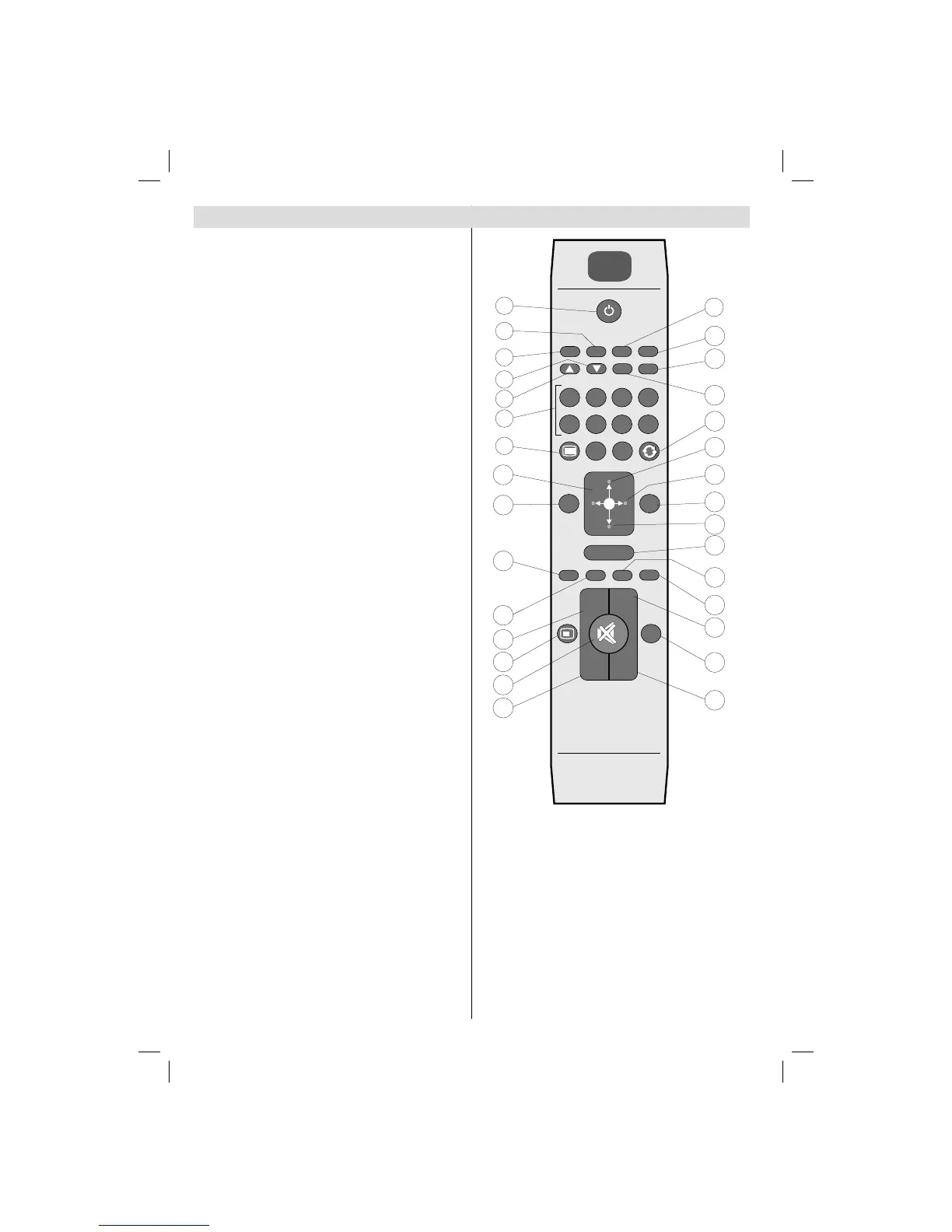
Standby / On1.
Mono/Stereo - Dual I-II 2.
Expand (in TXT mode)/ Image size3.
Green / Picture Menu / Subtitle on-off (in DTV 4.
mode)
Red /Sound Menu 5.
Numeric buttons6.
Teletext / Mix / PAT (in TXT mode) 7.
Cursor Left 8.
Menu9.
AV / Source10.
Favourite Mode Selection (in DTV mode) 11.
Volume Up12.
Info / Reveal (in TXT mode)13.
Mute14.
Volume Down15.
Programme Down / Page up (in DTV mode)16.
Electronic programme guide (in DTV mode) 17.
Programme Up / Page down (in DTV mode)18.
Sleep Timer19.
Picture Mode Selecion20.
Okay (Store) / Select / Channel list (in DTV 21.
mode)/ Hold (in TXT mode)
Cursor Down22.
Exit (in DTV mode) / Return / Index page (in 23.
TXT mode)
Cursor Right / Subpage (in TXT mode)24.
Cursor Up 25.
Previous programme26.
Yellow / Feature Menu 27.
Blue / Install Menu 28.
No function29.
Subtitle on-off (in DTV mode) / TXT subtitle30.
A01_MB38_[GB]_3902UK_IDTV-T2_GOLD7_42884W_10068537_50167165.indd 8A01_MB38_[GB]_3902UK_IDTV-T2_GOLD7_42884W_10068537_50167165.indd 8 17.06.2010 13:10:0217.06.2010 13:10:02





 To Next Page