2
1 Figures
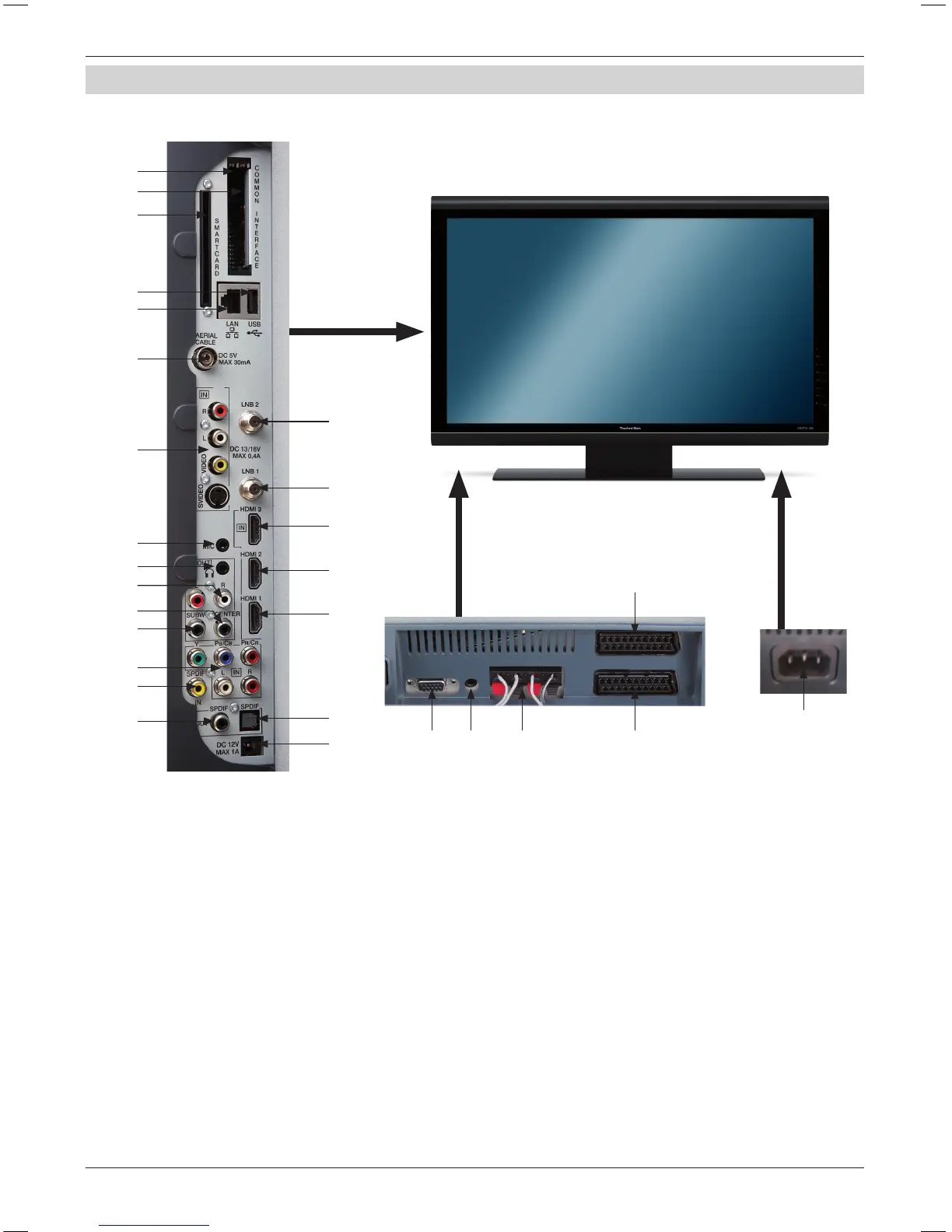
Device connections
lllustration of the device connections
1 Common Interface Slot 1
2 Common Interface Slot 2
3 Card reader (Adjust the
golden chip of the CONAX
smart card forwards and
in the slot direction)
4 USB connection
5 Network connection (LAN)
6 Antenna input
(DVB-C, DVB-T, analogue)
7 Video, S-Video and
audio input
8 LNB input 2 (DVB-S)
9 LNB input 1 (DVB-S)
10 HDMI connection 3
11 HDMI connection 2
12 HDMI connection 1
13 Microphone input
(Jack 3.5mm)
14 Headphone output
(Jack 3.5mm)
15 Audio output (R,L)
16 Centre output
17 Sub-woofer output
18 Component inputs
(Y, Pb/Cb, Pr/Cr and audio)
19 Digital audio input
(SPDIF electric)
20 Digital audio output
(SPDIF electrical)
21 Digital audio output
(SPDIF optical)
22 DC 12V output switching
voltage ext. Ampliers
23 VGA connection
24 Audio input (VGA/DVI)
(Jack 3.5mm)
25 Loudspeaker connection
26 Scart connection (AV1)
27 Scart connection (AV2)
28 Mains connector
1
2
3
4
5
6
7
8
9
10
11
12
21
22
13
14
20
19
18
17
16
15
23 24 25 27
28
26
Please open.



 To Next Page