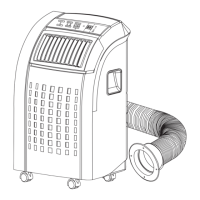
THANK YOU..................................................................……………..................................…………..
1
Energy Saving Tips
SPECIFICATIONS ......................………………………….................................................…………..
2
-0 E
BEFORE USE .........................................…………………………......................................……………
4
PARTS ...................................................…………………………........................................………..….
5
Accessories.
INSTALLATION .....................................................……………………............................……………
6
Mounting the Unit
Mounting the Exhaust Pipe................................…….................................................................
7
Installation of the Carbon Filter
OPERATION - ELECTRONIC CONTROL MODELS .......................................………..............…..
8
Control Panel
Turning On/Off
Setting Mode / Function
Au
to Mode
Setting theTemperature
.
Setting Fan Speed...................................................................................……………..................
9
Setting the
Timer
Regulating Airflow Direction
DRAINAGE..........……...................................................................……………………........................
1
By the Draining into a Container
By Water Tube (continuous drainage)
MAINTENANCE ....................................…….............................………………………......................
Cleaning the Housing
Cleaning the Filter
End of Season Storage
Storing the Power Cord
3
TROUBLESHOOTING..................................................................……..…………...............................
YOUR GUARANTEE ................................................................……...…………..………………........
The unit doesn’t run or •Is the machine plugged in?
only runs in fan mode •Is the mains power supply on?
•Is the room temperature in the working range?
•Is the unit in auto mode? (Electronic Model)
set to cool or heat and set to proper temperature.
The unit seems to do little •Is there direct sunshine?
(Please close the curtains or blinds)
•Are too many windows or doors open?
•Are there too many people in the room?
•Is there something in the room producing lots of
heat?
The unit seems to do nothing •Is the dust filter dirty?
•Is the air intake or outlet blocked up?
•Is the temperature within the selected temperature +/- 5˚F?
•Is the water tank full? Drain the water.
The room is not cold enough •The room being cooled should have proper insulation.
If the unit is used in UN-INSULATED
rooms such as Sunrooms, Garages, or Attics, ideal
cooling might not be attained.
Too noisy •Is the machine positioned unevenly so as to create
vibration?
•Is the floor underneath the machine uneven?
The compressor doesn’t run •The overheat protection feature on the compressor
might be on. If this occurs, wait for the
temperature of the unit to drop.
•Is the water container full? Does it need draining?
NEVER TRY TO REPAIR OR DISMANTLE THE UNIT YOURSELF
REPLACEMENT FILTERS:
To purchase Replacement Filters for this unit, contact SPT
USA at
1-800-330-0388 and request model
number &
.
If this product is defective or not working properly,
please DO NOT return to your retail store.
Please contact us directly for any Service or Technical Assistance at 1-800-330-0388.
T
N
T
N
9
12
-
-0
T
N
T
N
9
12
-
1
12
11
E
10
F
F


 To Next Page
 Loading...