10
For Support Visit· support.technocnc.com or Call: (631) 648-7481
HDS User Manual
(HTT06291133)
Section II: Machine Start-Up | Screen Functionality
2.1.1
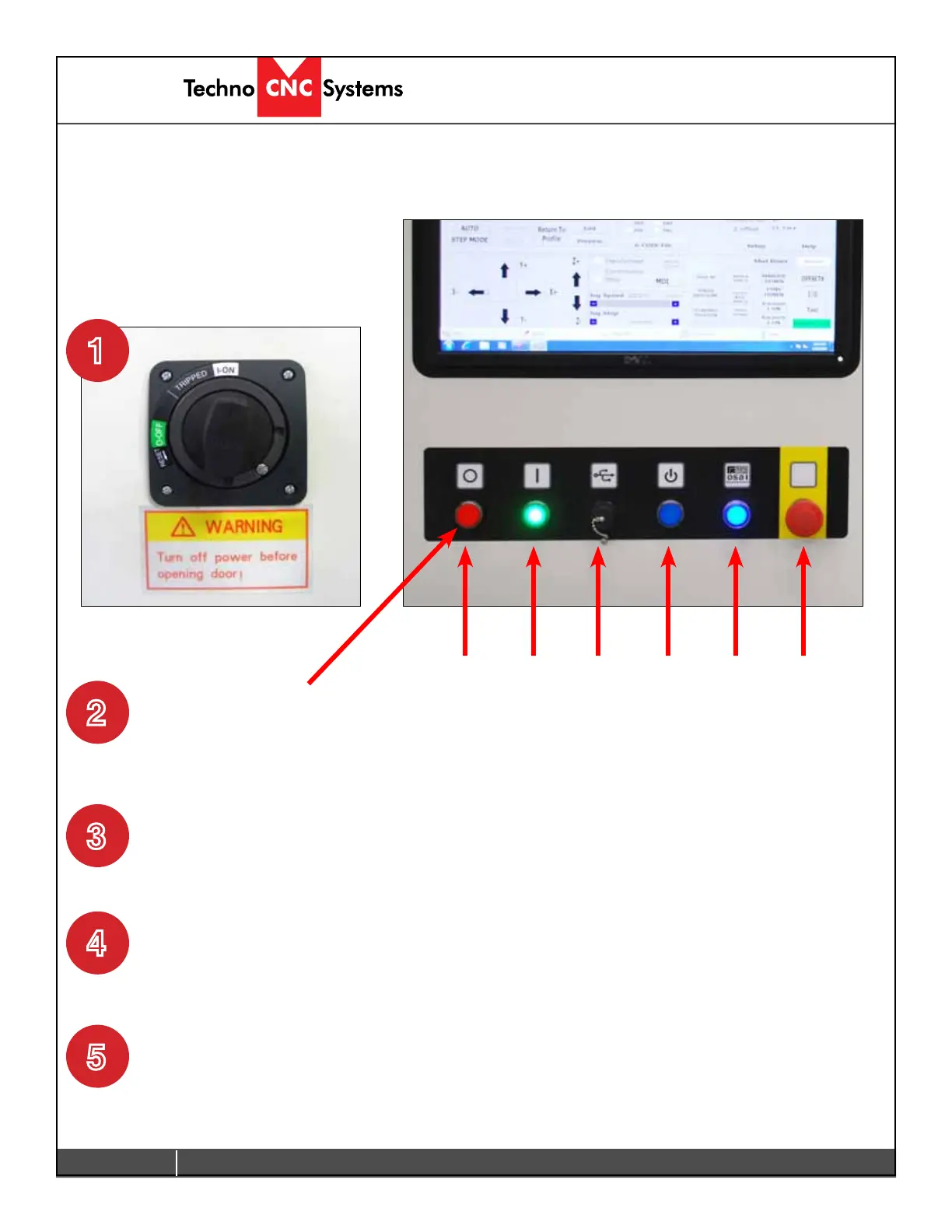
Turn the Main power switch to the ON
Position. 220 Volts should have been
attached to this switch by an electrician.
2.1.2
The red light on the front of the
machine will light up. This indicates
that 220 volts is coming into the
machine.
The Power on light will light up
indicating that power has been
applied to the controller system and
the motors.
2.1- Start up Procedure.
Fig 2.1.1
Power
Off
Power
On
OSAI
Power
Switch
MUST
BE ON!
PC
Power
Switch
E-stop:
Turns off
controller,
motor and
spindle
USB
Port
1
2
4
3
Fig 2.1.2
Press the Power On button to start
the system.
Press the Computer Power button
to start the PC. This may only light
temporarily. The PC will start to boot.
5



 To Next Page