For Support Visit· support.technocnc.com or Call: (631) 648-7481
11
HDS User Manual
(HTT06291133)
2.1.4 Software start up.
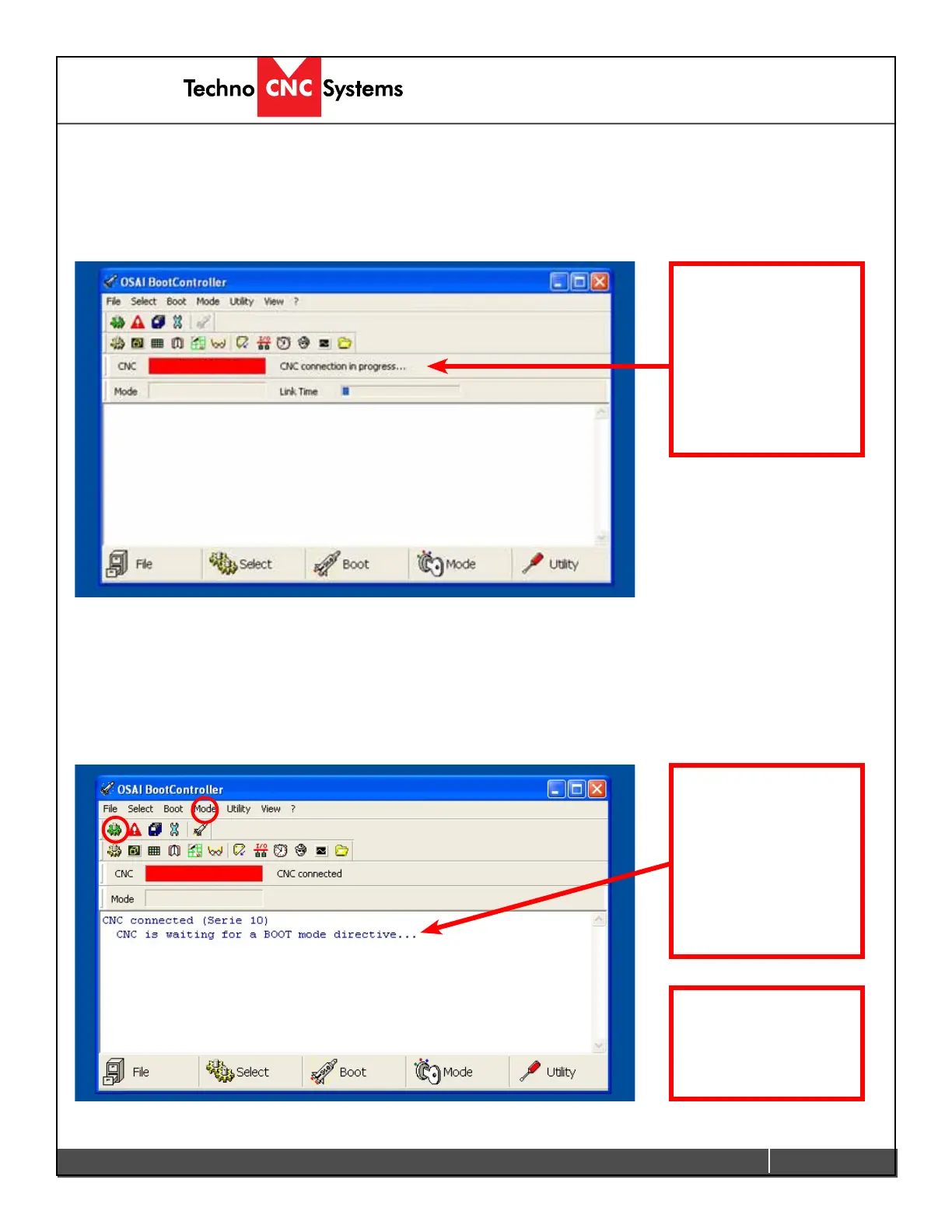
Once the PC has started, the Boot Controller software will start automatically. If it does not, double click on the
Boot Controller Icon (It looks like a rocket ship.) on the desktop. If no text appears in the box, after 30 seconds,
check that the light for the controller is on and that the network cable from PC to Osai controller is connected.
If no connection occurs, see the Fault Finding section in the Appendix.
If the Boot Controller does not start after a minute and the message CNC is waiting for a BOOT mode directive
appears on the screen, then normal mode needs to be selected.
Click on the Mode Icon and select Normal. *
Boot controller
loaded and
connecting to
machine
Controller is waiting
for a mode.
If the machine is starting
from a fresh PC boot,
then Normal mode will
automatically be selected.
192.168.0.1
192.168.0.1
* Otherwise, it will
automatically go into
normal mode after a few
seconds.


 To Next Page
 Loading...