For Support Visit· support.technocnc.com or Call: (631) 648-7481
9
HDS User Manual
(HTT06291133)
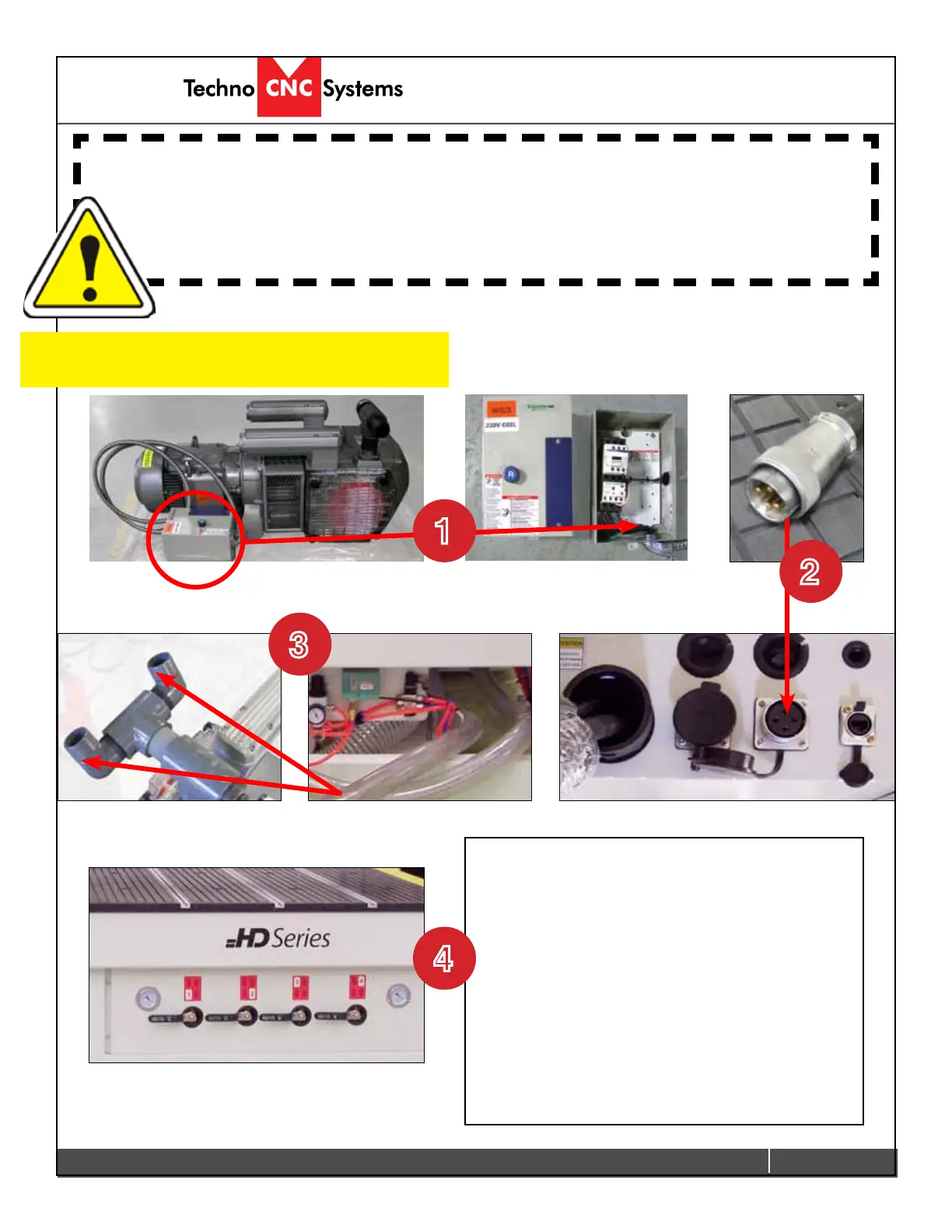
1.5 Vacuum Pump connections
You will need to have an electrician connect AC power
(220or440VAC)asspeciedontheunittothemotorstarter.
Take the silver connector from the Starter Box and connect
it to the female connector on the main electronic unit.
Attach the silver connector
from the starter box here.
Attach the hoses from the machine to the
T-connectors and attach them to the pump.
WARNING: Direction of Rotation is critical.
Briey start motion and check rotation (arrow on casing).
Exchange phases if rotation is incorrect.
IF YOU RUN THE PUMP/BLOWER CONTINUOUSLY IN THE
WRONG DIRECTION, THE VANES WILL BE DAMAGED
Turn on individual sections of the
vacuum table by turning the manifold
handles in the front of the machine.
Vacuum on and off functions are
controlled by the Osai controller
and can only be turned on from
the computer screen.
To test the motor, press the
reset button on the starter box
once all connections are made.
1
2
4
3



 To Next Page
 Loading...