14
For Support Visit· support.technocnc.com or Call: (631) 648-7481
HDS User Manual
(HTT06291133)
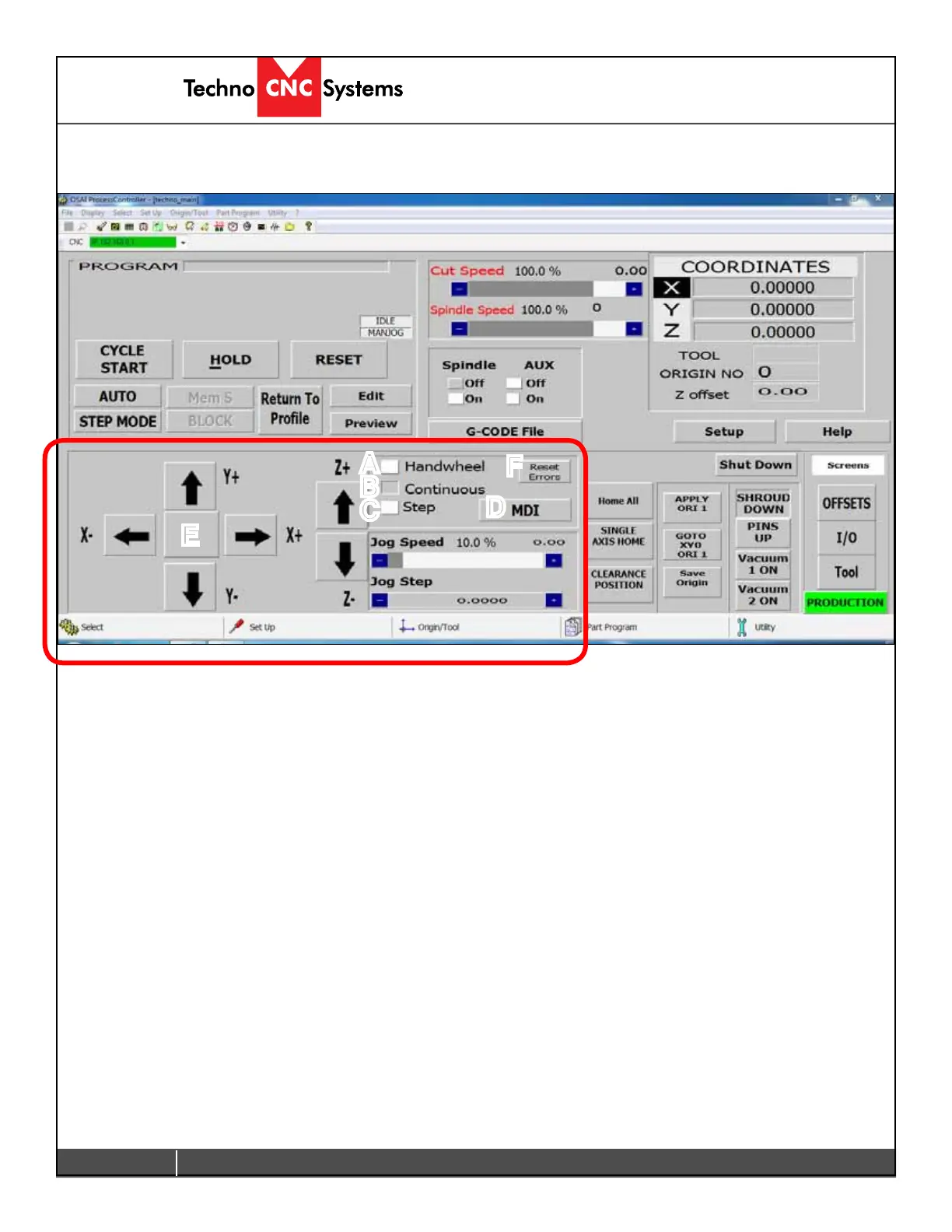
The sections highlighted below are the Jog controls of the interface.
The machine will not move unless a jog mode is selected. Click on the button beside the
text to select a mode.
A - Handwheel:
In this mode, the machine will operate via the MPG/Handwheel. Please see Handwheel
operation for more information. All other functions are disabled when this is active.
B - Continuous:
Also, known as Jog Mode. The machine will move smoothly and continuously when the user
clicks on the directional arrow associated with each axis. Speed is controlled by Jog speed and
isapercentageofthemaxjogspeed-800ipmformanualjogmode.
C - Step:
Also,knownasIncrementalJogMode.Themachinewillmovebyanexactamount,asspecied
by Jog Step variable when the arrow button is held down with left click.
D - MDI:
Manual Data Input, this feature allows the user to manually enter and execute a line of G-code.
E - Jogging Arrows:
By left clicking on these arrows the machine will move in the corresponding direction. These
arrows are only functional if Continuous or Step mode is active.
F - Reset Errors: This will remove any warning/error messages that appear on the screen.
A
B
C
D
E
F
A-Jogging Functions


 To Next Page
 Loading...