18
For Support Visit· support.technocnc.com or Call: (631) 648-7481
HDS User Manual
(HTT06291133)
E-Coordinate System
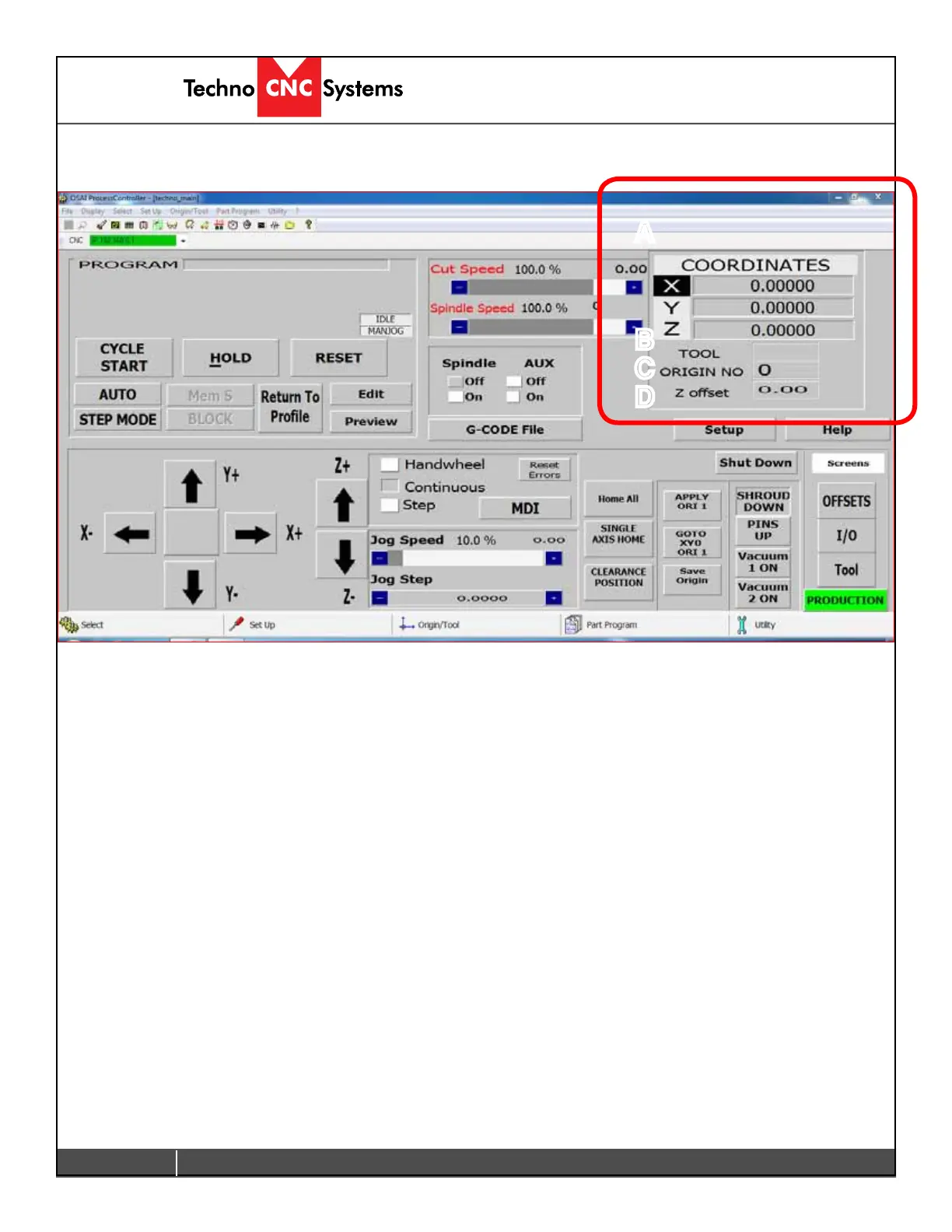
The section highlighted below is the Coordinate System.
A
B
C
D
A - XYZ Coordinates:
This displays the location of the machine. If the Origin No is zero,the numbers displayed
are the distance from the Home position (Absolute XYZ = 0). If there is an Origin Number
active, the numbers displayed are the distance from that origins zero position.
B - Tool:
This displays the tool that is currently in the spindle. If the number reads a single digit then
there is no offset applied to that tool at this time. When the Tool displays 1.1, or 2.2, or 5.5
etc then the Z-offset is active. The Z-offset needs to be active when setting the origin.
C - Origin No:
This displays the active origin/ coordinate system. When it reads 0, no origin is active and
the coordinate system displayed is the from the Home position. The system is setup to
accommodate 8 origins, but many more can be made available.
D - Z Offset:
This is the amount of Z-offset being applied to the tool. Z-offset is the distance from the
home position and it is set in the Tool menu using the tool calibration block.


 To Next Page
 Loading...