For Support Visit· support.technocnc.com or Call: (631) 648-7481
19
HDS User Manual
(HTT06291133)
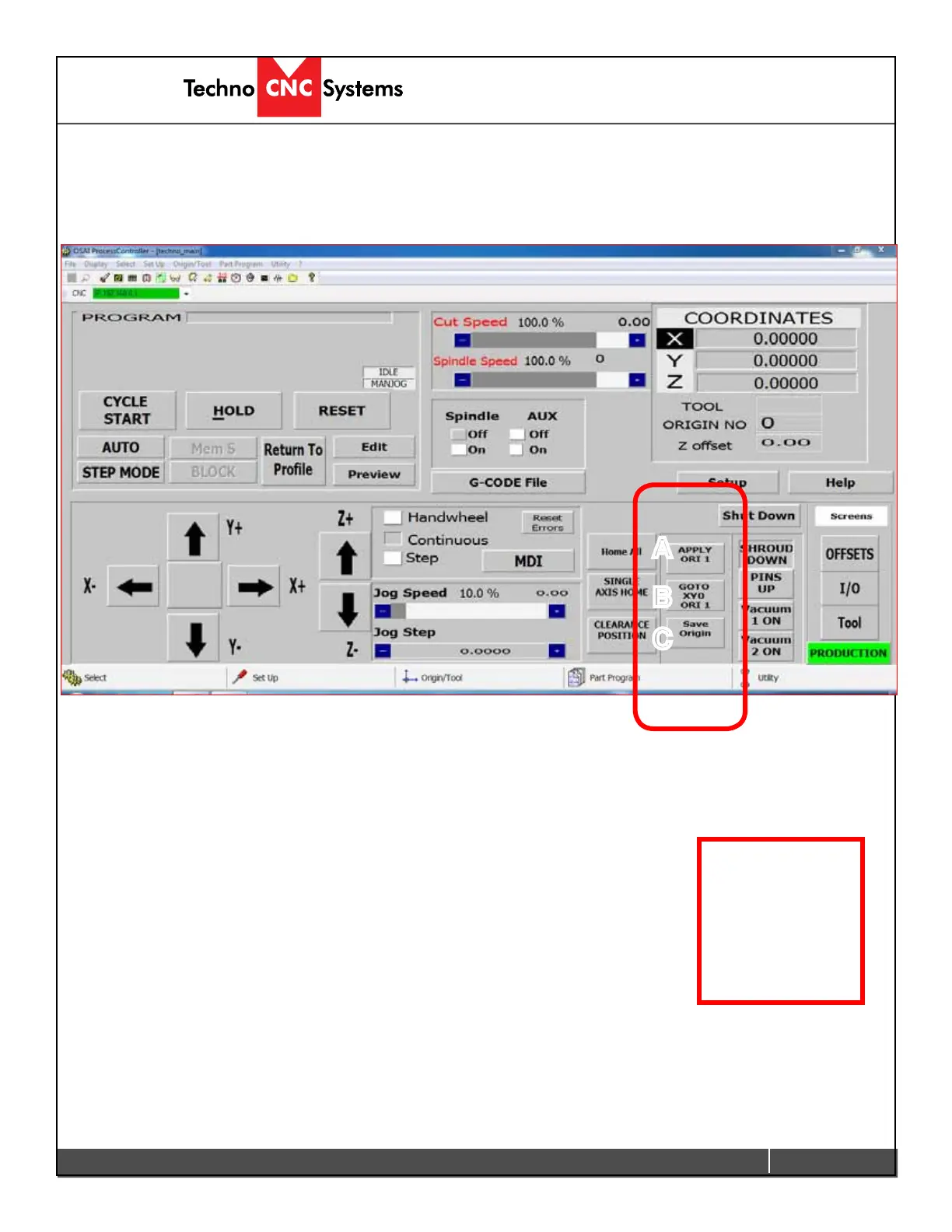
F-Origin Functions
The sections highlighted below contain the Origin functions of the interface.
A
B
C
A - APPLY ORI 1:
Left clicking on this button activates Origin 1 for the coordinate system.
B - GO TO XY0 ORI 1:
Left clicking on this button moves the Z axis to the home position and
the XY axes to the X-zero, Y-zero for Origin 1. (XY=0)
C - Save Origin:
Left clicking on this button opens the Save Origin Screen Safe Mode
Option. In this screen the user can save the position of the machine as
the Origin. This is where the user sets XYZ zero. This Safe Mode Option
will provide additional warnings and opportunities for the user ensure
that the origin is saved correctly.
Origin can also
be called the XYZ
zero point.


 To Next Page
 Loading...