20
For Support Visit· support.technocnc.com or Call: (631) 648-7481
HDS User Manual
(HTT06291133)
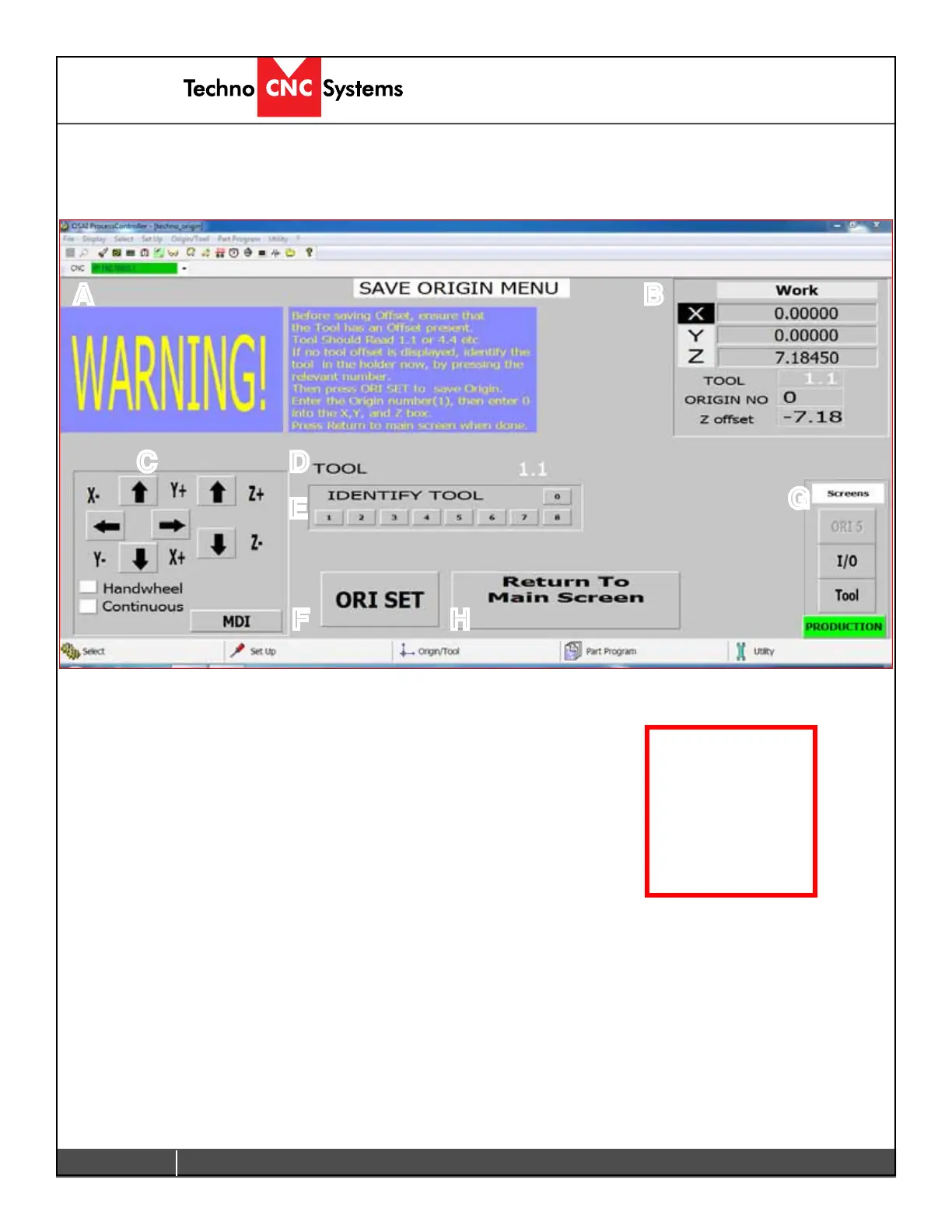
G-Save Origin Menu
When the Save Origin button is clicked on the main screen, this screen will open. This
screen provides a reminder to identify the tool in the tool holder before saving an origin.
A - Warning Message:
This gives the user instructions on how to save an origin correctly.
B - Coordinate System:
This displays the coordinate system, as explained in Section E.
C - Jog Functions:
Thisisaminimizedversionofthejogfunctions,asexplainedinSectionA.
D - Tool:
This displays the Tool Number. It should read 1.1, or 2.2, or 6.6 etc, indicating that an offset is applied.
E - Identify Tool:
Left clicking on one of these buttons will apply the offset to the Tool number, or rename / reidentify at tool.
F - Ori Set:
Will open the Origin Preset Screen where the user will enter the Origin number to be saved and set XYZ to zero.
G - Menu Screen:
Changes the screen.
H - Return to Main Screen:
Once the Origin has been set, left clicking on this button will return to the main screen.
A B
C D
E
F
G
H
This screen
gives the user an
opportunity to
identify the tool in
the holder.


 To Next Page
 Loading...