For Support Visit· support.technocnc.com or Call: (631) 648-7481
25
HDS User Manual
(HTT06291133)
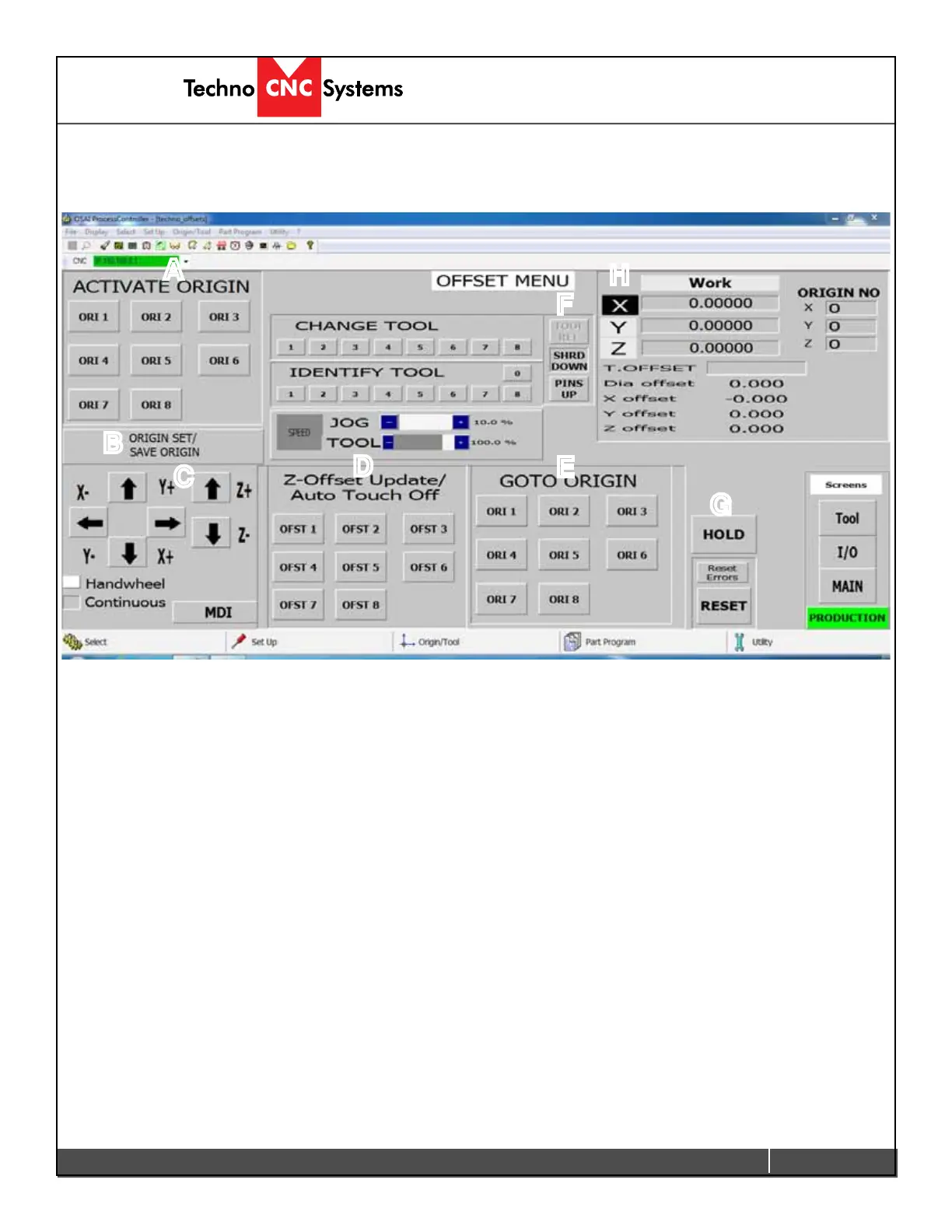
L-Offset Menu
When Offset is clicked on the main menu, the screen below will open. In this screen multiple
offsets can be saved and recalled.
A - ACTIVATE ORIGIN:
Left clicking on these buttons will activate the corresponding Origin.
B - ORIGIN SET/SAVE ORIGIN: Left clicking on this will open the Origin Preset screen. This will allow
theusertosavethecurrentpositionofthespindleinaspecicoriginnumber.
C - Jog Functions:
Thisisaminimizedversionoftheregularjogfunctions.
D - Z-offset Update:
Pressing one of these buttons will cause the Tool to move down until it touches the Tool Calibration
Block, and then it will store the Z-offset for that tool number.
E - GOTO ORIGIN:
Left clicking on one of these buttons will move the router to the XY zero position for that origin number.
The Z axis will move to the home position.
F - Pneumatic Controls:
This section controls dust shroud, chuck control and pop up pins.
G - HOLD:
Pressing hold during an operation will cause the operation to be aborted.
H - Coordinates System:
This displays the system coordinates and active origin, etc.
A
B
C
D
E
F
G
H


 To Next Page
 Loading...