For Support Visit· support.technocnc.com or Call: (631) 648-7481
27
HDS User Manual
(HTT06291133)
Section III: Operating Tutorials
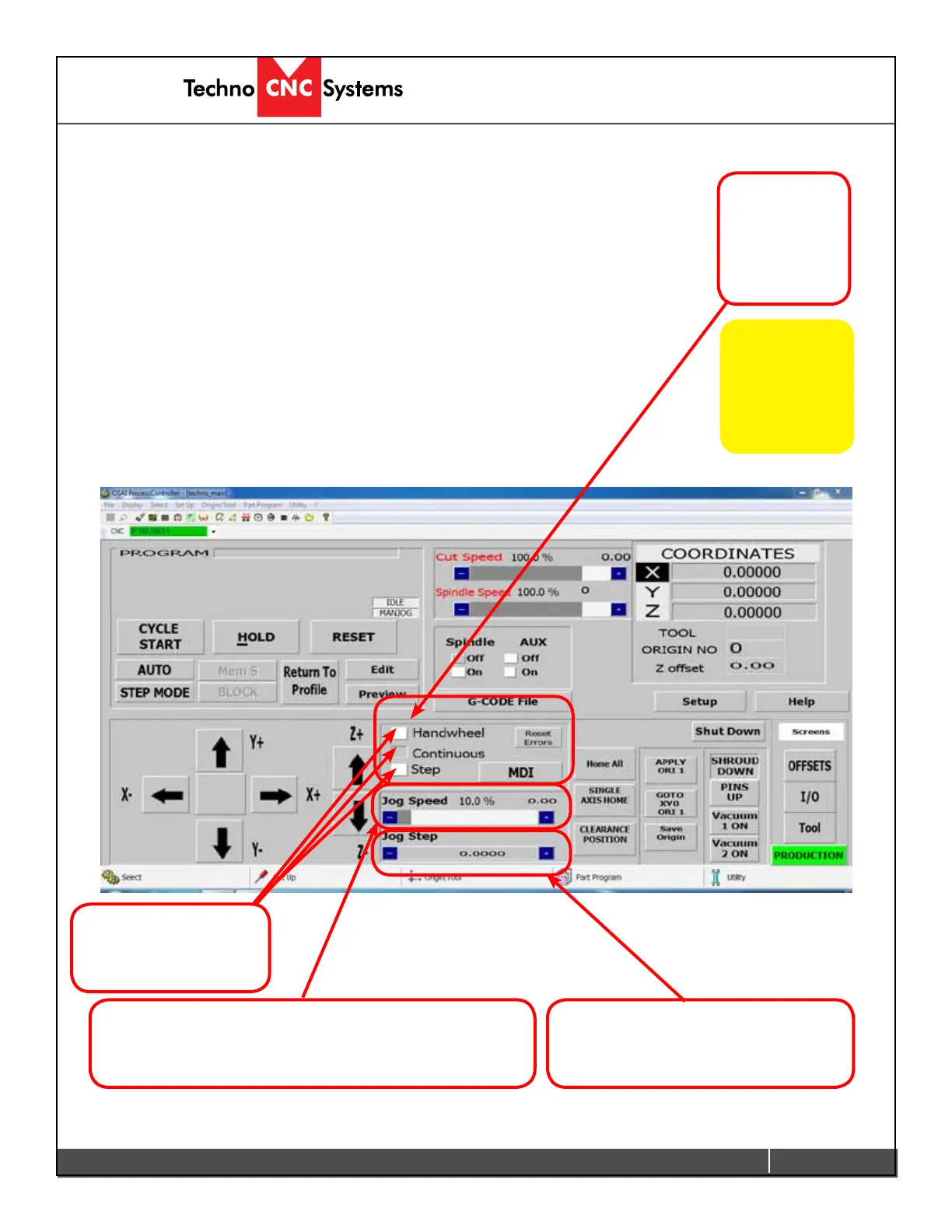
3.1 Jogging the machine
The machine has three jog modes:
• Handwheel:
In which the machine is controlled by the handwheel / manual pulse
generator on the side of the machine.
• Continuous:
Inwhichthoughuidandsmoothcontinuousmovementthemachineis
controlled. Speed is controlled by the Jog Speed Bar.
• Step:
Similar to continuous, however with every mouse click the machine
moves a distance determined by the Jog Step Bar.
A mode MUST be selected in order for the machine to move. The selection
box to the left of the text indicates what mode is selected.
Click on the box
beside the mode
name to select it.
Increase (+) or decrease (-) the Jog Speed by pressing
the (+) or (-) box. Speed is shown in % of maximum speed.
Actually speed is displayed when the machine is running.
Increase or decrease the Jog Step by
pressing the (+) or (-) box. Step size in
inches will be shown.
Click on a
box to enable
Handwheel
Control.
Note:
You cannot
change tools or
save origins while
in Handwheel Jog
Mode.


 To Next Page
 Loading...