For Support Visit· support.technocnc.com or Call: (631) 648-7481
31
HDS User Manual
(HTT06291133)
3.3 Saving An Origin | Setting XYZ zero position
When setting an origin, make sure the correct tool is in the chuck and this tool has been identied.
The T.OFFSET box in the top right hand side of the screen should be 1.1 or 2.2, etc ,for whatever tool is in
thechuck.IftheT.OFFSETboxonlyreadsonedigit,thetoolmustbeidentiedintheToolscreen.
See Tools section for instructions in how to do this.
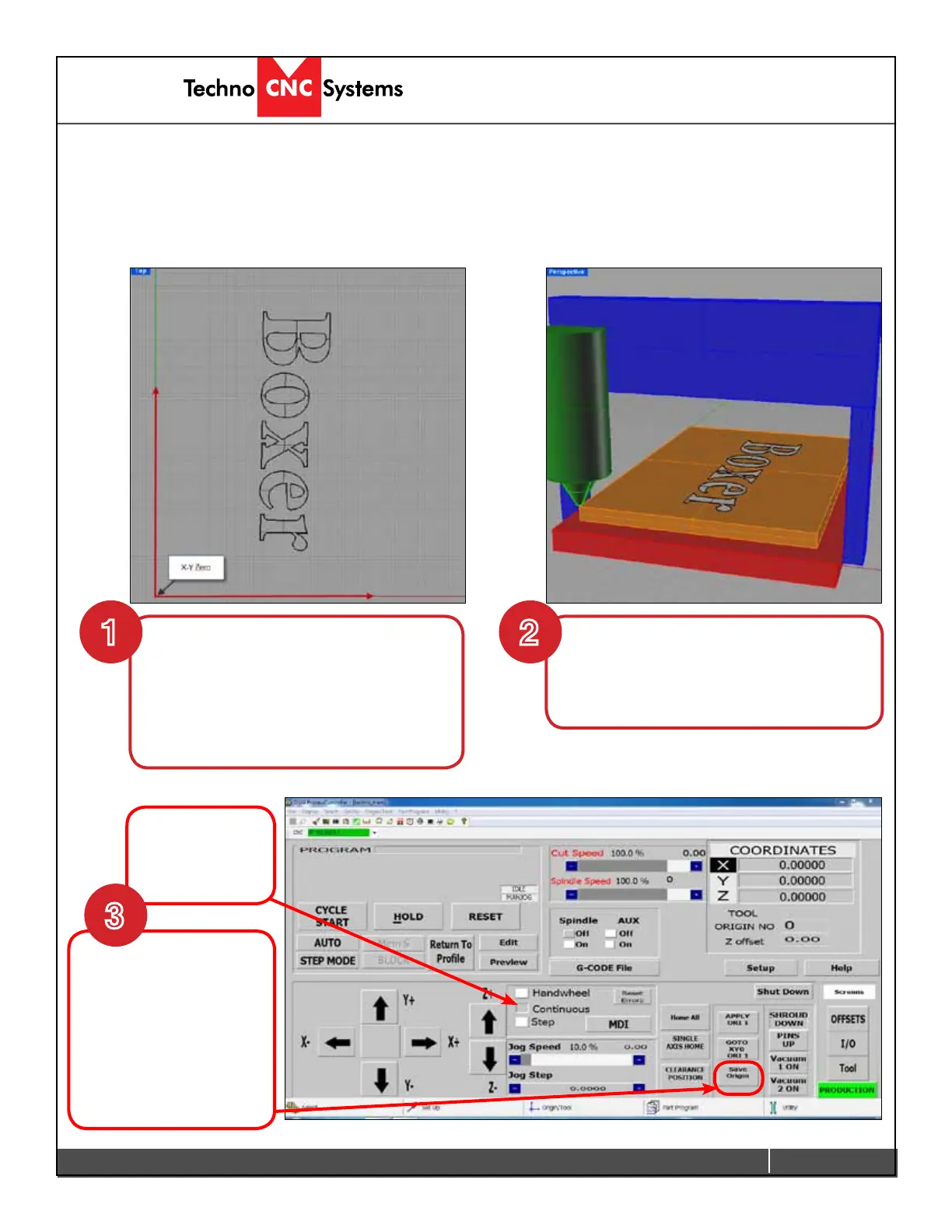
To set the Origin:
Move the machine to the location on the
table you want to set as XYZ. Use the
handwheel for precision.
XYZ zero position is the location point on a
drawing in a CAD/CAM package where X,Y
andZallequalzero.Generally,XYzero
is on the bottom left corner and Z zero is
the top of the part. The letters to be cut are
located away from the XY zero.
Once in position switch
to Continuous Jog mode.
Note: You cannot
save an origin with the
handwheel active.
Click on Save Origin.
Continuous
must be active
to save origin.
1 2
3


 To Next Page
 Loading...