32
For Support Visit· support.technocnc.com or Call: (631) 648-7481
HDS User Manual
(HTT06291133)
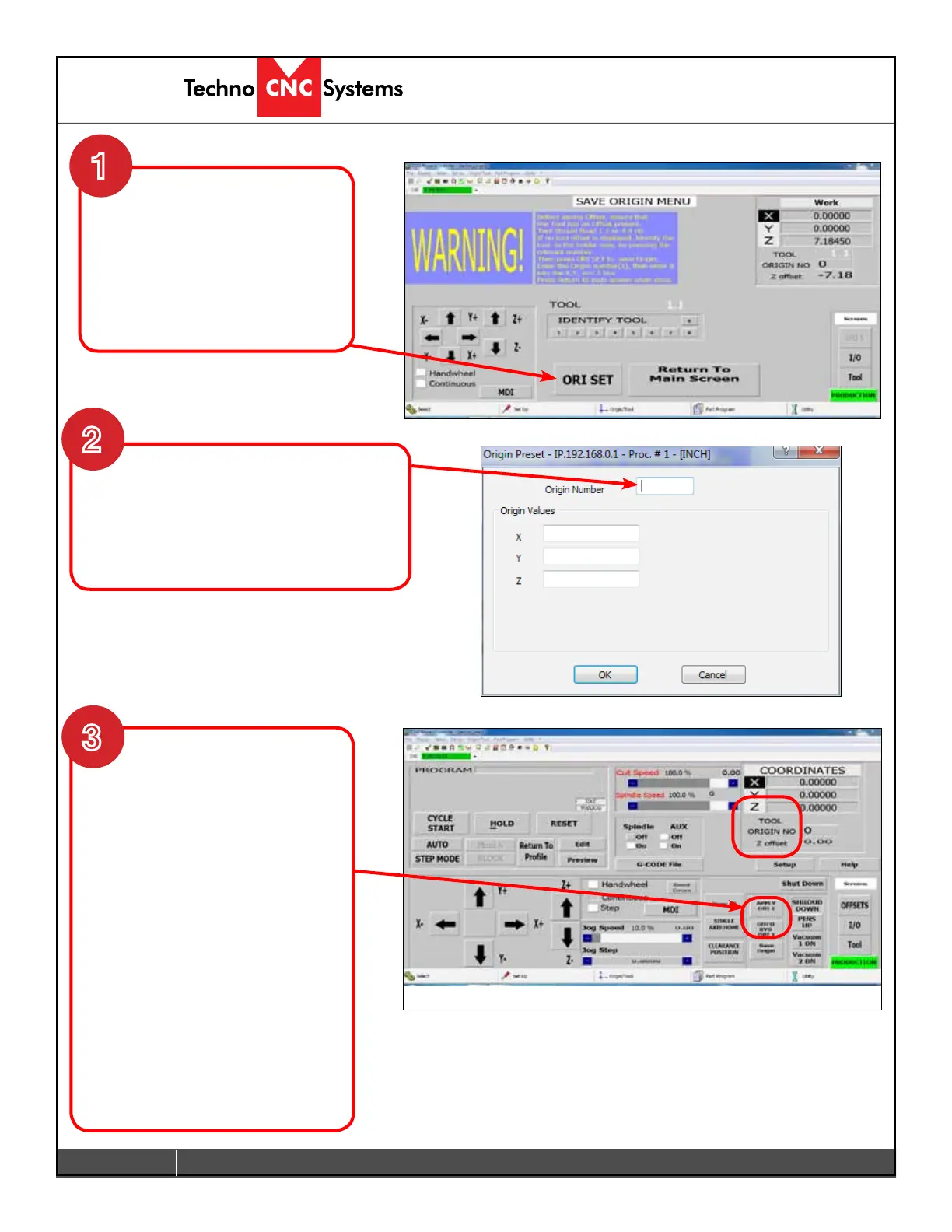
The coordinates displayed will
still be the Work Coordinates.
That is the coordinate system from
the home position.
To display the Origin just saved.
Click on Apply ORI 1.
The coordinate system will now
switch to the origin you saved.
The data (UAO,01) in the G-code
le will also switch coordinate
systems. So if you hit reset and the
coordinate system returns to the
Work/Home Coordinates when the
G-codeleisstarted,thecontroller
will read the (UAO,01) command
and apply Origin 1.
The origin is now set. If you click reset, the coordinate
system will switch back to Work system, and the tool offset
will be removed. Identifying the Tool in the chuck and
clicking Apply ORI will enter the values again.
The Save Origin screen will open,
and a reminder to load the tool
number will appear. Click the
number of the tool that is in the
spindle, then click ORI SET.
Enter the Origin Number on top and zero
in the XYZ boxes.
- Click OK.
- Click Return to Main Screen, when done.
1
2
3


 To Next Page
 Loading...