36
For Support Visit· support.technocnc.com or Call: (631) 648-7481
HDS User Manual
(HTT06291133)
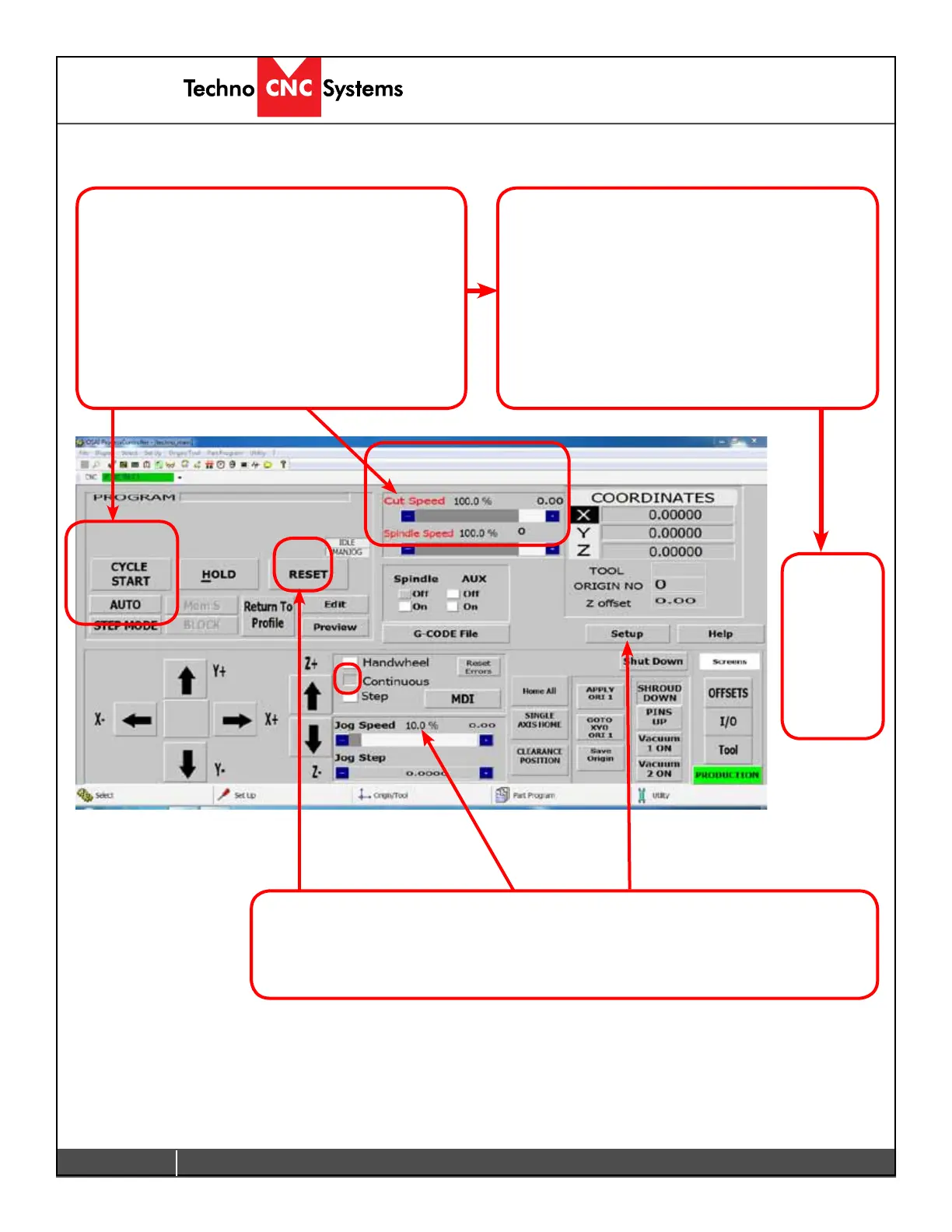
To Override speeds, click on Setup and select Feedrate Bypass.
TheCutspeedwillnowbedeterminedbythePercentageofthemaximumjogspeed.
Clicking RESET will remove the override command.
3.5 Running a G-Code File (Continued)
Thelenamewillnowappearonthetoprightof
the screen. You are now ready to run the le.
To run the le.
-Ensure that the Origin and the Tool offsets are set.
-Check AUTO to run in Continuous mode.
-Click CYCLE STARTtorunthele.
Thecutspeedcanbeadjustedbypressingthe(+)
or (-) blue box under cut speed.
The le will now run.
- Pressing HOLD will pause the machine.
- Pressing CYCLE START willcontinuethele.
DO NOT JOG OFF THE PART WHILE IN HOLD.
Ifyoudo,youwillneedtousethereturntoprole
functiontoreturntocontinuethele.
See advanced tutorials to learn how to do this.
RESET
will stop
thele
and reset
offsets
and the
origins.


 To Next Page
 Loading...