For Support Visit· support.technocnc.com or Call: (631) 648-7481
37
HDS User Manual
(HTT06291133)
Machine Origin:
Working Origin:
Offsets:
3.6 Machine Origin, Working Origin and Offsets
When the machine goes to the home position, the coordinate system is set to zero.
This is the machine origin.
Machine origin is a reference position from which Tool locations, lengths and saved offsets can
be recalled. Machine origin is always located in the bottom left corner of the machine.
Once the machine has been homed, machine origin is no longer a concern for the user.
Working origin, also called Origin, or XYZ zero position, is the coordinate system the part to be
cut exists in.
Working origin can be saved by the user anywhere on the table.
If the working origin is set too close to the gantry, andtheG-codelehaspositionsbeyondthesize
of the table, an error message will be produced stating that an over travel limit has been reached.
Use the Save Origin button to save an origin.
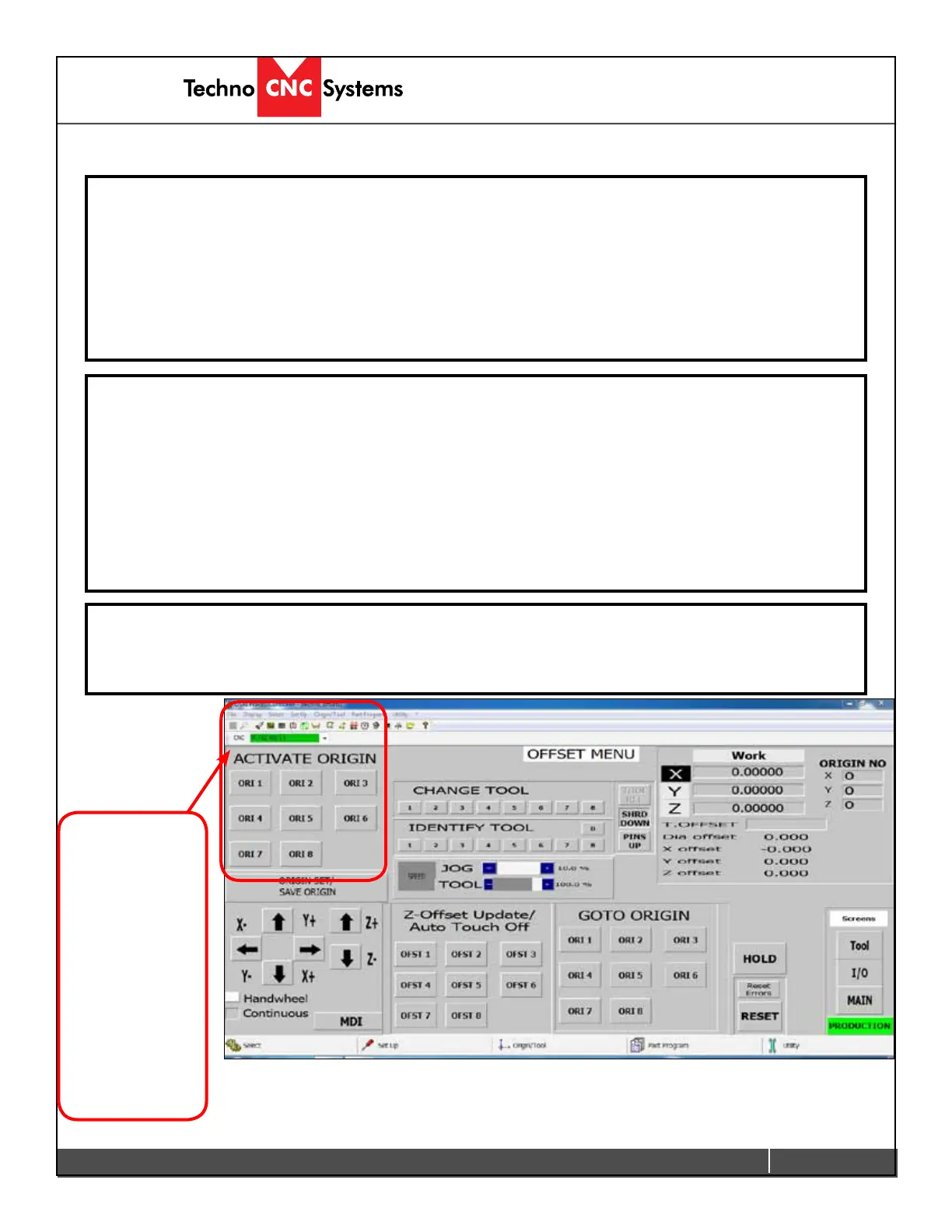
Offsets are just another name for a saved Working Origin. Different offsets can be saved using the
Save Origin function, but instead of naming the offset 1, pick a different number.
Offsets can
be activated
in the interface
by clicking
ACTIVATE
ORIGIN in the
Offset Menu
and in the
G-code by using
the function :
(UAO,0#)
Where # is the
offset number.


 To Next Page
 Loading...