For Support Visit· support.technocnc.com or Call: (631) 648-7481
51
HDS User Manual
(HTT06291133)
Addendum:
HDS Drill Bank Machine
29 Trade Zone Drive, Ronkonkoma NY 11779
Office: (631) 648-7481
www.technocnc.com
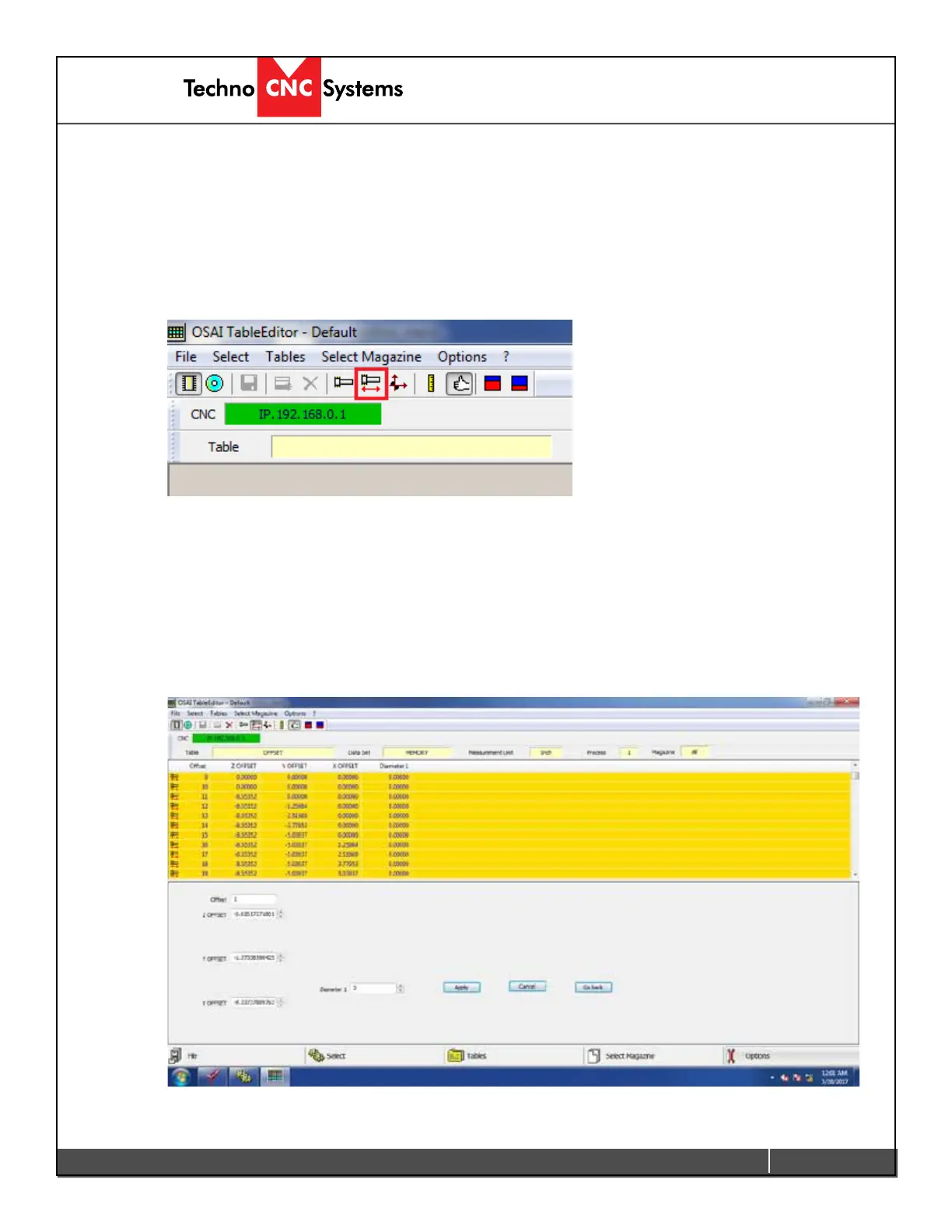
3. Once the “Table Editor” opens up in a new window, we need to select “Tool
Lengths”. Click on the “Tool Offset” button shown below to display the tool
length table. Make sure the “Thumbs up” button is also selected.
4. This will now show the “Tool Offsets” in a yellow table. You can see the tool
numbers and associated offsets in the table. The HDS drill bank has 8
standard tools and 9 drills for a total of 17 tools. The tools are numbered as
“Offset” 1- 8 for the standard tools and “Offset” 11-20 for the drill bank
tools. The “Z-offset” column shows their known lengths. The X and Y offsets
should NEVER be touched.
6.1 Addendum: HDS Drill Bank Machine


 To Next Page
 Loading...