Techno
Inc.
HTT03170704
2
Premium Class Setup Instructions
Phone: 516-328-3970 · Web: www.technocnc.com
Continue to next page …
HAVE A LICENSED ELECTRICIAN PERFORM ALL ELECTRICAL
CONNECTIONS BASED ON YOUR LOCAL CODES
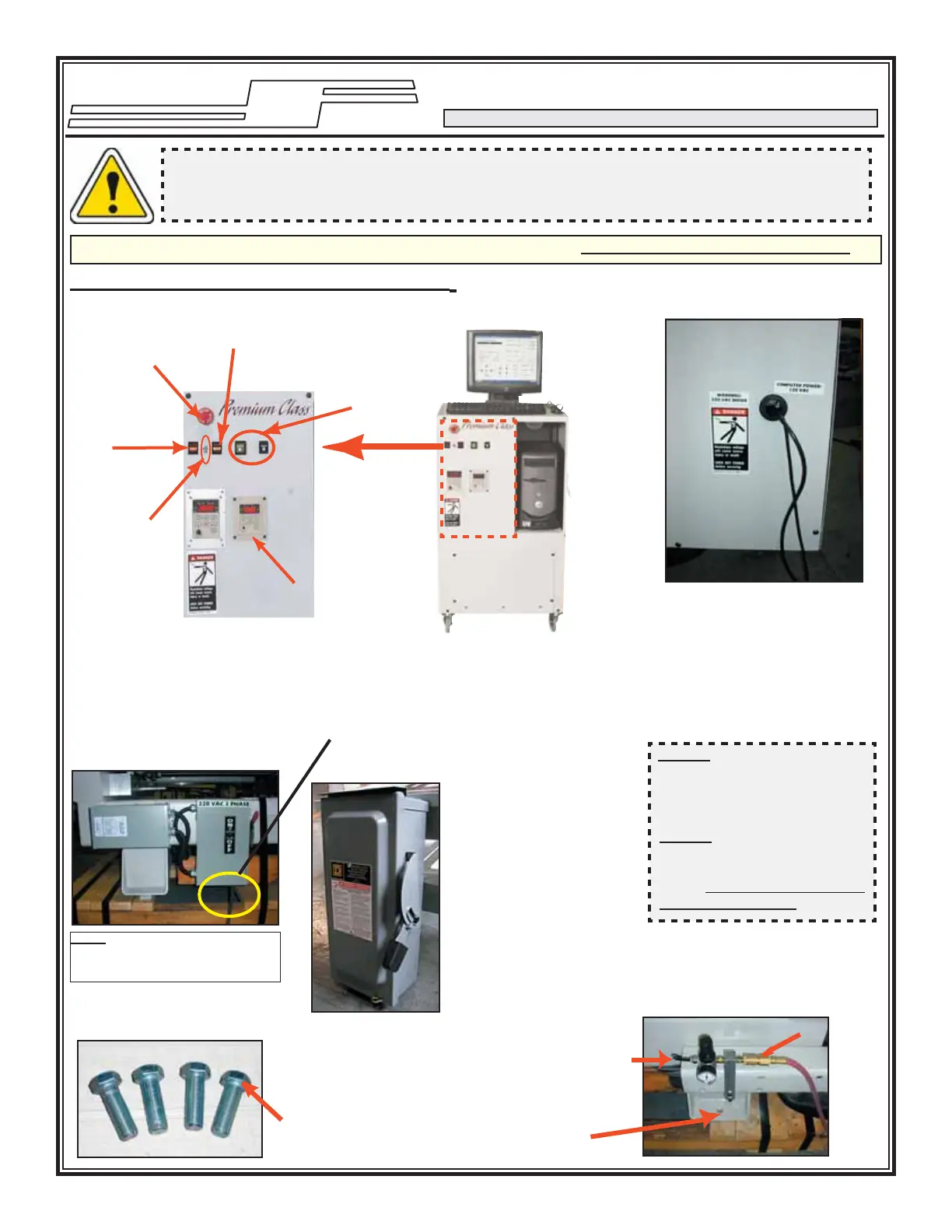
Leveling Bolts / Feet
Airline Connection /
Leveling Feet Thru Hole
1- The toolchanger models must be connected to
an air supply from a clean, dry, non-fl uctuating
source (90-110 psi). Please set the regulator to an
appropriate psi level. Machine regulator should
be set to 90 psi.
Screw the leveling bolts in the threaded holes.
Adjust them to level the machine.
Remove the packing material from around the computer. Please keep the computer
documentation in the CNC Control Unit Computer Cabinet. The WARRANTY paperwork
is part of this package.
1
Incoming AC Power
Connect the incoming AC
power to the machine here
Note: The indicated voltage on
the box. Turn power OFF when
the machine is being serviced.
CNC Control Unit
CNC Control Unit Panel
Emergency Stop
Button (E-Stop)
Vacuum Pump
1 Switch
Vacuum Pump 2 Switch
(If Present)
Start / Stop
Switches
Brake Switch
Spindle Control
Panel / Display
(Factory Preset)
CNC Control Unit Wires
There are two wires coming
from the rear of the CNC
Control unit. These must be
plugged into an outlet with
the voltage indicated on the
label. Please note the specifi ed
Voltage label.
I. MACHINE IDENTIFICATIONS
IMPORTANT: KEEP YOUR TECHNO CD-ROM. IT CONTAINS ADDITIONAL DOCUMENTATION.
NOTE ¹: Voltage on the main
power line must be measured
and the correct tap on the input
transformer must be selected.
NOTE ²: Clean, dry air must be
used otherwise damage to the
spindle and air solenoids will
result. THIS IS NOT COVERED
UNDER WARRANTY.
It is strongly recommended
that all 220 and 440VAC
connections be connected
through a power disconnect
switch (example seen left) for
use with either CNC Router
spindle and/or vacuum pump
setup. This switch is required
for safety and to meet National
Electrical Codes. A licensed
electrician should perform this
installation.
Power Disconnect Switch
(not included with Purchase)



 To Next Page
 Loading...