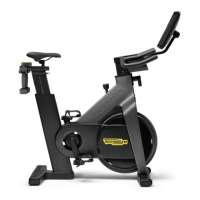
The Technogym Bike Live (Product Code: D93T, Document Code: PIR-00161-EN, Rev: 1.0, Date: 20-01-2021) is an indoor cycling product designed for fitness and wellness, offering both wired and wireless internet connectivity to access various digital services.
Function Description
The Technogym Bike Live is an exercise bike equipped with a 21.5-inch Live display. This display serves as the primary interface for users to access a range of fitness content and entertainment options, including:
- REVOLUTION: Likely a program or feature related to cycling workouts.
- 1REBEL: Suggests integration with a specific fitness brand or class type.
- VIRTUAL CLASSES: Provides access to guided workout sessions.
- CUSTOM: Allows for personalized workout settings.
- OUTDOORS: Potentially offers virtual outdoor cycling experiences.
- Streaming Services: Includes popular platforms like NETFLIX and YouTube.
- APPS: Access to other applications such as Instagram, EUROSPORT, and Bloomb.
The display also shows real-time workout metrics, including LEVEL, TIME, DISTANCE, and CADENCE, enabling users to monitor their performance during sessions. The bike is designed to integrate with Technogym's Mywellness Cloud services, requiring specific network configurations for optimal functionality.
Important Technical Specifications
General Data & Requirements (TECHNOGYM BIKE RESTYLING):
- Power Source (Equipment input): 12V 5A
- Power Supply Unit:
- Input (Electrical Network): 100-240Vac 50/60Hz 2A
- Output: 12V 5A
- Weight of the product: 67 Kg (148 lbs)
- Maximum weight of user: 160 Kg (353 lbs)
- Noise Level: Less than 70 dB
- Protection rating: IP 20
- Operating Temperature: From +5°C to +35°C (41°F - 95°F)
Electrical Connection:
- The product must be connected to a mains power supply that complies with binding regulations.
- The power supply unit provided with the product must be used.
- The wall socket for connection should be easily and safely accessible for plugging and unplugging.
Place of Usage:
- Requires a free space of at least 60 cm wide around the product.
- Must be installed on a flat, stable, and vibration-free surface capable of supporting both the product and the user. Installation on floating floors is not recommended.
Network Requirements:
The Technogym Bike Live supports both wired (Ethernet) and wireless (Wi-Fi) internet connections.
Ethernet Cabled Network:
- LAN Ethernet: 10/100 GigaBit.
- Cables: Category 5e/6 - UTP Ethernet cables with RJ45 patch.
- Switch: Must have a number of ports greater than the number of connected products.
- Connection requires removing a shaped cap from the rear casing of the display.
Wi-Fi Network Requirements:
- Standard: IEEE 802.11 a/b/g/n/ac at 5GHz or 2.4GHz.
- Security Protocol: WEP, WPA/WPA2, open (free) network. WPA2 Enterprise protocol is not supported.
- Access Point/Router: Only one dedicated Access Point/Wi-Fi router should provide the service.
- DHCP: Must be enabled.
- SSID Broadcasting: It is recommended to avoid broadcasting the same SSID through both 2.4 and 5 GHz simultaneously.
- Professional Access Point / Public/Company Network (B2B):
- Access Point should broadcast only one SSID (Service Set Identifier) for equipment installation; the SSID must not be hidden.
- The defined SSID must be programmed in the equipment's display (Customer Menu 2406 -> Network -> Wi-Fi).
- Frequency Band: 5GHz band only is suggested. If 5GHz is not available, 2.4GHz is acceptable but may require channel fine-tuning. Recommended 2.4GHz channels are 1, 6, 7, 8, 9, 10, 11, 12 to avoid interference with Bluetooth signals. Channels 2, 3, 4, 13, 14 should be avoided.
- LEASE TIME: At least three days.
- SESSION TIMEOUT: Disabled (typically by setting timeout = 0).
Internet Speed Requirements for Streaming:
- 5 Mbps or more (per equipment): For the best audio and video experience (HD quality up to 1080p).
- 3 Mbps (per equipment): For viewing medium quality (standard definition video, DVD quality).
- 1.5 Mbps (per equipment): For viewing low quality video (minimum) (not recommended).
- The product automatically adapts video quality to available connection speed.
Firewall / Router Rules for Access to Mywellness Cloud:
- Ports: Ports 80 and 443 must be open on the local Firewall/Router and on the devices of the Internet Service Provider (ISP).
- DNS Names: Free access to the following DNS names must be guaranteed and never disabled for Mywellness Cloud services:
- mywellness.com
- technogym.com
- facebook.com
- facebook.net
- fbcdn.net
- google.com
- googleapis.com
- google-analytics.com
- worldweatheronline.com
- clouddrive.com
- cloudfront.net
- amazonaws.com
- time.android.com
- The system must be able to download
.tar packets.
- Domains for external cloud resources (e.g., facebook, google, akamai, worldweatheronline) do not require specific definition.
Proxy:
- This parameter MUST ALWAYS BE DISABLED.
Usage Features
The Technogym Bike Live is designed for both Business-to-Business (B2B) and Business-to-Consumer (B2C) environments.
Network Design and Installation (B2B):
- Installation and configuration of network infrastructure (cables), hardware (Switch, Router, firewall), and wireless networks are the customer's responsibility.
- Technogym emphasizes that equipment efficiency and Mywellness Cloud service operation depend on the technical characteristics of the installed hardware.
- Technogym requests to be in touch with the customer's technicians during network design and preparation to ensure proper installation and configuration according to technical requirements.
- Customers must inform Technogym that all required components are provided, installed, and operating correctly before installation.
Account Requirements:
- Technogym Account (B2C): Customers must create a Technogym Account on the Technogym site at the time of sale. This account is essential for unlocking the equipment during the first login.
- Salesforce Account ID (B2B): The Technogym Customer Service Department must create a Salesforce ID Account for the customer at the time of sale. This is fundamental for unlocking the equipment during the first login.
- Facility Creation (B2B): The Technogym After Sales Department must create the Facility on admin.mywellness.com at the time of sale. This step is also fundamental for unlocking the equipment during the first login.
Maintenance Features
While the manual primarily focuses on pre-installation requirements, it implicitly highlights aspects crucial for ongoing maintenance and reliable operation:
- Network Reliability: Emphasizes that the efficiency and correct operation of the equipment and Mywellness Cloud services depend on the technical characteristics and proper configuration of the network hardware. Non-compliance with technical specifications and warnings can lead to operational failures.
- Software Updates: The document mentions that information may change without prior notification and advises referring to the official 'After Sales documents repository' for updates. This suggests that software and firmware updates are part of the device's lifecycle, requiring users or technicians to stay informed.
- Troubleshooting: The detailed network requirements, including open ports and DNS names, provide a clear checklist for IT personnel to troubleshoot connectivity issues, ensuring continuous access to Mywellness Cloud services and streaming content.
- Power Supply: The instruction to "Only use the power supply provided with the product" is a key maintenance guideline to prevent damage and ensure safe operation.
- Physical Environment: Requirements for a flat, stable, and vibration-free surface, along with adequate free space, contribute to the longevity and safe operation of the equipment, minimizing wear and tear.

 Need help?
 General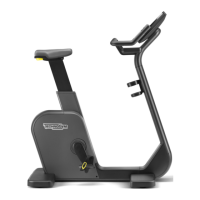











 To Next Page