MYRUN TECHNOGYM
A
F G
C
C
B
D E
E
B
9
Description of the equipment
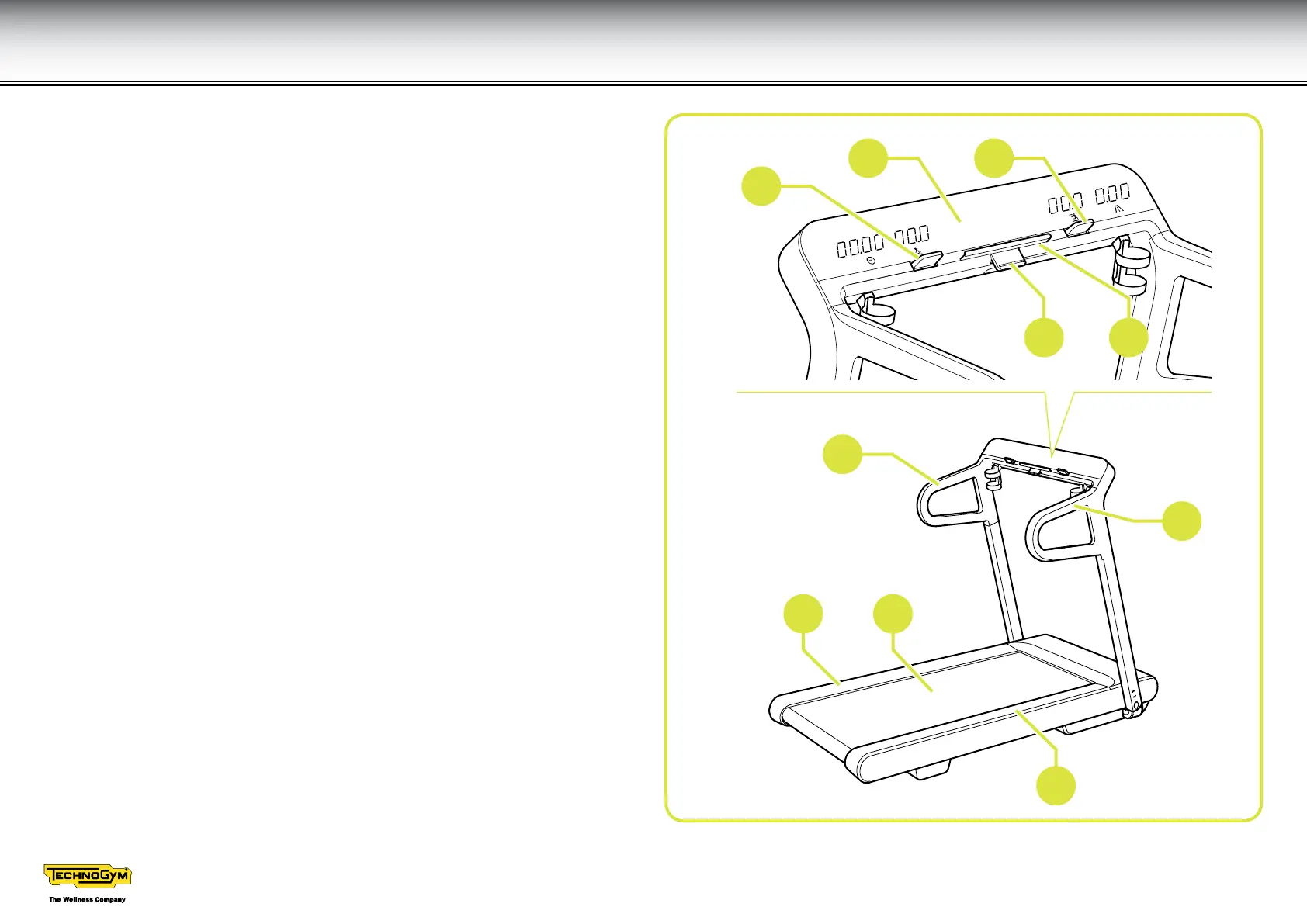
Treadmill belt (A): is a correctly cushioned running surface.
Side handgrips (B): provide a safe support for you when climbing onto the
equipment or if you lose your balance. They may be gripped to take long
strides.
Footrests (C): by moving your feet from the treadmill belt to the footrest, you
can take a short rest if you are tired or in danger
Screen (D): displays the parameters of the current exercise, that is the time
elapsed, speed and gradient of the belt, distance covered.
Fast track controls (E): allow you to change the speed and gradient of the
belt during the exercise.
Start/stop key (F): when it is green, you can start an exercise; when it is red,
you can stop the belt.
When held down for at least 2 seconds it pauses the exercise; it lights up green
while paused. Press the button again to restart the paused exercise; hold the
button down for at least 2 seconds to end the paused exercise.
Support for small electronic devices (G): you can place your tablet on it.





 To Next Page