GB 3
SIGNAL RECEPTION INDICATOR
The signal indicator displays signal strength in 4 levels. Wave segment flashing means time
signals are being received. The signal quality could be classified into 4 types:
RC synchronize process
Weak signal quality
Acceptable signal quality
Excellent signal quality
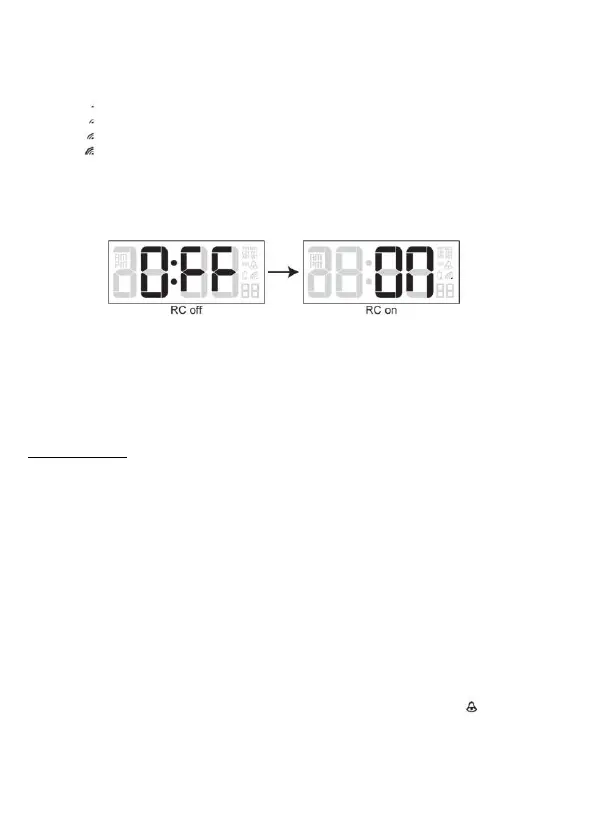
DISABLE / ENABLE RCC SIGNAL RECEPTION
● Press and hold [ RCC ] button for 8 seconds to disable the reception.
● Press and hold [ RCC ] button for 8 seconds to enable automatic RCC reception.
MANUAL SETTINGS
● In normal time mode, press and hold [ TIME SET ] button for 2 seconds until the 12/24 Hr
flashes.
● Press [ +/- ] button to set 12/24 Hour format.
● Press [ TIME SET ] button again until Hour digit flashes and press [ +/- ] button to adjust its
value.
● Repeat above operations to set the time and calendar in this sequence:
DCF/MSF version:
12/24Hr>Hour>Minute>Second>Year>Date>Month>+/-23 Hour offset>Language>DST
auto/off
Note: ● When setting second, press [ +/- ] button to set its value to 00.
● 7 selectable languages and setting orders: EN(English) → FR(French) →
DE(German)→ ES(Spanish) → IT(Italian) → NL(Dutch) → RU(Russian)
SETTING THE ALARM TIME
● In normal time mode, press and hold [ ALARM SET ] button for 2 seconds until hour digit
flashes.
● Press [ +/- ] button to set its value.
● Press [ ALARM SET ] button again to step to Minute setting. Press [ +/- ] button to set its
value.
● Press [ ALARM SET ] button to save the setting and return to normal time mode. Or the
clock will automatically exit the setting mode after 1 minute without pressing any button.
Note: After pressing [ +/- ] button, alarm function is automatically turned on (icon “ ”
displayed).


 To Next Page