EasyManua.ls Logo

Technoline WT280 - User Manual

Technoline WT280
3 pages
Print Icon
To Next Page IconTo Next Page
Loading...
INSTRUCTION MANUAL WT280
FEATURES:
- Radio controlled clock
- Manual time setting
- 12-or 24-hour time display
- Calendar display
- Time zone (+/- 12 hours)
- Indoor temperature in °C/°F
- Alarm snooze function
- 5 languages selectable display in Day-of –week: German, English, Spanish, Italian and French
- Jumbo LCD
- Back-light
If you want to take your product to Europe, it will automatically find the radio controlled time signal. If
you want to go to the UK, please follow the manual time setting option.
SETTING UP:
1. Firstly, open the battery cover at the back of the clock.
2. Checking the correct polarization, insert 2 x AA, LR06, 1.5V batteries into the compartment and
replace the cover.
3. When the batteries are inserted, the clock will be automatically scanning for the radio controlled
time signal.
4. If after 6 minutes the DCF time has not been received, you can manually set the time. (see chapter
manual time setting)
5. If the clock cannot receive the signal at the first time, it will automatically attempt to receive the
signal again one hour later.
6. The clock will automatically receive the signal everyday 2.00 am.
7. When the clock is scanning for signal, only the WAVE key is operational.
MANUAL TIME SETTING:
In some cases after inserting the batteries, the clock may not be able to receive the DCF signal. In this
situation, the time should be set manually.
1. Press and hold the TIME SET key for 3 seconds and the “hour” digits will start flashing, press UP
or DOWN key to adjust the hour.
2. Press the TIME SET key again and the “minute” digits will start flashing, press the UP or DOWN
key to adjust the minute.
3. Press the TIME SET key again and the “second” digits will start flashing, press the UP or DOWN
Question and Answer IconNeed help?

Do you have a question about the Technoline WT280 and is the answer not in the manual?

Summary

Setting Up the Clock

Manual Time Setting

Alarm Setting

Function Keys

Snooze and Light Key

Controls snooze alarm, pauses alarm for 5 minutes, and illuminates LCD for 3 seconds.

Celsius;Fahrenheit Key

Toggles temperature readings between Celsius and Fahrenheit in normal time display.

12;24 Hour Display Key

Toggles between 12-hour and 24-hour time display formats.

Wave Key Operation

General Precautions

Battery Safety Warnings

Battery Disposal Regulations

Electrical Device Disposal Regulations

Overview

This document provides the instruction manual for the WT280, a radio-controlled clock designed for indoor use. The device offers a range of features for timekeeping, temperature display, and alarm functions, making it a versatile addition to any home or office.

Function Description

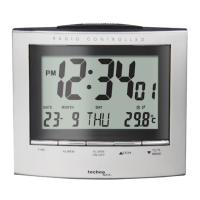
The WT280 primarily functions as a radio-controlled clock, automatically synchronizing with a time signal to ensure accuracy. It supports both 12-hour and 24-hour time displays, catering to different user preferences. Beyond basic timekeeping, it includes a calendar display, showing the day of the week, date, month, and year. The day of the week can be displayed in five selectable languages: German, English, Spanish, Italian, and French.

An integrated indoor thermometer provides temperature readings in either Celsius (°C) or Fahrenheit (°F). The clock also features an alarm with a snooze function, allowing users to temporarily pause the alarm for a few extra minutes of rest. A jumbo LCD display ensures clear visibility of all information, complemented by a backlight for easy reading in low-light conditions.

Important Technical Specifications

While specific numerical technical specifications like dimensions or power consumption are not explicitly listed, the manual details several key operational aspects:

  • Power Source: The clock operates on 2 x AA, LR06, 1.5V batteries. The manual emphasizes the use of alkaline batteries and warns against using rechargeable batteries.
  • Time Synchronization: The clock is designed to automatically scan for a radio-controlled time signal (DCF). If the signal is not received within 6 minutes, or if the user is in a region like the UK where the signal may not be optimal, manual time setting is an option. The clock attempts to receive the signal again one hour later if the initial attempt fails and automatically scans for the signal every day at 2:00 AM.
  • Temperature Range: The indoor temperature display supports both Celsius and Fahrenheit.
  • Time Zone Adjustment: Users can adjust the time zone by +/- 12 hours, which is useful for regions with different offsets from the DCF time.

Usage Features

The WT280 is designed for user-friendly operation with several dedicated keys for various functions:

  • TIME SET Key: Used for manual setting of the hour, minute, second, year, month, date, time zone, and language for the day of the week. Pressing and holding this key for 3 seconds initiates the time setting mode.
  • UP/DOWN Keys: These keys are used to adjust values during time setting, alarm setting, and time zone adjustment.
  • ALARM SET Key: Initiates the alarm setting mode. Pressing and holding for 3 seconds allows adjustment of the alarm minute and hour.
  • ALARM ON/OFF Key: Toggles the alarm function on or off. Pressing it once activates the alarm, twice activates the snooze function, and a third press inactivates the alarm.
  • SNOOZE/LIGHT Key: When the alarm sounds, pressing this key pauses the alarm for 5 minutes, activating the snooze function. It can be used repeatedly. Pressing it also illuminates the LCD for 3 seconds. To stop the snooze function, any other key can be pressed once.
  • C/F Key: In normal time display, this key toggles the temperature unit between Celsius and Fahrenheit.
  • 12/24 Key: In normal time display, this key toggles between 12-hour and 24-hour time formats.
  • WAVE Key: Pressing and holding this key for 3 seconds activates the DCF scanning function. If the clock is already scanning, pressing it once inactivates the scanning function.

Maintenance Features

The manual provides clear guidelines for the maintenance and safe use of the WT280, primarily focusing on battery handling and general device care:

  • Battery Installation: Users are instructed to open the battery cover, insert 2 x AA, LR06, 1.5V batteries, ensuring correct polarization (+/-), and then replace the cover.
  • Battery Safety Warnings:
    • Use only alkaline batteries; do not use rechargeable batteries.
    • Always replace a complete set of batteries; do not mix used and new batteries.
    • Remove exhausted batteries immediately and remove batteries when not in use.
    • Do not recharge or dispose of batteries in fire, as they may explode.
    • Store batteries away from metal objects to prevent short circuits.
    • Avoid exposing batteries to extreme temperatures, humidity, or direct sunlight.
    • Keep all batteries out of reach of children, as they pose a choking hazard.
  • Precautions for Device Care:
    • The unit is intended for indoor use only.
    • Avoid excessive force or shock.
    • Do not expose to extreme temperatures, direct sunlight, dust, or humidity.
    • Do not immerse in water.
    • Avoid contact with corrosive materials.
    • Do not dispose of the unit in fire, as it may explode.
    • Do not open the inner back case or tamper with any components.
  • Environmental Considerations:
    • Battery Disposal: Old batteries should not be disposed of with domestic waste due to potential health and environmental damage. Users are legally committed to returning used batteries to dealers and collection points free of charge.
    • Electrical Device Disposal: The symbol indicates that electrical devices must be disposed of separately from general household waste at the end of their useful life. Users should take the unit to a local waste collection point or recycling center, in accordance with European Union and other European countries' waste collection systems.

In summary, the WT280 is a feature-rich radio-controlled clock designed for convenience and accuracy, with clear instructions for setup, operation, and responsible disposal.

Technoline WT280 Specifications

General IconGeneral
BrandTechnoline
ModelWT280
CategoryClock Radio
LanguageEnglish

Related product manuals