1166 UHF Reader User Guide V1.07Copyright © 2019 Technology Solutions (UK) Ltd
5
USING THE 1166 UHF READER
REMOVING/INSTALLING THE BATTERY
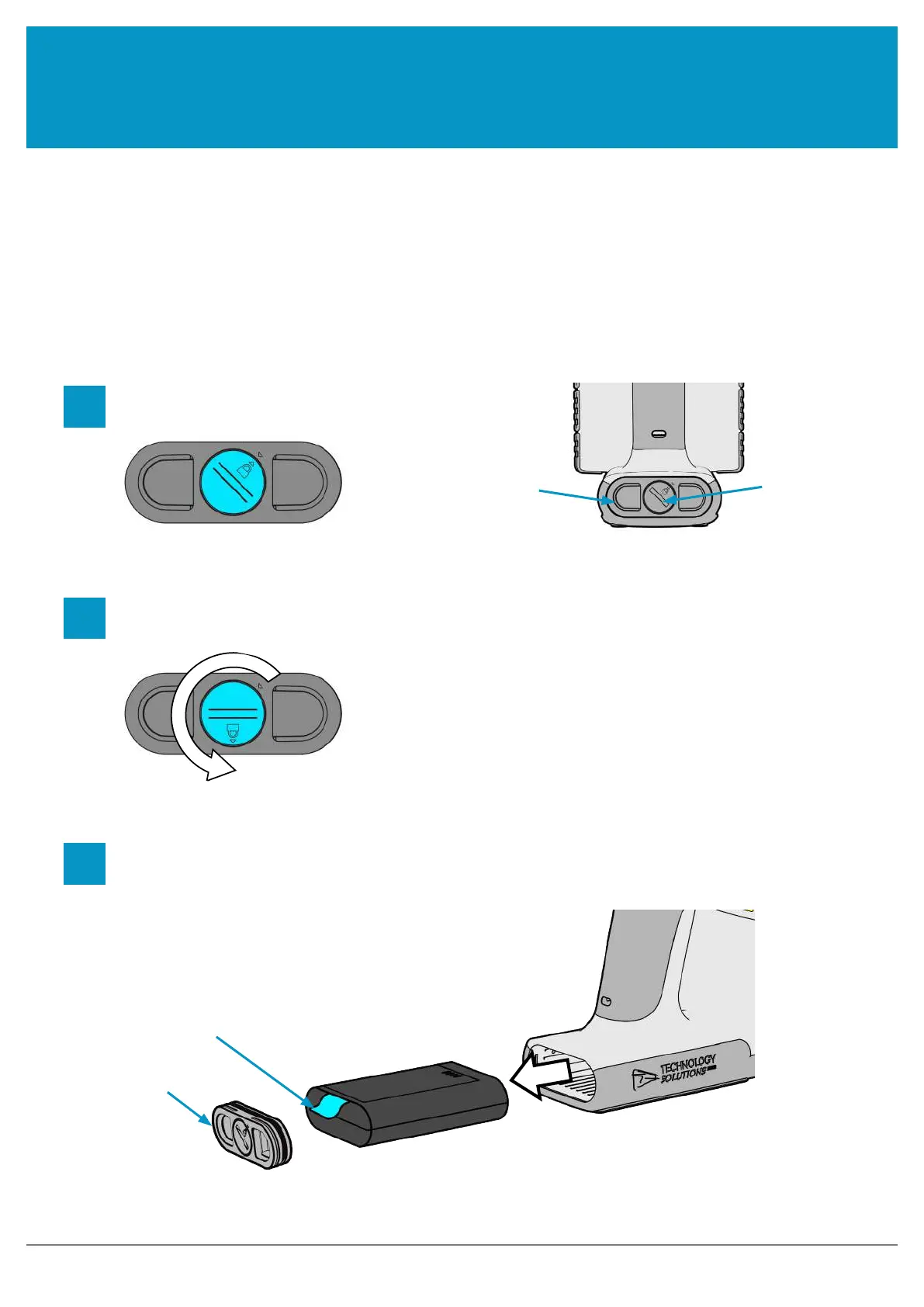
To remove the battery, locate the screw on the Battery Cover and rotate it anti-clockwise using a mid-sized coin.
The Battery Cover can then be removed. The battery and ‘Battery Pull Tab’ will now be visible. Use the ‘Battery Pull
Tab’ to slide the battery out.
Figure 2: Battery Removal
Rotate ‘Battery Cover Screw’ anti-clockwise
by about two thirds of a turn.
1
2
Locate ‘Battery Cover Screw’
3
Remove the ‘Battery Cover’ using the finger
holes and then pull on the ‘Battery Pull Tab’ to
slide the battery out
‘Battery Pull Tab’
Battery Cover
‘Battery Cover
Screw’
REMOVING THE BATTERY
Battery Cover
www.tsl.com



 To Next Page