Installaon and Operang Instrucons
VPS devices
Feel good through warmth from electricity - www.technotherm.de
GB
5. Details for operaon of Types VPS plus /VPS H plus/VPS TDI
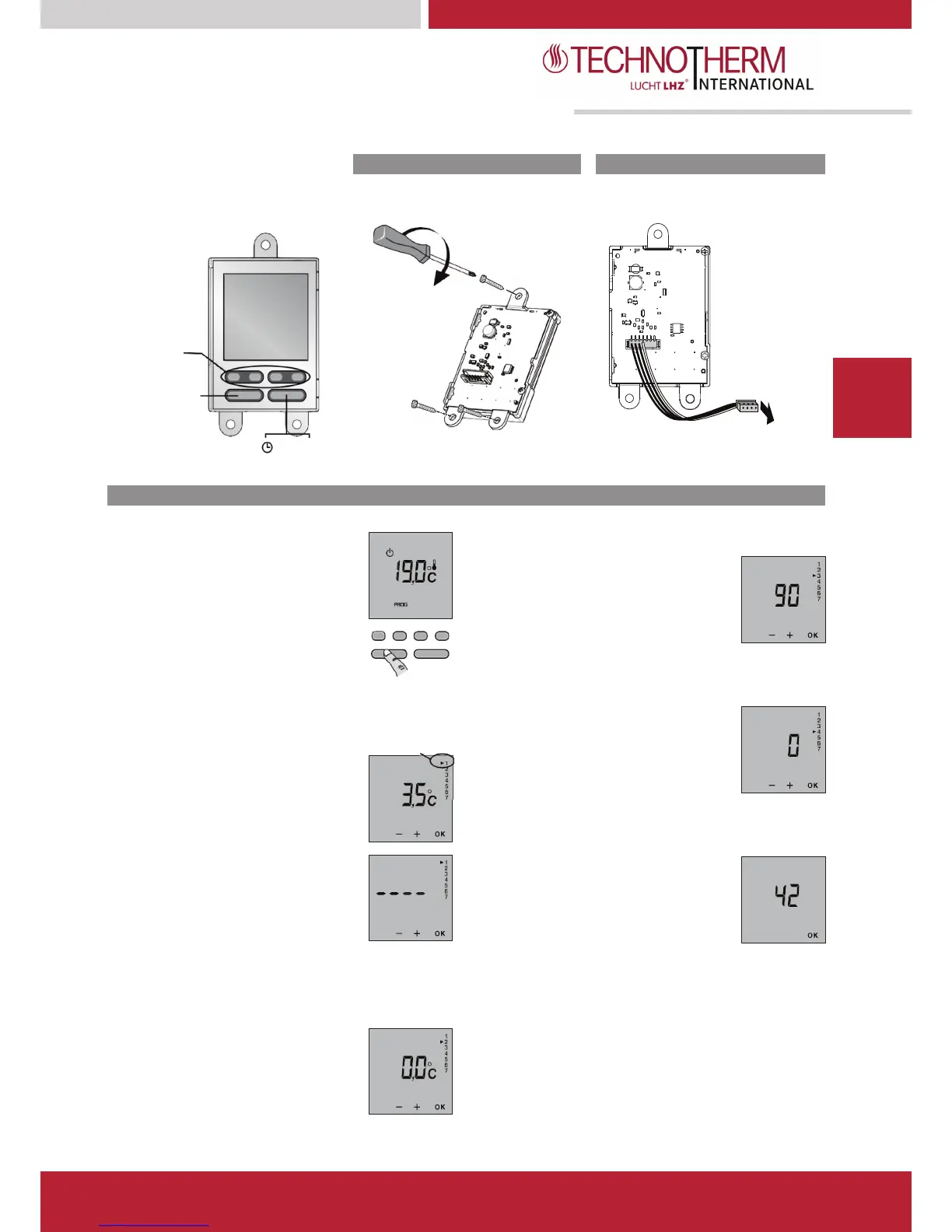
Digital control display
TDI
–
“
plus
”
Thermostat
Mounted on the side of the radiator using
Connection
Connection on the radiator’s power card.
Menu 3: Backlight time out setting
The time out can be adjusted between 0
and 225 seconds, in steps of 15 seconds
(set on 90 seconds by default).
To modify, press on the + or - buttons then
press OK to confirm and go to the next setting.
press and hold down the On/Off button
for 10 seconds to access the first configuration
Menu 4: AUTO mode temperature display option
Menu 1:ECO set-point adjustment
By default, Economy setting = Comfort setting - 3.5°C.
0 = Continuous display of room temperature.
1 = Continuous display of set-point temperature.
To modify, press on the + or - buttons then
press OK to confirm and go to the next setting.
This reduction can be set between
0 to -10°C, in steps of 0.5°C.
To adjust the reduction, press on
buttons then press OK to confirm
and go to the next setting.
Menu 5: Product number
This menu allows you to view the product
number.
To allow the user to modify the set-point, press
on the + button in Economy mode until “----” is
displayed on the screen.
To exit the configuration mode, press OK.
Menu 2: Correction of the measured temperature
If there is a difference between the temperature noted
(thermometer) and the temperature measured and displayed by
the unit, menu 2 acts on the measurement of the probe so as to
compensate for this difference (from -5°C to +5°C in steps of
To modify, press on the + or - buttons then press
OK to confirm and go to the next setting.


 To Next Page