Feel good through warmth from electricity - www.technotherm.de
Installaon and Operang Instrucons
VPS devices
Feel good through warmth from electricity - www.technotherm.de
GB
Use
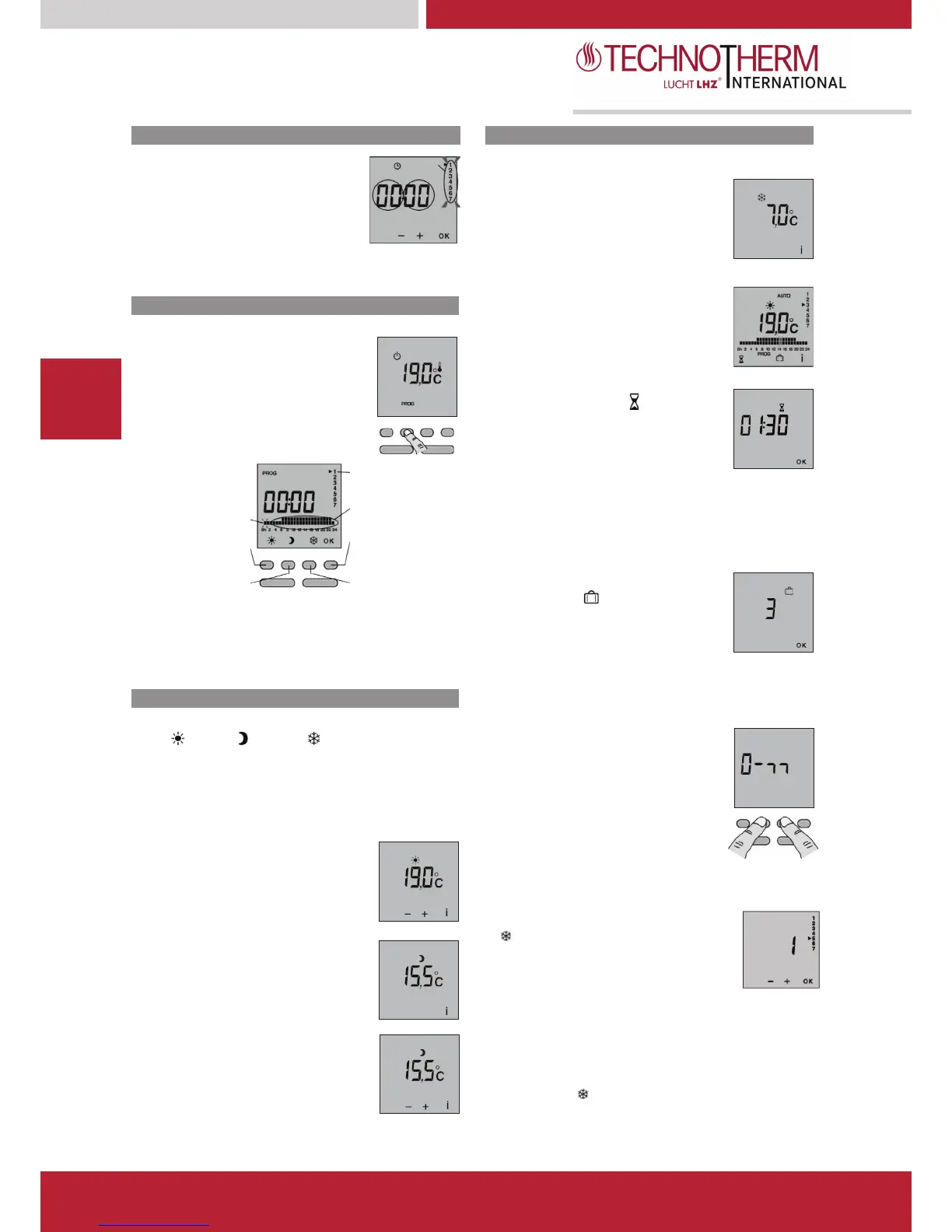
Continuous Frost Protection
In Off mode, press the
The days flash.
Pressing and holding the + or - buttons lets you
change the current set-point (+5 to +15°C) in
Press + or - to set the day, then press OK
to confirm and go on to set the hour and then
the minutes.
the mode button once to access the pro-
and press the On/Off button once to exit the
AUTOMATIC mode
In this mode the device follows the programming
set.
To modify the programming, press the PROG
When starting up, the “Comfort mode from 8am
to 10pm” program is applied to all the days of
To set a set-point temperature for a certain
To change the programming, press the PROG
button in Off or AUTO mode.
time slot flashes on and off.
period of time, press on the
To set the temperature you want (+5°C to
+30°C), use the + and - buttons, then press OK
to confirm and go on to set the duration.
To set the duration you want (30 min
to 72 hours, in steps of 30 min), use
the + and – buttons (e.g. 1 hr 30 min), then press OK.
To cancel the timer mode, press on the OK button.
profile
Confirm
and go to
the next day
You can set your device to Frost protection
mode for a period between 1 and 365 days,
apply the same program to the following day,
approximately 3 seconds until the program of
To exit the programming mode, press on the On/Off button.
To set the number of days of absence,
press on the + or – buttons, then confirm by
pressing OK.
To cancel this mode, press on the OK button
Use
The Mode button allows you to select the different operating
If you press and hold the central buttons
simultaneously during 5 seconds, it enables
you to lock the keypad. A key symbol appears
briefly on the display.
To unlock the keypad, press simultaneously on
i button gives you the temperature of the room
point temperature, according to your configuration
ON icon is displayed, this means that the device is in
Once the keypad is locked, the key symbol
appears briefly if you press on a button.
Pressing and holding the + or
-point is indexed according to
-point. The reduction can be
in the configuration settings for menu 1.
set-point can be modified if it
configuration settings in menu 1 (“----”).
Pressing and holding the + or
Menu 5: Open Window detection
The detection of an open window occurs
when the room temperature falls rapidly.
In this case, the display shows a flashing
pictogram, as well as the frost
protection set-point temperature.
0 = Open window detection is deactivated
1 = Open window detection is activated
To modify, press on the + or – buttons,
then press OK to confirm and to go to the
next setting.
Please note: an open window cannot be
detected in OFF-Mode.
This feature can be temporarily interrupted
by pressing on .


 To Next Page
 Loading...