Your new receiver
Remote control
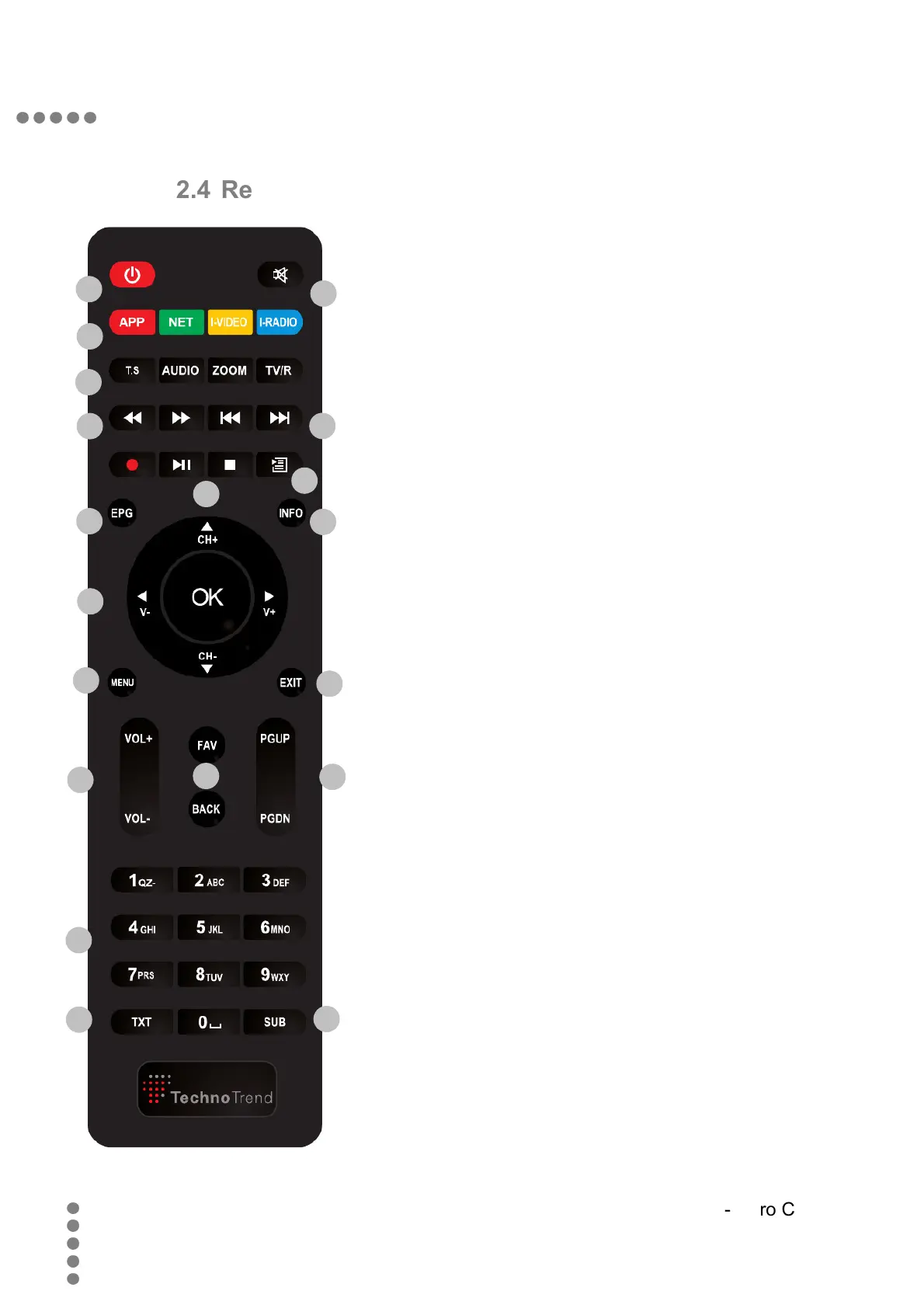
2.4 Remote control
1) Standby: Switch device on/off
2) Mute: Mute audio
3) APP: Internet applications
NET: Without function
I-VIDEO: Without function
I-RADIO: Internet radio
4) T.S.: Without function (PVR not supported)
AUDIO: Select audio format
ZOOM: Zoom the current video
TV/R: Switch between TV and Radio
5) Fast-forward / fast-rewind
6) 30 Seconds jumping in media player
7) Play/Pause/Stop in media player
8) Media archive
9) EPG: Electronic Program Guide
10) INFO: Info banner on / off
11) V+/-: Increase / Decrease volume
CH+/-: Next / Previous Channel
OK: Program list / Select
12) MENU: Open Main menu
13) EXIT: Cancel / Back
14) VOL+/-: Increase / Decrease volume
15) FAV: Select favorite list
BACK: To previous program / item
16) PGUP/PGDN: Page up / down
17) 0-9: Figure based entry / channel no.
18) TXT: Switch teletext on / off
19) SUB: Switch subtitle on / off
46
TT-micro C2810


 To Next Page