EasyManua.ls Logo

TECshow MINI-HIVE 10 - Page 17

TECshow MINI-HIVE 10
44 pages
Print Icon
To Next Page IconTo Next Page
To Previous Page IconTo Previous Page
Loading...
P. 17
| Tecshow Mini-Hive 10
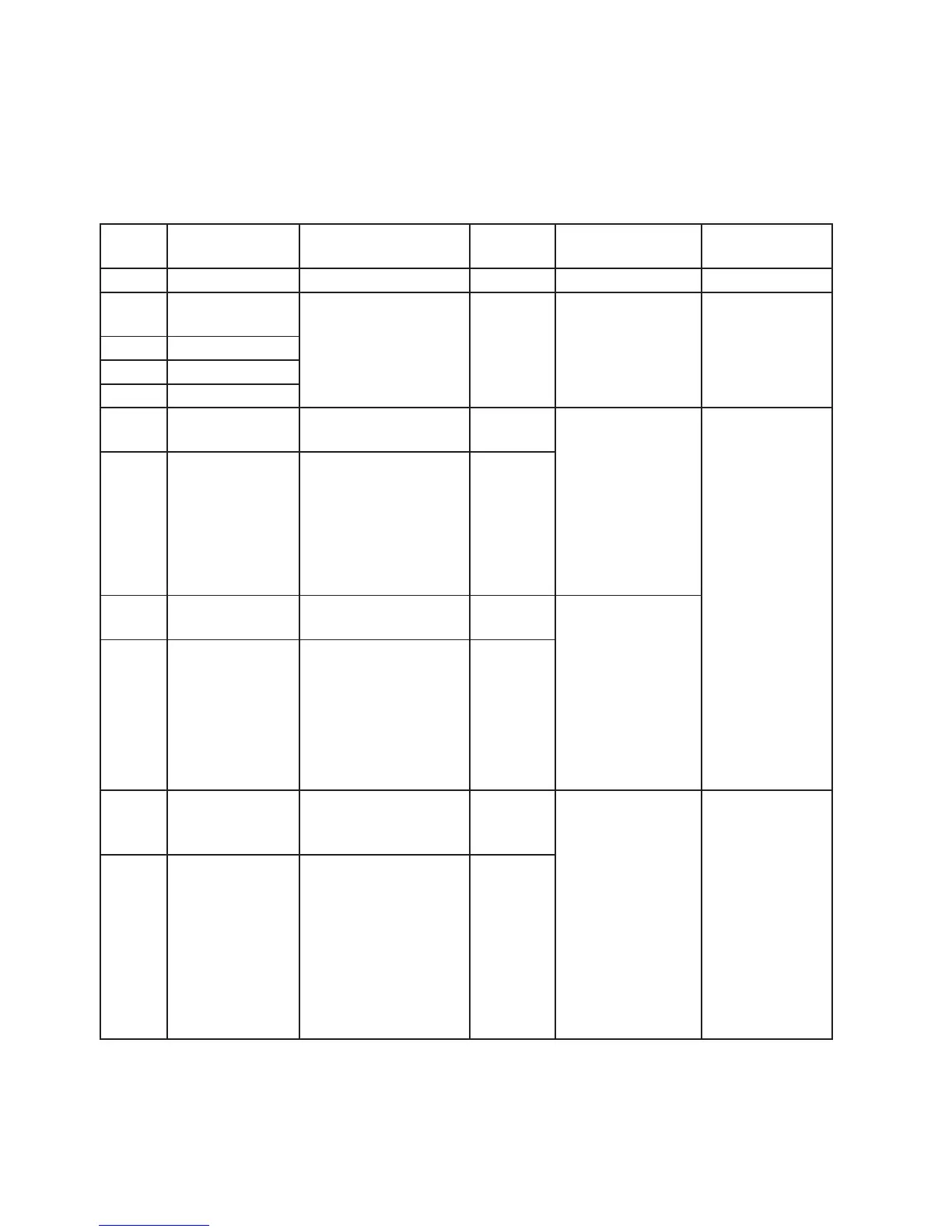
Shape selection - shape sped - shape oset
BIT Shape-selection Description Pandom
colors 1
Shape speed Shape oset
0-7 Macro OFF N.a N.a N.a
8-12
13-17
Ring 1
Ring 2
Static eects.The ring
or rings used by the
macro are turned-on
with the foreground
colour.
N.a N.a N.a
18-22 NO Function
23-27 Ring 1+2
28-32 NO Function
33-37 Ring Opening
(Closing)
Yes 0-63 = Radius size,
static.
64-158 = max to
min speed,
Closing eect 159-
160 = STOP
161-255 = min to
max speed,
Opening eect
0-9 → continuous
10-255→ random
distribution of
ash from 2 to 20
xtures 2-20
38-42 Ring Opening
(Closing) Filled
Yes
43-47 Ring Opening
(Close/open)
Yes 0-63 = Radius size,
static.
64-158 = max to
min speed,
Closing eect, 159-
160 = STOP.
161-255 = min to
max speed,
Opening eect
48-52 Ring Opening
(Close/open)
Filled
Yes
53-57 Random pixels
distributed on
many xtures
Yes 0-63 = STOP
64-158 = max to
min speed, In-
stant-on + fade out.
159-160 = STOP.
161-255 = min to
max speed, Fade In
+ Fade Out.
Fade or snap
depending on fade
channel
0-255 → select
random distribu-
tion from 2 up to
20 xtures
0-255 →select
pixel density
58-62 Random pixels
with variable
density and
speed
Yes
English version

Related product manuals