English version
Tilt, press ENTER, operate UP or DOWN. Choose
Normal or Reverse to set the forward and reverse
operation.
Check equipment’information
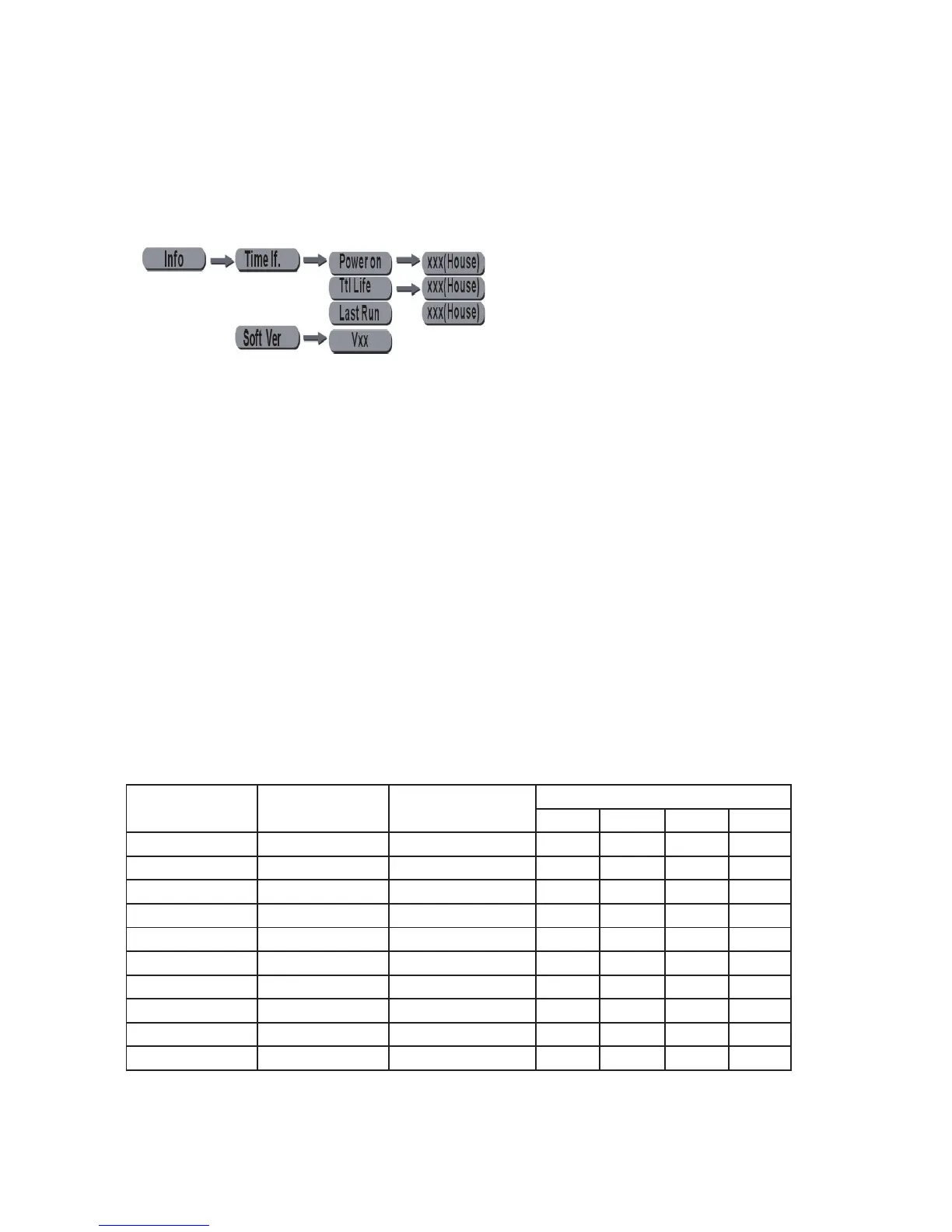
• Press MENU until it shows Info, then press ENTER.
• Operate UP or DOWN to choose Time Info So-
ware Ver.
• When selecting Time Info press ENTER operate
UP or DOWN to choose Power on Ttl Life hrs or
Last Run Hrs. If choosing Power on press EN-
TER to enter into the equipment “XXXX” hours. If
selecting Ttl Life hrs press ENTER to enter into
the equipment total operation time “XXXX” hours.
If selecting Last Run Hrs press ENTER to show the
LED’s last operation“XXXX”hours.
• When selecting Soware Ver press ENTER, it will
show the equipment ’soware version.
Macro Colour
Bit Lee Reference Colour Bit value
R G B W
209-255 - White 255 235 66 255
208 - Dirty White 255 255 122 255
207 197 Alice Blue 128 255 143 0
191-206 181 Congo Blue 77 0 255 0
184-190 174 Dark Steel Blue 181 255 95 0
180-183 170 Deep lavender 255 168 64 0
179 169 Lilac Tint 255 199 49 0
175-178 165 Daylight Blue 82 214 90 0
174 164 Flame Red 255 46 2 0
172-173 162 Bastard Amber 255 181 28 0



 To Next Page