www.tedee.com13
AC
TI
VA
TION
CO
DE
XXXXXXXXXXXXXX
AC
TI
VA
TION
CO
DE
XXXXXXXXXXXXXX
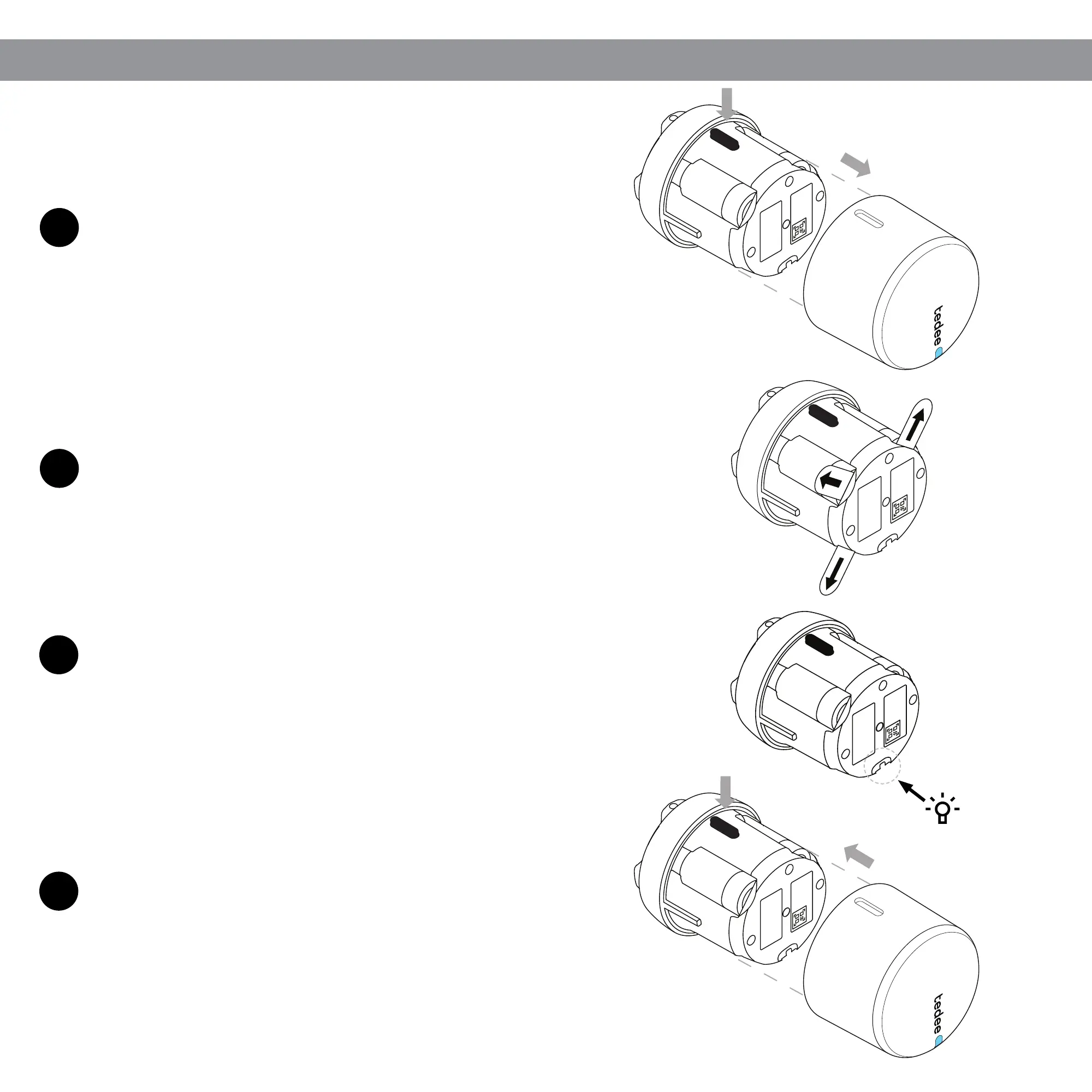
STEP 3: UNLOCK BATTERIES
1
2
4
3
Keep the latch button pressed while sliding off the cover.
Slide the cover back onto the housing, holding down
the latch button until it clicks into place.
You can now add and calibrate your Tedee GO lock in
the Tedee app.
Remove the protective tabs from under all three batteries.
After removing the third protective tab, check for a light signal (LED).
The RED-GREEN-BLUE-WHITE sequence conrms that your Tedee
GO is ready.
ACTIVATION
CODE
XXXXXXXXXXXXXX
AC
TI
VA
TION
C
ODE
XXXXXXXXXXXXXX


 To Next Page