EN
Owner’s manual16
• This appliance is suitable exclusively for food preparation. Do not place anything but food
in the appliance.
• Switch o the appliance before tting and removing the attachment.
• Keep your ngers away from moving parts and the opening on the attachment.
• The appliance must be plugged into an earthed electrical socket. If you have to use an
electrical extension lead, it must be earthed.
• Do not put any accessories containing metal in a microwave oven.
• Do not touch the whisk, mixer blade or kneading hook while the appliance is in operation.
• Only use one attachment at a time.
• Do not operate the appliance for more than 7 minutes at one time. Allow 30 minutes rest
before next use.
OPERATION
• Plug the device to power mains.
• Press the POWER button to turn the device on.
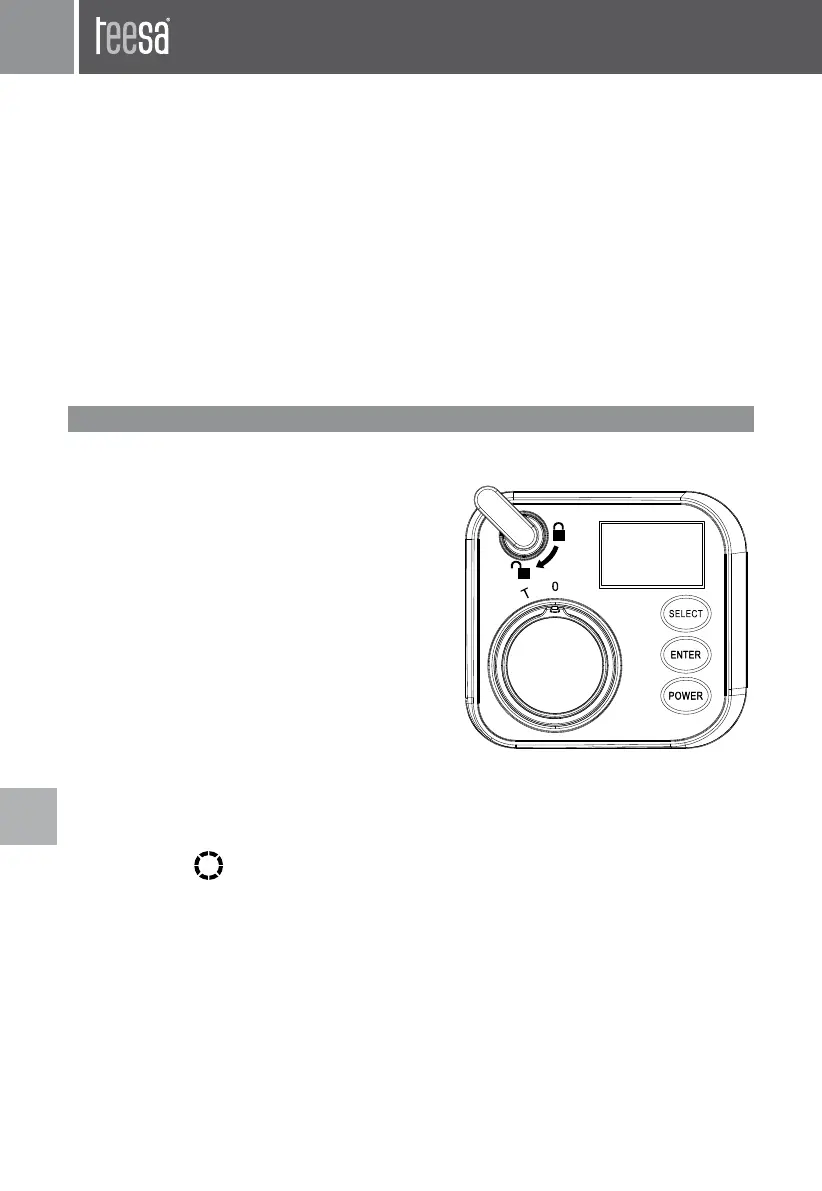
Control panels buttons:
The control panel has three buttons for managing
device operation, use the three buttons to navigate
through modes and options:
• SELECT – press to change or switch
• ENTER – press to select, approve, enter or start
• POWER – press to power on/o
Note:
• The buzzer will sound each time one of the buttons is pressed.
• In Auto mode, the operation is paused if pressed SELECT or ENTER button while working.
To resume work press the button again.
• In Auto mode, press POWER button to stop operation.
• The symbol
sign if not moving signies paused or stopped operation.
• The longest countdown is 9 minutes 59 seconds.
1
2
3
4
5
6
7
8


 To Next Page