EasyManua.ls Logo

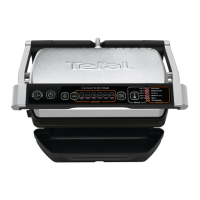
TEFAL OptiGrill XL - User Manual

TEFAL OptiGrill XL
164 pages
Go to English
Print Icon
To Next Page IconTo Next Page
Loading...
FR
DE
EN
NL
DA
SV
FI
NO
ES
PT
EL
Mode d’emploi - Bedienungsanleitungen -
Instructions for use - Gebruiksaanwijzing -
Brugsvejledning - Bruksanvisning - Käyttöohje -
Bruksanvisning - Instrucciones de uso -
Instruções de utilização -
Οδηγίες χρήσης

Questions and Answers

  • J
    Jenny GouldAug 17, 2025
    What to do if TEFAL Grill stops during cooking cycle?
    • B
      Brenda WarrenAug 17, 2025
      If your TEFAL Grill stops during the e-heating or cooking cycle, it might be because the appliance was kept open too long. Disconnect it from the outlet, wait 2-3 minutes, and restart the process. To prevent this, open and close the grill quickly during cooking. Alternatively, the appliance may have been idle for too long after warm-up. If the issue persists, contact TEFAL customer service.
  • T
    Timothy BlackAug 20, 2025
    Why is the indicator light flashing on my TEFAL OptiGrill XL Grill?
    • K
      Kyle RayAug 20, 2025
      A flashing white indicator light on your TEFAL Grill could indicate an appliance failure or that the appliance was stored or used in a room that is too cold. Try disconnecting and reconnecting the appliance and immediately restarting a preheat cycle. If the problem continues, contact Customer Service.
  • N
    Nicole WellsAug 22, 2025
    What to do if TEFAL OptiGrill XL activates in manual mode?
    • J
      Joseph WintersAug 23, 2025
      If your TEFAL Grill activates in manual mode with a blinking red indicator light, it means the preheating time was cut short. You should monitor the cooking periodically. Alternatively, stop the grill, remove the food, close the grill, select the desired cooking program, and wait for the preheating cycle to finish.
  • A
    Amanda MccoyAug 26, 2025
    What to do if the TEFAL OptiGrill XL doesn't start after preheating?
    • B
      Brandon SullivanAug 26, 2025
      If your TEFAL Grill indicator stays on after preheating and the cooking cycle doesn't start, ensure your food is not thicker than 4 cm. Also, make sure you completely open the grill to place the food and then close it. If the 'OK' button is flashing, it may not be sensing the food because it is too thin; confirm the start of cooking by pressing the button.
  • D
    Derek MorganAug 28, 2025
    How to fix solid green light and flashing button on TEFAL Grill?
    • K
      Kayla McclainAug 28, 2025
      A solid green indicator light with a flashing button on your TEFAL Grill indicates that manual mode has been activated because the appliance was switched on or an automatic cooking cycle was started with food between the plates without preheating. You can choose a temperature setting by pressing the button, then press OK and monitor the cooking manually. Alternatively, stop the appliance, remove the food, close it properly, reprogram it, and wait for preheating to complete.
  • D
    Darryl WallaceAug 31, 2025
    What does a flashing white button mean on my TEFAL OptiGrill XL Grill?
    • D
      Daniel AtkinsAug 31, 2025
      A flashing white button with continuous beeping on your TEFAL Grill indicates an appliance failure. Unplug the product and contact customer service.
  • J
    Joe VillaSep 2, 2025
    Why is the green light flashing on my TEFAL Grill?
    • C
      Christina KennedySep 2, 2025
      If the solid green indicator light and button are flashing on your TEFAL Grill, it could be due to starting an automatic cooking cycle with food between the plates without preheating, which automatically activates manual mode. To resolve this, choose a temperature setting by pressing the button, then press OK and remember to monitor the cooking process. Another reason could be that something went wrong, so you should stop the appliance, remove the food, close the appliance properly, re-program it, and wait until the preheating is complete.
  • T
    Todd RossSep 5, 2025
    What to do if my TEFAL Grill stops mid-cycle?
    • Z
      Zachary KellySep 5, 2025
      If the TEFAL Grill stops during preheating or cooking, it might be because it was left open too long while cooking. To fix this, disconnect the grill from the outlet for 2-3 minutes, then restart the process. Alternatively, the grill might have been idle too long after warming up. Next time, open and close it quickly for best results. If the issue continues, contact TEFAL customer service.
  • C
    Courtney AndersonSep 7, 2025
    Why does my TEFAL OptiGrill XL Grill activate manual mode with a blinking red light?
    • B
      Brandon MercadoSep 8, 2025
      If your TEFAL Grill activates manual mode and the indicator light blinks red, it means the preheating time was cut short. Monitor the cooking periodically or stop the grill, remove the food, close the grill, select the new cooking program you wish to use, and wait for the preheating cycle to finish.
  • A
    Ann WilliamsSep 12, 2025
    What does it mean when the white button on my TEFAL OptiGrill XL Grill is flashing with continuous beeping?
    • K
      Kelly CarterSep 12, 2025
      If the white button on your TEFAL Grill is flashing and beeping continuously, it indicates an appliance failure. Unplug the product and contact customer service.

Summary

Safety Instructions and Important Safeguards

Operating Dos

Operating Donts

Tips and Information

Environmental Protection

Appliance Description and Components

Control Panel Features

Details the On/Off, Frozen food, Cooking programs, Manual mode, OK button, and indicator lights.

Appliance Parts Identification

Identifies key physical components like body, handle, plates, drip tray, and power cord.

Cooking Status Indicators and Programs

LED Color Guide for Cooking Status

Explains LED colors indicating preheating, cooking progress, and readiness for different doneness levels.

Automatic Cooking Programs and Manual Mode

Details specific automatic programs and the manual cooking mode with temperature settings.

Initial Setup and Preparation

Unpacking and Initial Cleaning

Instructions for removing packaging and cleaning the appliance before first use.

Pre-heating Preparation and Start

Steps for positioning the drip tray, oiling plates, connecting power, and starting pre-heating.

Starting the Cooking Process

Selecting Cooking Programs and Modes

Details on choosing automatic programs or manual mode for various food types.

Pre-heating and Readiness Indicator

Steps for initiating pre-heating via the OK button and recognizing completion signals.

Cooking Process Steps

Placing Food and Starting Cooking

Instructions for opening the grill, placing food, closing, and starting the automatic cooking cycle.

Monitoring Cooking Progress and Levels

Details on how the indicator light changes color to show cooking progress and doneness.

Cooking and Batch Management

Removing Cooked Food and Auto Shut-off

Guides on removing food at desired levels and the appliance's automatic shut-off feature.

Cooking Additional Batches

Instructions for pre-heating and cooking subsequent batches of food.

Usage Comments and Tips

Cooking for Different Preferences

Advice on removing food at desired levels and continuing cooking for others.

Keep Warm Functionality

Explains the automatic keep warm setting after cooking ends and its audible alerts.

Cleaning and Maintenance Procedures

Appliance Power Down and Cooling

Instructions to turn off the appliance, unplug it, and allow it to cool completely before cleaning.

Detailed Cleaning Instructions

Cleaning Cooking Plates and Drip Tray

Guides on cleaning dishwasher-safe plates and the drip tray using appropriate methods.

Cleaning Grill Body and Cover

Instructions for cleaning the appliance body and cover, emphasizing what not to immerse.

Storage and Servicing Advice

Advice on ensuring the grill is dry before storage and that servicing is done by authorized personnel.

Troubleshooting Common Issues

Indicator Light Status Issues

Troubleshooting for various indicator light states and button behaviors during operation.

Appliance Stopping or Beeping Issues

Solutions for when the appliance stops mid-cycle or fails to beep as expected.

Cooking Cycle Start Failures

Addressing issues where the cooking cycle doesn't start after placing food, including thickness problems.

Cooking Guide: Automatic Programs

Automatic Program Food-Level Mapping

Table mapping specific programs (e.g., Red meat, Burger) to cooking levels (Rare, Medium, Well-done).

Cooking Guide: Manual Mode

Manual Mode Food Recommendations

Guidance for manual cooking of various foods like bread, meats, and fish with temperature settings.

International Guarantee: Country List

TEFAL OptiGrill XL Specifications

General IconGeneral
Cooking programs9
Cooking surface area800 cm²
Power2000 W
Removable platesYes
Dishwasher safeYes
Drip trayYes
Weight5.2 kg
Adjustable thermostatNo
Automatic cooking sensorYes
Non-stick coatingYes
Automatic cookingYes
Indicator lightsYes

Related product manuals