EN
13
5 Using your refrigerator
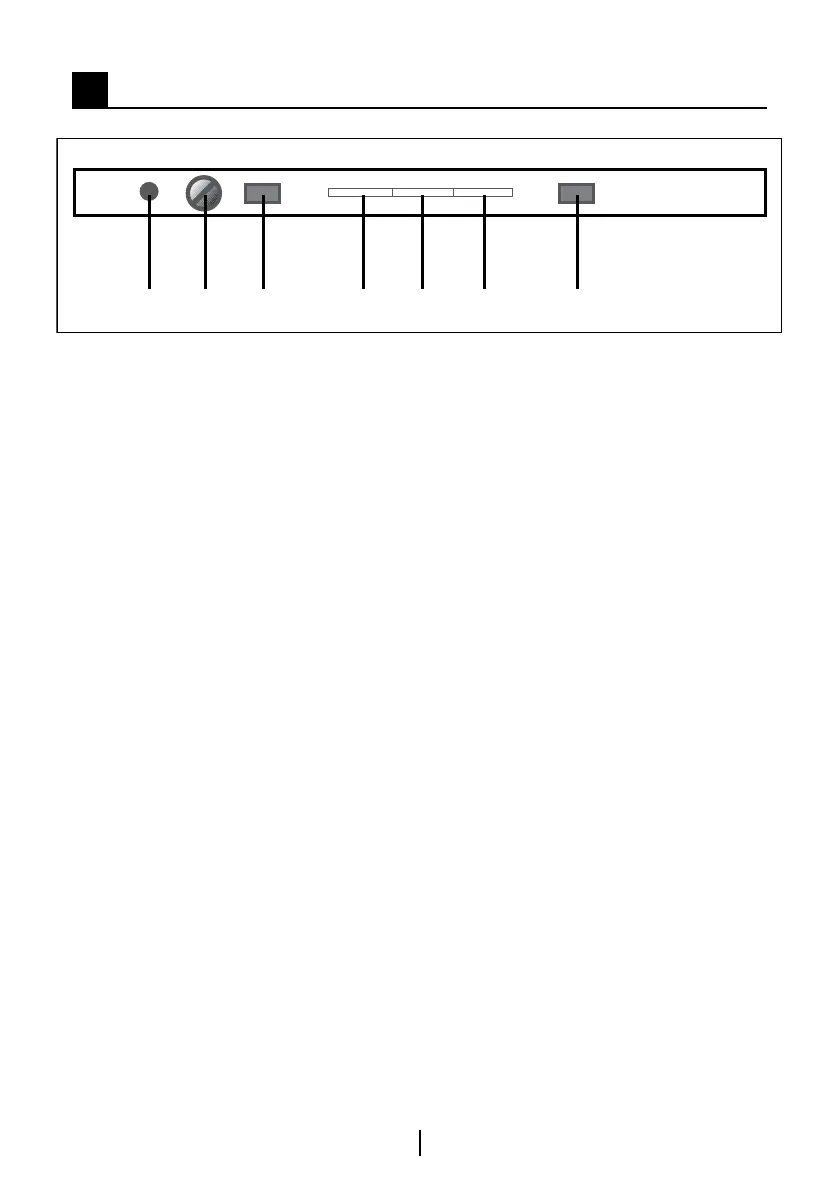
1 2 3 74 5 6
Switching on for the first time
To switch on the appliance be sure that
the plug is inserted to the mains and
the ON/OFF switch on the thermostat
box is pushed.
(Fig.1-3)
Insert the plug in mains socket to
switch on. The green light (5) will light
on.
The freezer temperature is pre-set to
-18°C but can be changed by the user.
In addition, the fridge temperature is
also adjusted.
Do not load with food immediately.
The display shows fridge actual
temperature up to 19°C.
The display shows freezer actual
temperature.
The appliance incorporates a
protection device in the electronics,
therefore the appliance may not start
immediately – wait for about 6 minutes.
When it starts, you will then hear the
compressor and refrigerant gas flows
(You may also hear some cracking /
popping sounds which is normal).
The set temperature will not be
reached for approximately 8 hours
and the display may fluctuate during
this period. This is not a fault. When
the correct storage temperatures have
been reached (approximately 8 hours),
you can start loading food.
When the fridge door is opened the
interior light will come on.
The front edges of the cabinet are
designed to avoid condensation and
may feel warm to the touch.
Temperature display &
adjustment
Operating temperatures are controlled
by the electronical thermostat knobs
and may be set any position between
MIN and MAX (coldest position)
a) Fridge
The display (7) shows average
temperature in fridge compartment.
The fridge temperature will display
from –5 to +19°C with respect to
internal temperature.
The average temperature inside the
fridge should be around +4°C (+41°F).
b) Freezer
The display shows the actual
average temperature in the freezer
compartment.
Control Panel



 To Next Page