30
User Manual
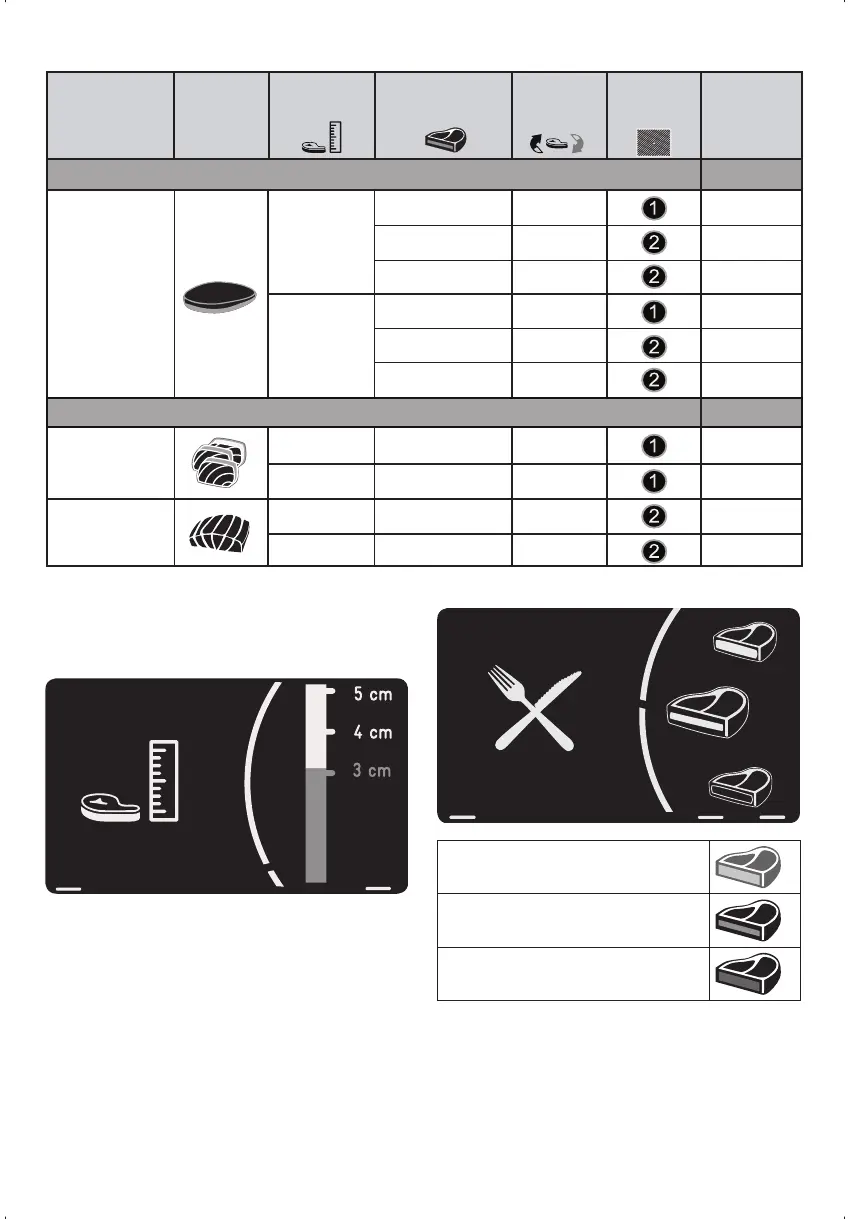
After selecting the food type, turn the right-hand
control and press OK. Now you should select
the thickness/size of the piece to be cooked.
For each food type the oven will offer differ-
ent options. The thickness of the piece to be
cooked should be within the ranges proposed.
After you have selected the thickness with the
right-hand control and pressed OK to confirm,
the oven will ask you for the finish you require:
rare, medium or well-done. Select and press
OK to confirm.
RARE
MEDIUM
WELL DONE
Lastly, the oven will display how you should
insert the special SteakMaster grill inside the
oven.
2
2
2
2
2
2
DESCRIPTION LOGO
THICKNESS FINISH TURN
OVER?
GRILL
POSITION
REPEAT?
MEAT
MAGRET
Duck magret
300 g
RARE NO YES
MEDIUM YES YES
WELL DONE YES YES
400 g
RARE NO YES
MEDIUM YES YES
WELL DONE YES NO
FISH
Tuna TATAKI
Tuna
3 cm MEDIUM YES YES
4 cm MEDIUM YES YES
Lachs SALMON
2 cm MEDIUM YES YES
3 cm MEDIUM YES YES


 To Next Page