EasyManua.ls Logo

TEKMAGIC W18-W - User Manual

TEKMAGIC W18-W
14 pages
Print Icon
To Next Page IconTo Next Page
Loading...
W18-W User Guide
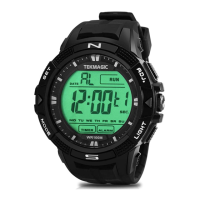
I. Product Overviews
1. Date
2. Set/Confirm Button
3. Hourly chime Indicator
4. 12/24 Hour
5. Hour
6. week
7. Mode Button
8. Countdown Timer Indicator
9. Start/ Pause /Adjust Button
10. Second
11. Minute
12. Light Button
13. Alarm Indicator
Question and Answer IconNeed help?

Do you have a question about the TEKMAGIC W18-W and is the answer not in the manual?

Summary

Time Setting

Setting Seconds

Press SET to blink seconds, then ADJ to set second to zero.

Setting Hour

Press Mode to blink Hour, then use ADJ to adjust the hour.

Setting Minute

Press Mode to blink Minute, then use ADJ to adjust the minute.

Setting Month

Press Mode to blink Month, then use ADJ to adjust the month.

Setting Date

Press Mode to blink Date, then use ADJ to adjust the date.

Setting Week

Press Mode to blink Week, then use ADJ to adjust the week.

Setting 12;24 Hour Format

Press Mode to toggle between 12-hour and 24-hour formats.

Confirming Time Settings

Press SET once to confirm all configured time settings.

Stop Watch

Alarm Clock

Alarm Clock Time Setting

Guides on setting alarm time, including hour, minute, and alarm type.

Countdown Timer

Dual Time Setting

Summary

Time Setting

Setting Seconds

Press SET to blink seconds, then ADJ to set second to zero.

Setting Hour

Press Mode to blink Hour, then use ADJ to adjust the hour.

Setting Minute

Press Mode to blink Minute, then use ADJ to adjust the minute.

Setting Month

Press Mode to blink Month, then use ADJ to adjust the month.

Setting Date

Press Mode to blink Date, then use ADJ to adjust the date.

Setting Week

Press Mode to blink Week, then use ADJ to adjust the week.

Setting 12;24 Hour Format

Press Mode to toggle between 12-hour and 24-hour formats.

Confirming Time Settings

Press SET once to confirm all configured time settings.

Stop Watch

Alarm Clock

Alarm Clock Time Setting

Guides on setting alarm time, including hour, minute, and alarm type.

Countdown Timer

Dual Time Setting

TEKMAGIC W18-W Specifications

General IconGeneral
BluetoothBluetooth 5.0
Charging Time2 hours
Battery Life7 days
Water ResistanceIP67
Resolution240 x 280 pixels
CompatibilityAndroid, iOS
SensorsHeart rate sensor

Related product manuals