Version 2024 29
24 | Troubleshooting
Mechanical issues
The attached
tool does not
run true.
1. Inner side of the spindle taper
2. Tool, arbour tapers
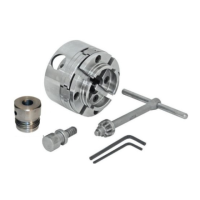
3. Chuck
4. Attached tool
Note:
The NOVA axial run-out specification is:
±0.02 mm on the spindle taper.
±0.04 mm on the end of the chuck arbour.
±0.18 mm at the end of an inserted
100 mm straight rod, fitted in a chuck
collet.
The solution depends on where the run-out is
detected:
1. Inside the spindle:
- Replace the entire spindle assembly.
2. Morse taper tool/arbour:
- Clean all contact surfaces.
- If the tool is still not running true after all
surfaces have been cleaned, try replacing
the tool with another one.
3. Chuck:
- Replace the chuck.
4. Attached tool:
- Make sure the tool is properly mounted on
the chuck.
Note:
When checking the run-out,
always make sure to check from
the spindle.
The quill cannot
be retracted.
1. Return spring
2. Quill and quill housing:
- Make sure that all moving parts
are lubricated, but without excess.
3. Pinion gear of handle:
- Make sure that all moving parts
are lubricated with sufficient
grease.
Note:
Support the quill to make sure
that it does not fall out of the
headstock.
1. Carefully release the locking bolt of the
return spring housing and hand tighten it by
rotating it in the anti-clockwise direction.
Lock the spring housing with the locking bolt
before releasing.
2. Extend the quill as far as possible and apply
lubricant of a relatively high viscosity. Move
the quill up and down a couple of times to
spread the lubricant.
3. Remove the handle spring and release the
locking set screws to extract the handle
from the headstock. Apply lubricant on all
contact surfaces and reassemble.
1. Workpiece mounting:
- Check if the workpiece is securely
mounted.
2. Fixing the pillar drill to the base:
- Check if the column is securely
connected to the base.
3. Stand on which the drill press is
mounted.
4. Drill bit:
- Check if the drill bit is blunt or
damaged.
5. Wrong drilling speed.
1. Make sure that the workpiece is securely and
firmly mounted to avoid vibrations.
2. Tighten all connecting screws.
3. Level the stand and, if necessary, add
additional weights to dampen vibrations. If
necessary, bolt the stand to the floor.
4. Use a sharper drill bit or sharpen blunt tools.
5. Refer to the speed chart.


 To Next Page
 Loading...