CONTACT CUSTOMER CARE 1+(619)449-2392
Step 3
Step 4
A
A
B
B
C
C
1
4
2
3
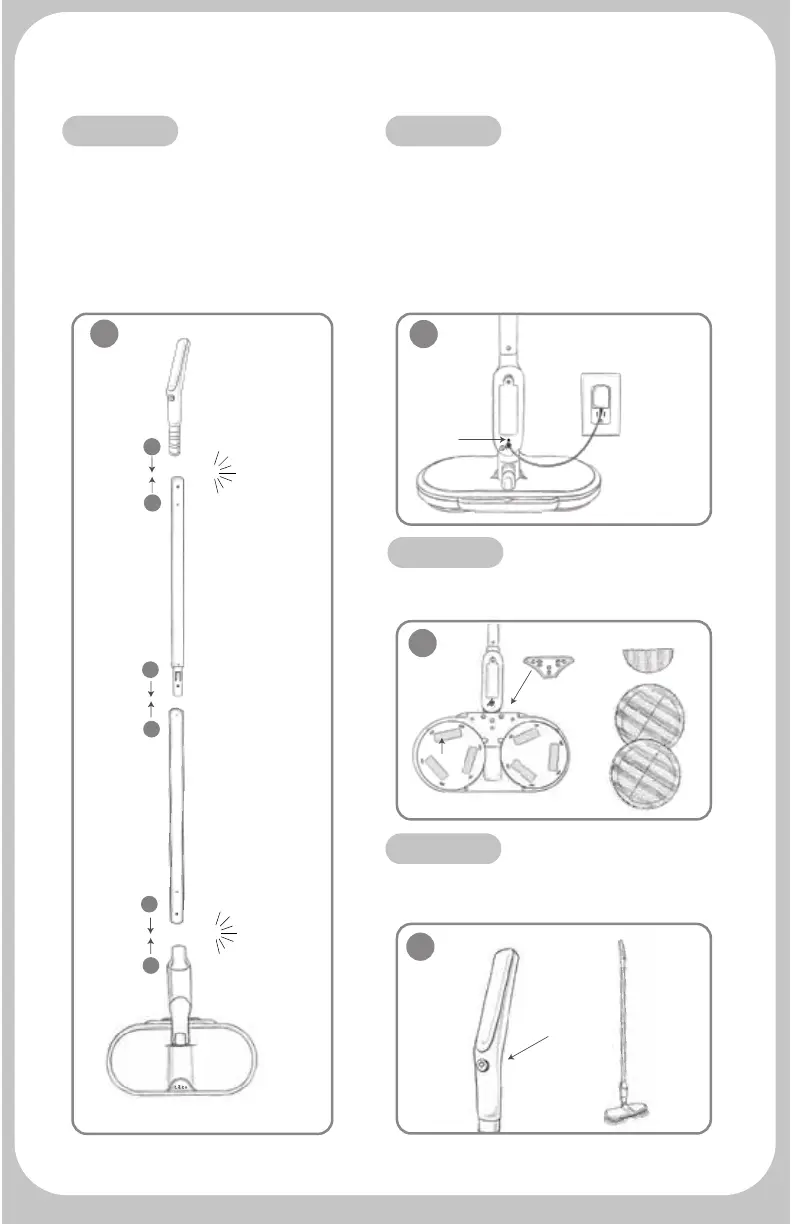
Step 1
Assemble the unit by connecting
the pieces based on the matching
stickers: A to A, B to B and C to C.
The metal pins on the handle & main
unit will lock into the holes creating
a “click” sound when locked into
place. You may remove stickers once
assembled.
Fully charge the unit prior to using. Plug
the power adapter into an outlet, then
plug into the charge port of the main
unit-note: Pull the tab of the protective
closure to access the charging port. The
indicator light will show flashing red
while charging and solid green when
fully charged.
Attach power wedge to base.
Attach desired pads.
Congratulations! Your Hover Scrubber
Omni is ready to work!
Wahoo! Congratulations on your purchase
of our best Hover Scrubber model ever!
Quick Start Guide:
Step 2
on/off
button
click
click
indicator
light



 To Next Page