CONTACT CUSTOMER CARE 1+(619)449-2392
CR2032
Lithium 3V
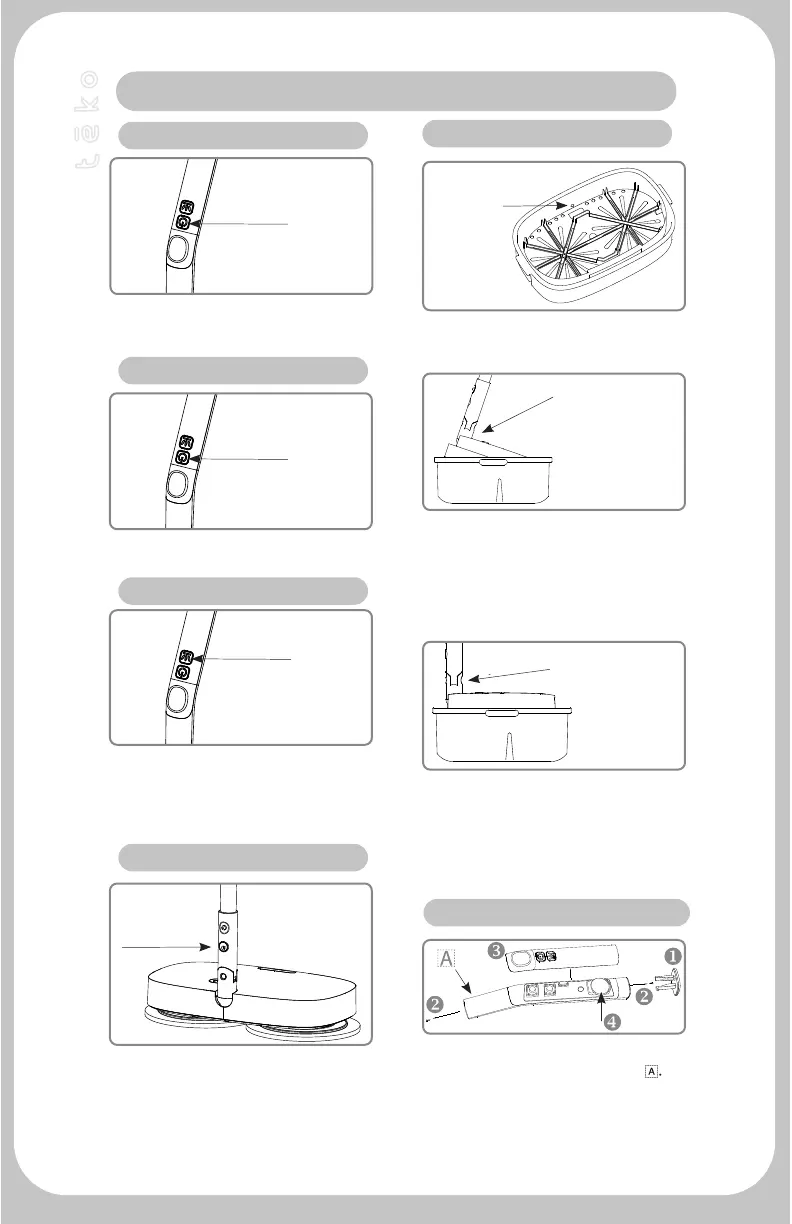
If you need to wet the surface, press the
water spray button, and the water outlet
will spray water mist to wet the ground.
Water spray function works after mop has
been tuned on.
Press the Power Button, and the light will
be on together.
Press the Button on the back side of the
handle to remove handle from pole
🇦
.
Remove cap from end of handle u, unscrew
1 screw from each end of handle v. Lift
cover off of handle w. Replace battery x
(CR2032) .
When charging, the indicator port shows
a red light, and a green light shows that
the battery is full. Working time: about
60 minutes. The actual use time varies
depending on the environment. Charging
time: 2-3 hours.
Add water to the water level line/hole in
the cleaning bucket to ensure that it is
below the highest water level line.
This hole is
the water level,
add water
below this
hole.
Water Spray
Power button.
DC -
Charging
port
This angle is the
cleaning mode.
Spin dry under
cleaning mode.
Stand the handle upright, tilt the electric mop
and the washing basin about 45 degrees, the
cleaning cloth enters the water, press and hold
the power button for 3 seconds, the wheels
start to rotate, the cleaning cloth starts to
clean, wait for 3-5 minutes. Short press the
power button to stop cleaning.
After the cleaning is completed, turn the
handle to the vertical 90 degree mode by
hand, and the cleaning cloth leaves the water
surface. At this time, it enters the cleaning
cloth drying mode, wait 3-5 minutes, short
press the power button, the wheels stop, and
the drying ends.
1. Turn On Mop
2. Illuminating Function
3. Water Spray Function
4. Battery Charging
6. Handle Battery Cell Replacement
5. Cleaning Mode
Press the Power Button, and the light will
be on together. Press and hold button for
3 seconds to turn on.
Power button.
Main Function Of The Cordless Power Mop
TM


 To Next Page