Need help?
Do you have a question about the TekTone Tek-CARE NC403TS and is the answer not in the manual?
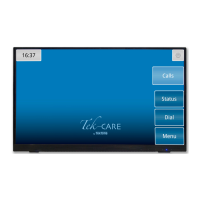
Describes the NC403TS as a purpose-built tone-visual touchscreen monitor.
Details the NC404TS features, including two-way voice communication and call sorting.
Explains the NC415AV's tone-visual or voice-capable capabilities with a handset.
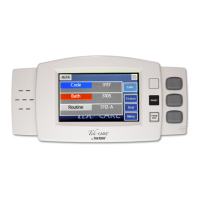
Highlights the NC402TS as a self-contained unit with a touchscreen, function buttons, and keyboard.
Describes the List view as the default display of active calls in a list format.
Explains the Icon view for station layout, call indication, and direct dialing.
Details the Map view showing facility layout with station icons and call status indicators.
Guides on how to answer and place calls using the master station's handset or TALK button.
Explains how to access password-protected features using a key icon and password entry.
Describes the Tone Silence feature to silence low priority calls and its behavior with new calls.
Explains the fault icon indicating system issues and how to view and resolve them.
Details the process to change the system time and date via the clock and Set Time interface.
Explains how to adjust Tone Volume and Voice Volume for the handset to Low, Medium, or High.
Describes configuring which calls are annunciated using Zones Watched and Call Filter options.
Details selecting specific call types to be announced on the master station.
Explains selecting which faults should be announced on the master station.
Describes the Play Tones feature for notification sounds on the NC403TS Monitor.
Explains the Pre-Announce feature indicating an upcoming audio session.
Details viewing IP address and Device ID, with a warning about changes.
Explains the Status screen showing active calls and their statuses.
Guides on accessing the Dial screen to enter station IDs and initiate calls.
Describes using the Stat call for emergencies and how to reset it.
Explains the different levels of aid (L1, L2, L3) for requesting assistance.
Details how Status 1 and Status 2 are used for specific situations like fall risk.
Describes sending preprogrammed or custom messages to individuals or groups.
Explains configuring zones for stations and adding them to watched zones.
Details adjusting speaker volume and mic gain, and choosing Full/Half Duplex.
Describes reverting audio settings to defaults and adjusting volume/gain.
Explains setting up schedules and reminders for staff rounds.
Describes the Check-In feature for assisted living facilities and inactivity alarms.
Explains setting a station to Vacation mode to indicate resident absence.
Describes using the Search button to find Patients or Staff.
Explains sending messages to individuals or staff groups.
Details paging all masters, stations, or zones for audio communication.
Lists advanced functions like backup, faults, sync reporting, info, and export.
Describes calibration for NC402TS and cleaning for NC415AV touchscreens.
Introduces the NC404L sidecar master, its functions, and integration with the NC404TS monitor.
Guides on answering calls using the sidecar, including handset and TALK button use.
Explains viewing system faults using the sidecar master.
Lists and explains the functions of various buttons on the NC402TS keypad.
Introduces the NC401VFD Master Station and its display, keys, and capabilities.
Details navigation through the Main Menu options of the NC401VFD.
Explains navigation within the Master Menu and Station Device Menu of the NC401VFD.
Outlines navigation for Transmitter and Foreign Device menus on the NC401VFD.
Lists and explains the functions of the 20 programmable buttons on the NC401VFD keypad.
 General
| Type | Nurse Call System |
|---|---|
| Model | NC403TS |
| Operating Voltage | 24 VDC |
| Communication | RS-485 |
| Material | Plastic |
| Color | White |
| Mounting | Wall mount |
| Operating Temperature | 32°F to 122°F (0°C to 50°C) |
| Certifications | UL 1069 |
| Description | Touchscreen Master Station |

 To Next Page