Pinpoint trigge
rs
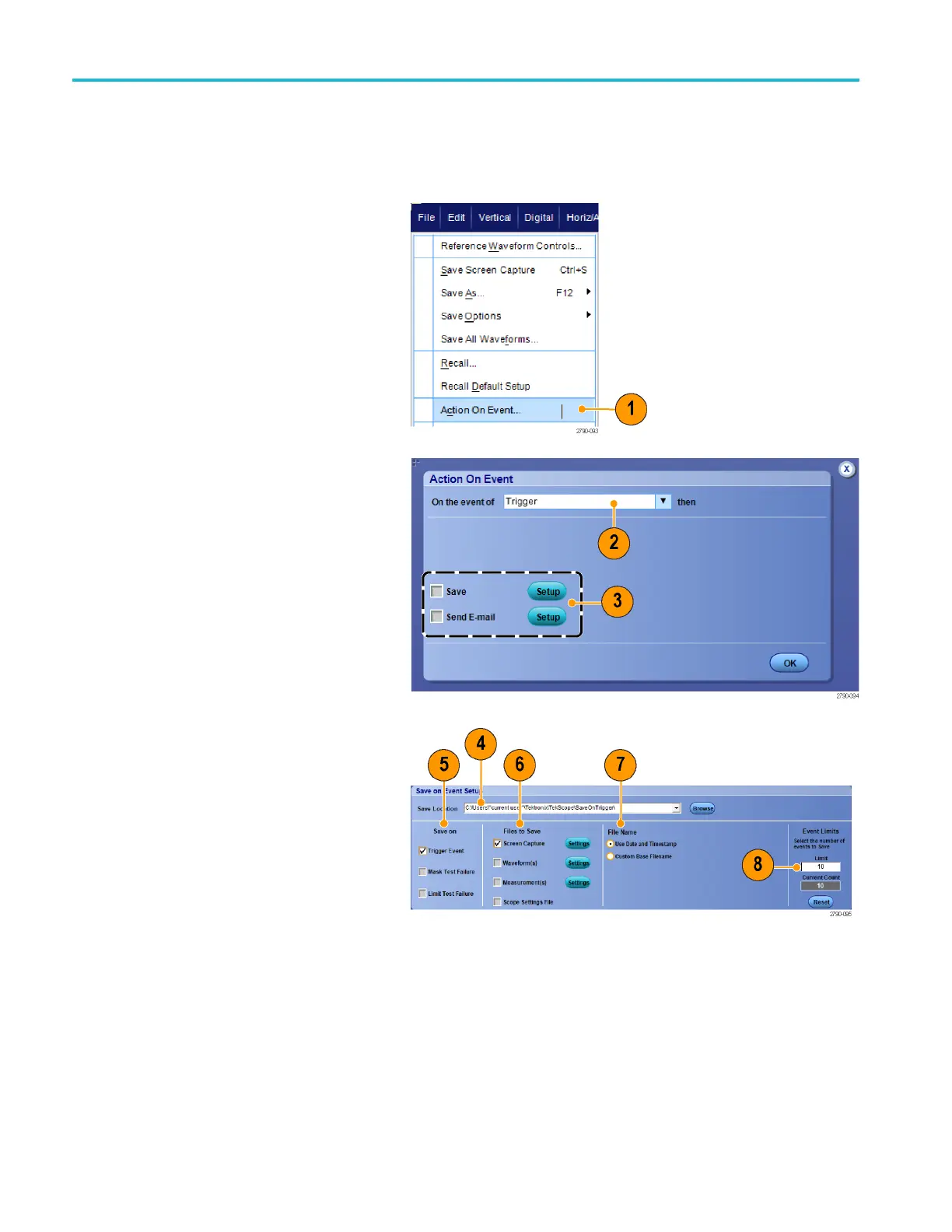
Setting up Action on Event
Action on Event allows configure the oscilloscope to save a variety of fi les when a defined event takes place, such as a
trigger events, mask test failures, and limit test failures.
1. Select File > Action on Event.
2. Select the event to use.
3. Select the a ction to take when the event
occurs. Select Save, Send E-mail, or
both.
Use the Setup button (next to Save) to
display the Save on Event Setup display
screen.
Use the Setup button (next to Send E-mail)
to display the Send E-mail Setup display
screen. (See page 88, Setting up E-Mail on
Event.)
4. Enter the location to save the files.
5. Select the event that initiates a save.
6. Select what type of filestosaveonthe
event.
7. Set the file naming convention to use.
8. Set the number of events to save.
86 MSO/DPO70000DX, MSO/DPO70000C, DPO7000C, and MSO/DPO 5000B Series U ser M anual



 To Next Page